
Resources

Blazor and WebAssembly

Building web applications today is no longer just about making something that works. Users expect speed, smooth interactions, and reliability, while businesses want solutions that are easy to evolve, scale, and maintain over time. This growing gap between user expectations and development complexity is exactly where Blazor and WebAssembly fit in.

Rather than chasing trends or piling on multiple frameworks, Blazor offers a more grounded approach. It allows teams to focus on clean architecture, shared logic, and long-term stability without sacrificing modern user experience.

Blazor From a Developer’s Perspective

Blazor feels familiar to developers who already work with .NET. Instead of switching mental gears between backend logic in C# and frontend logic in JavaScript, everything lives in one ecosystem. UI components, business rules, and validation logic can all be written in the same language.

For companies working with a .Net development company in USA, this consistency is often the biggest advantage. Teams move faster, onboarding becomes easier, and the overall codebase stays more predictable as the application grows.

Blazor’s component model also encourages better design habits. Small, reusable components make large applications easier to reason about and far less fragile over time.

Why WebAssembly Changes the Conversation

For years, browsers were seen as limited environments, good for forms and simple interactions but not much more. WebAssembly quietly changed that reality.

By allowing compiled code to run inside the browser at near native speed, WebAssembly removed many of the performance barriers that once held web apps back. Heavy data processing, complex UI updates, and responsive interactions are now possible without constantly calling the server.

When Blazor runs on WebAssembly, it brings the .NET runtime directly into the browser. This is especially valuable for teams offering C sharp development services, as existing libraries and logic can often be reused rather than rewritten from scratch.

How Blazor WebAssembly Feels in Real Use

When a user opens a Blazor WebAssembly app for the first time, the browser downloads the application and the runtime it needs. After that initial step, everything feels noticeably different.

Interactions are instant. Page reloads disappear. The app responds more like a desktop or mobile application than a traditional website. For users, this creates confidence and trust. For businesses, it reduces server load and improves scalability.

This client-side execution model is one reason Blazor WebAssembly is gaining attention in serious production environments, not just demos or experimental projects.

Choosing the Right Blazor Hosting Model

Blazor gives teams flexibility rather than forcing a single approach.

Blazor WebAssembly is ideal when responsiveness, offline support, and scalability matter most. It works well for customer facing platforms, dashboards, and tools used frequently throughout the day.

Blazor Server makes sense when data must stay tightly controlled or when minimizing initial download size is critical. UI updates are handled in real time from the server, which can be a good fit for internal systems.

Newer hybrid approaches allow teams to mix these models, choosing the best execution method for each part of the application instead of making one global decision.

Adoption Is Growing for Practical Reasons

Blazor’s growth is not driven by hype. It is driven by practicality.

More teams are choosing it because it reduces long-term maintenance costs, simplifies hiring, and aligns well with existing Microsoft ecosystems. Enterprises that already hire ASP.NET developers find it easier to extend their web capabilities without rebuilding teams or workflows from scratch.

Across industries like finance, healthcare, logistics, and SaaS, Blazor is increasingly used for internal platforms, partner portals, and customer dashboards where reliability matters more than trends.

Why Businesses Stick With Blazor

One of the strongest reasons companies stick with Blazor after adoption is stability. Shared models and logic reduce duplication. Strong typing catches errors early. Applications become easier to test and safer to refactor.

WebAssembly also ensures that performance does not degrade as features grow. Even complex interfaces remain responsive, which directly impacts user satisfaction and engagement.

For organizations delivering software development services in USA, these qualities translate into fewer production issues, happier clients, and systems that age gracefully instead of becoming technical debt.

Building Better Blazor WebAssembly Apps

Strong Blazor applications are rarely accidental. Teams that succeed pay attention to details like initial load performance, smart component design, and thoughtful state management.

Lazy loading, caching, and trimming unused code can dramatically improve first-time load experience. Careful use of JavaScript interop keeps the codebase clean while still allowing access to browser features when needed.

Most importantly, successful teams treat Blazor like a long-term platform, not a shortcut. They design for clarity, testability, and future growth from the start.

Is Blazor WebAssembly Right for You?

Blazor WebAssembly is a strong choice if your application needs rich interaction, long-term maintainability, and a clear architectural structure. It works particularly well for business platforms where logic is complex and user experience matters.

It may not be ideal for extremely lightweight marketing sites or projects deeply tied to JavaScript-only ecosystems. But for many modern web applications, it strikes a rare balance between power and simplicity.

Closing Thoughts

Blazor and WebAssembly represent a shift toward calmer, more sustainable web development. Instead of juggling multiple languages and frameworks, teams can focus on solving real problems with tools that work well together.

As browsers continue to evolve and WebAssembly matures, Blazor is positioned not as a passing trend, but as a dependable foundation for building modern web applications that users trust and businesses can grow with.

Integrating AI with Java Development Kit

Artificial Intelligence is no longer something businesses talk about as a future goal. It is already shaping how applications respond, learn, and deliver value. From smarter recommendations to faster decision making, AI is becoming a natural expectation rather than a competitive bonus. For teams already building with Java, the question is not whether to adopt AI, but how to integrate it responsibly and effectively using the Java Development Kit.

Java has powered enterprise systems for decades. It runs banks, hospitals, logistics platforms, and global SaaS products. Integrating AI into this ecosystem allows organizations to evolve without abandoning the systems they already trust. When done right, AI enhances Java applications instead of complicating them.

Why Java Remains a Strong Foundation for AI

Java continues to be one of the most widely used programming languages in the world, especially in enterprise environments. This matters because most real-world AI does not live in isolation. It lives inside business systems that must scale, remain secure, and perform consistently under pressure.

Java offers stability that businesses rely on. Its platform independence allows AI-powered applications to run reliably across environments. Its mature ecosystem supports long-term maintenance, which is essential when AI models and data pipelines evolve over time.

Many enterprises looking for a Java development company in USA choose Java-based AI integration because it fits naturally into existing architectures. Instead of rewriting core systems, teams can layer intelligence on top of what already works, reducing risk and preserving operational continuity.

What the JDK Brings to AI Integration

The Java Development Kit forms the foundation of every Java application. While it does not include AI models by default, it provides everything required to support them effectively.

The JDK enables reliable networking for communicating with AI services, strong multithreading capabilities for data-heavy workloads, efficient memory management for large datasets, and built-in security features for protecting sensitive information. Monitoring and performance tools help teams understand how AI workloads behave in real-world conditions.

In AI-enabled applications, the JDK serves as the execution backbone that keeps systems responsive, predictable, and secure.

Common Ways Businesses Integrate AI with Java

Integrate AI with Java

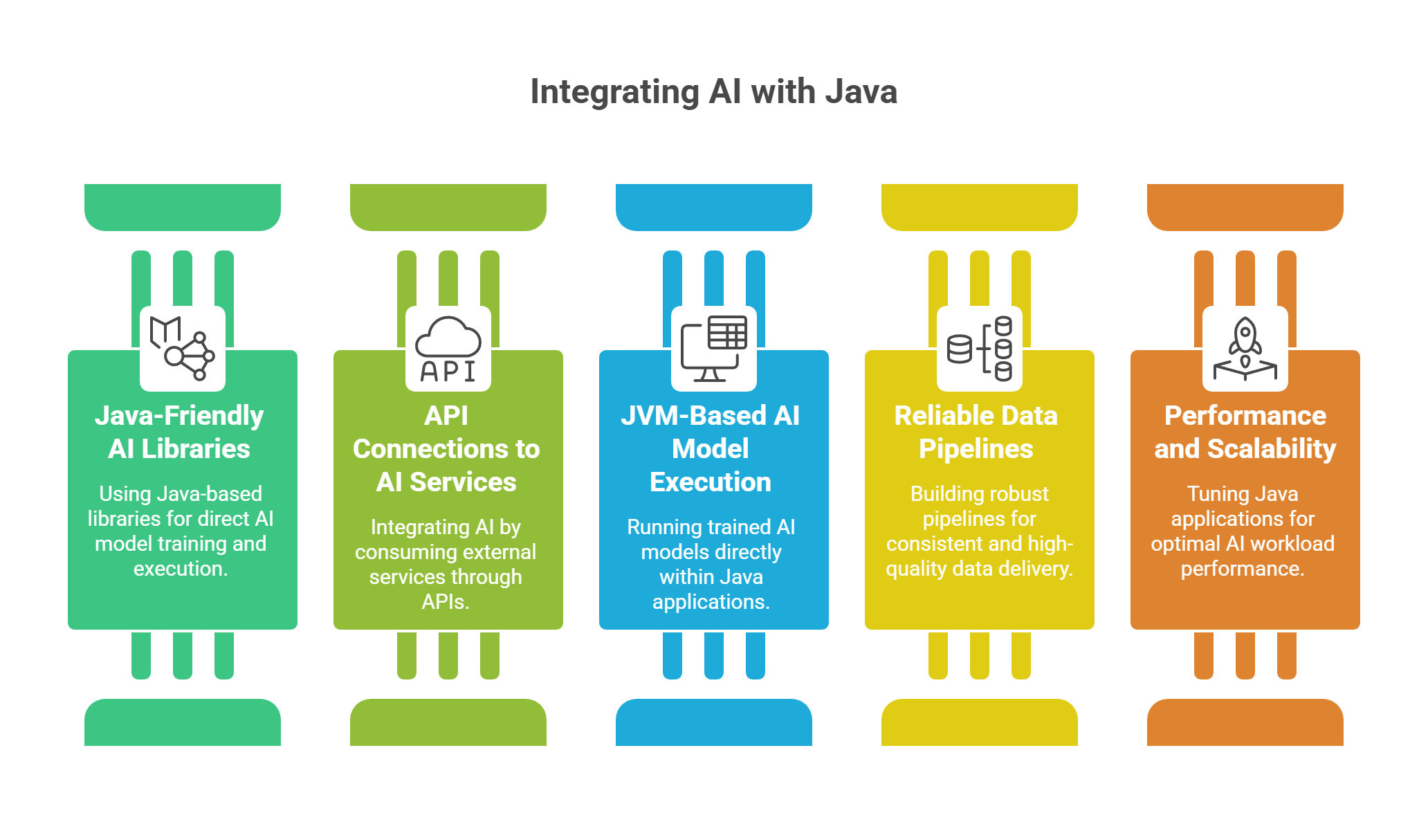
Using Java-Friendly AI Libraries

Some teams prefer working entirely within the Java ecosystem. Java-based machine learning libraries allow developers to train and run models directly on the JVM. This approach feels natural for Java engineers and works well when AI logic needs to sit close to business rules.

It is commonly used for fraud detection, recommendation engines, and predictive analytics where performance and tight system integration matter.

Connecting to AI Services Through APIs

Many organizations integrate AI by consuming external services. Java applications send data to these services and receive predictions or responses in return. This approach allows teams to adopt AI quickly without managing complex infrastructure.

In projects where frontend intelligence also plays a role, businesses may choose to hire javascript programmer resources alongside Java teams to ensure smooth interaction between AI-powered backends and responsive user interfaces.

Running AI Models Directly on the JVM

In scenarios where data privacy, latency, or regulatory requirements are strict, teams may run trained models directly inside Java applications. This keeps sensitive data internal and reduces response times.

With modern JVM optimizations, Java can handle AI inference workloads efficiently when performance is tuned correctly.

Building Reliable Data Pipelines for AI

AI systems depend on consistent, high-quality data. Java excels at building reliable data pipelines that collect, transform, and deliver information to AI models.

Java applications commonly handle real-time data streams, batch processing of historical records, and integration with databases and messaging systems. Many organizations rely on structured Ai software development services to design these pipelines correctly, ensuring data accuracy and long-term scalability.

Strong data pipelines ensure that AI outputs remain accurate, timely, and useful.

Performance, Scalability, and Stability

AI workloads are demanding by nature. They require more memory, increased processing power, and careful performance management.

Java gives teams the control they need to tune memory usage, garbage collection, and threading models to support AI workloads at scale. In production environments, Java-based AI services often run in containerized and cloud-native setups, making it easier to scale horizontally without sacrificing reliability.

When performance and scalability are addressed early, AI features enhance user experience instead of slowing systems down.

How YES IT Labs Supports AI Integration with Java

At this stage, many businesses realize that AI integration is not just a technical task. It is a strategic one. This is where YES IT Labs plays a key role. We help organizations integrate AI into their Java applications in a way that is fast, reliable, and built for growth.

As a trusted java spring development company, we focus on working with existing systems rather than replacing them. Our team designs AI-enabled architectures that align with business goals, optimize JVM performance, and support efficient data pipelines. From securely integrating AI services to deploying scalable Java-based AI solutions, our focus remains on delivering intelligent features that perform well in real-world conditions.

The objective is not experimentation for its own sake, but building AI capabilities that improve performance, support expansion, and create long-term value.

Security and Trust in AI-Driven Java Applications

Trust becomes even more important when AI enters the system. Many AI applications handle sensitive user, financial, or operational data.

Java provides mature security capabilities that help protect AI workloads, including encryption, secure communication, and access control. These features make Java a strong choice for AI adoption in regulated industries such as finance, healthcare, and enterprise SaaS.

Security is not an afterthought. It is part of the foundation.

Real Business Outcomes from AI-Powered Java Systems

When AI is integrated thoughtfully, the impact is measurable. Businesses use AI-enabled Java applications to detect fraud earlier, predict customer behavior more accurately, automate complex document processing, and improve operational decision making.

Many organizations also see faster deployment timelines by enhancing existing Java platforms rather than rebuilding from scratch. This approach allows innovation to move forward without disrupting core operations.

Challenges to Address Early

AI integration introduces new challenges that teams must be prepared for. These include managing model versions, monitoring AI behavior, controlling infrastructure costs, and ensuring AI outputs align with business intent.

Teams that plan for these challenges early are more likely to build AI systems that remain stable and valuable over time.

The Future of AI in the Java Ecosystem

The Java ecosystem continues to evolve alongside AI innovation. Improvements in JVM performance, cloud-native support, and AI tooling are making Java an increasingly strong platform for intelligent applications.

For Java teams, AI integration is no longer optional. It is a natural progression toward building systems that are adaptive, responsive, and aligned with modern business needs.

Final Thoughts

Integrating AI with the Java Development Kit allows businesses to move forward without leaving behind the systems they rely on. Java provides stability and scale. AI adds intelligence and adaptability.

Together, they create applications that feel smarter, more responsive, and more aligned with real human needs. With the right strategy and the right partner, AI becomes not a risk, but a meaningful advantage built on a trusted foundation.

Custom WordPress Themes vs. Templates

Choosing between a custom WordPress theme and a pre-built template is a decision that shapes how your website looks, performs, and supports your business over time. This choice influences branding, speed, scalability, and how confidently users engage with your content.

If you are building a website that needs to grow with your business, understanding the differences early helps you avoid costly rebuilds later.

Understanding the Two Options

Before comparing benefits, it helps to clarify what each option truly means.

WordPress Themes vs. Templates

What Is a Custom WordPress Theme?

A custom WordPress theme is designed and developed specifically for your website. Every element is built around your brand, your audience, and your goals. Nothing is added by accident, and nothing is included unless it serves a clear purpose.

Custom themes are built on WordPress and are often delivered through professional wordpress website development services that focus on performance, usability, and long-term stability rather than shortcuts.

What Is a WordPress Template?

A WordPress template, often called a premium or pre-built theme, is a ready-made design created to serve many industries at once. You install it, adjust colors and layouts, and launch relatively quickly.

Templates are popular because they offer speed and affordability, but they also introduce limitations that become more visible as your website evolves.

Design Freedom and Brand Identity

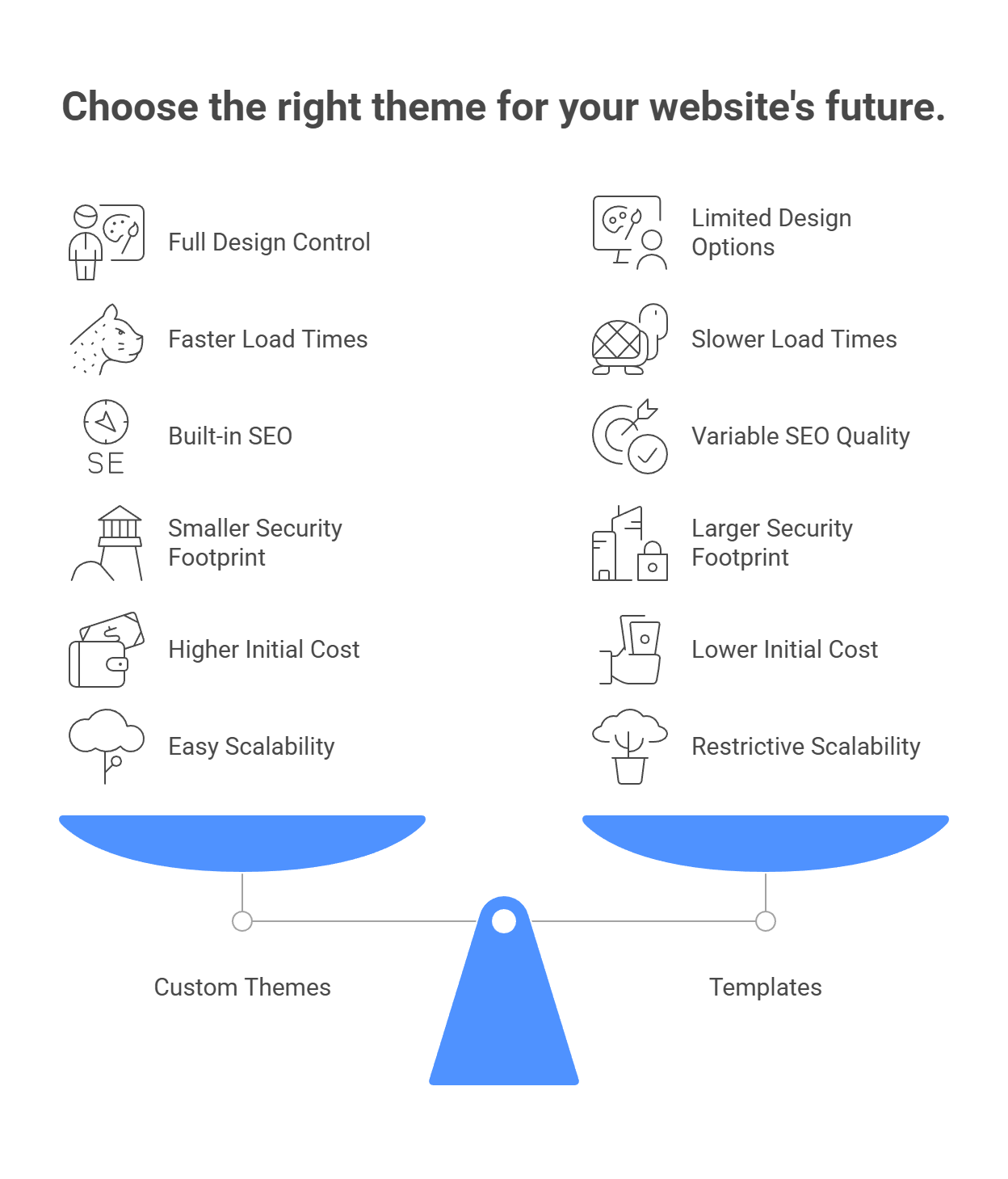
Custom Themes

Custom themes give you full control over how your brand is presented.

  • Visual identity created specifically for your business
  • User journeys aligned with real customer behavior
  • No unnecessary layouts or features

Many companies choose this path when they decide to hire wordpress developer expertise to translate their brand vision into a website that feels intentional and trustworthy.

Templates

Templates are built to appeal to a broad audience.

  • Design options are limited to theme settings
  • Many businesses end up with similar-looking websites
  • Deeper customization can be restrictive

Templates work best when speed matters more than originality.

Performance and Website Speed

Speed plays a major role in user experience, conversions, and trust.

Insight: Industry data consistently shows that more than half of users abandon websites that take longer than three seconds to load. Faster sites keep visitors engaged and reduce bounce rates.

Custom Themes

Custom themes are typically faster because they include only what your site actually uses.

  • Cleaner and lighter code
  • Faster load times across devices
  • Better performance metrics

This directly improves how users interact with your site.

Templates

Templates often come packed with features meant for many use cases.

  • Extra scripts and styles that go unused
  • Heavier page sizes
  • Dependence on optimization plugins

Performance improvements are possible, but they usually require additional effort.

SEO and Search Visibility

Custom Themes

With a custom theme, SEO can be built into the foundation.

  • Clear heading structure
  • Optimized page layouts
  • Strong mobile and accessibility support

When paired with professional SEO services in USA custom themes provide a clean technical base that helps search engines understand and rank your content more effectively.

Templates

Templates may advertise SEO readiness, but results vary widely.

  • SEO quality depends on the theme’s code
  • Page builders can add unnecessary markup
  • Additional plugins are often required

Templates can rank well, but they demand more ongoing fine-tuning.

Security and Long-Term Maintenance

Custom Themes

Custom themes usually have a smaller security footprint.

  • No bundled features you do not need
  • Fewer third-party dependencies
  • Easier updates and maintenance

This makes them a strong option for business-critical websites.

Templates

Popular templates are widely used and more frequently targeted.

  • Security depends on the theme developer
  • Updates can sometimes break layouts
  • Plugin conflicts are more common

Maintenance can become more complex over time.

Cost Considerations Beyond the Launch

Templates

Templates are appealing for short-term budgets.

  • Lower upfront cost
  • Faster launch
  • Suitable for simple or temporary websites

Over time, customization needs and plugin licenses can increase total costs.

Custom Themes

Custom themes require a higher initial investment but often deliver better long-term value, especially when common WordPress Development Challenges such as performance bottlenecks, plugin conflicts, and rigid layouts are considered early in the process.

  • Fewer fixes and workarounds
  • Better performance without excess plugins
  • Built to support growth

Many businesses eventually move to custom themes after outgrowing the limitations and technical constraints that templates can introduce over time.

Scalability and Future Growth

Custom Themes

Custom themes are designed with flexibility in mind.

  • Easy to add features as needs change
  • No layout restrictions as content expands
  • Better support for advanced functionality

They are ideal for businesses planning steady growth.

Templates

Templates can feel restrictive as your website evolves.

  • Layout limitations become more noticeable
  • Performance can decline with added features
  • Custom functionality may be harder to implement

What works today may not work well a year from now.

Which Option Is Right for You?

The right choice depends on your goals and timeline.

A template may be suitable if:

  • You need a site quickly
  • Budget is limited
  • The website is simple and informational

A custom theme is often the better option if:

  • Brand differentiation matters
  • Performance and SEO are priorities
  • You plan to scale

Final Thoughts

Templates offer speed and affordability, while custom WordPress themes provide control, performance, and long-term value. The best decision is not about the lowest initial cost but about choosing a foundation that supports future growth.

A website is not just a design asset. It is a business tool that builds trust and drives results. Choosing the right approach from the start makes everything that follows smoother and more effective.

Unity VR Development

Virtual reality is no longer a novelty reserved for entertainment. It is becoming a practical tool that helps people learn faster, practice safely, and make better decisions. At the center of this shift is Unity, a platform that makes immersive experiences accessible to educators, healthcare professionals, businesses, and designers. The real story of Unity VR is not about technology alone. It is about how people use it to solve real problems.

Why Unity VR resonates beyond gaming

Unity stands out because it removes friction between ideas and execution. Teams can move from concept to working experience quickly, test with real users, and refine without starting over. Many organizations that already rely on Unity game development services discover that the same tools translate naturally into training, simulation, and visualization projects.

What makes Unity especially appealing is flexibility. It works across devices, supports long-term updates, and allows organizations to grow their VR initiatives at a pace that feels realistic rather than overwhelming.

Education: learning that feels real

Education changes when students stop watching and start doing. Unity VR makes this possible by turning lessons into experiences.

Students can explore virtual science labs, interact with complex anatomy, or step into historical environments instead of just reading about them. These experiences feel closer to real life, which helps concepts stick. Learners are not just memorizing information. They are building understanding through action.

Institutions are increasingly investing in Education App Development Services because adding VR boosts student engagement and confidence. Learners often feel more motivated and less intimidated when they can practice skills in a safe, immersive environment where mistakes are a natural part of the learning process.

Healthcare: safer practice, more confident care

In healthcare, preparation matters. Unity VR gives professionals a way to practice without putting patients at risk.

Doctors, nurses, and emergency teams can rehearse procedures, improve coordination, and build muscle memory before facing real-world situations. Patients also benefit. VR is used for pain distraction, anxiety reduction, and rehabilitation exercises that feel more engaging than traditional routines.

Organizations working with a healthcare software development company in USA are adopting Unity VR because it combines realism with measurable outcomes. Training progress, reaction times, and consistency can all be tracked, giving teams clear insight into improvement over time.

Corporate and industrial training that actually sticks

Traditional training often struggles to hold attention. Unity VR changes that by placing employees inside realistic scenarios where decisions matter.

Companies use VR to teach safety procedures, equipment operation, and even communication skills. Practicing these situations in a virtual environment helps employees feel prepared rather than anxious when similar moments happen on the job.

When Unity VR is integrated with existing elearning portal development services, it becomes part of a complete learning journey. Short VR sessions complement courses and assessments, creating training programs that feel practical instead of theoretical.

Architecture and design: seeing before building

Design decisions are easier when you can walk through a space before it exists. Unity VR allows architects, designers, and clients to experience scale, flow, and functionality in a way drawings cannot match.

This shared understanding reduces misunderstandings, speeds up approvals, and prevents costly changes later. It also builds trust because everyone sees the same vision from the start.

Measuring value in human terms

Return on investment is important, but the real value of Unity VR often shows up in everyday outcomes.

Organizations report:

  • Faster readiness and skill confidence
  • Fewer errors during real-world tasks
  • Higher engagement and completion rates
  • Reduced risk during training
  • Stronger understanding of complex concepts


These improvements translate into saved time, reduced stress, and better results for both learners and professionals.

Designing experiences people want to use

Successful Unity VR projects focus on people first.

Comfort, clarity, and accessibility matter more than visual spectacle. Smooth performance, intuitive interactions, and options for different user needs make experiences welcoming rather than intimidating. When users feel comfortable, they stay engaged and learn more effectively.

Challenges and thoughtful adoption

Adopting VR does come with challenges. Costs, user hesitation, and system integration can slow progress. The most successful teams start small, listen to feedback, and grow intentionally. By involving real users early and focusing on one meaningful goal, organizations build momentum instead of resistance.

What the future looks like

As VR becomes more familiar, Unity VR will feel less like new technology and more like a natural part of learning and professional development. Smarter simulations, personalized experiences, and deeper analytics will continue to improve how people train and collaborate.

Conclusion

Unity VR is not about replacing traditional methods. It is about enhancing them in ways that feel human and practical. In classrooms, hospitals, workplaces, and design studios, it helps people practice with confidence, learn with purpose, and make better decisions. When used thoughtfully, Unity VR becomes more than a tool. It becomes a bridge between knowledge and real-world action.

Framer Motion npm

Think about the last website that really impressed you. Chances are it was not just the colors or layout. It was how the site felt. Buttons responded instantly. Pages flowed smoothly. Interactions felt natural instead of mechanical.

That feeling does not happen by accident. It is the result of thoughtful motion design, and today, Framer Motion npm is quietly shaping how modern web experiences come to life.

As users expect more polished, responsive interfaces, developers need animation tools that feel just as smooth to work with. Framer Motion delivers exactly that balance.

What Framer Motion Really Brings to the Table

Framer Motion is an animation library built specifically for React. Instead of forcing developers to wrestle with keyframes or complex JavaScript logic, it lets them describe motion in a way that feels intuitive and readable.

Animations become part of the component itself, not an afterthought layered on later. This is why teams working with a framer website development company often gravitate toward Framer Motion when building modern, visually engaging interfaces.

Installing it through npm takes seconds, and from that point on, motion feels like a natural extension of the UI.

Why Developers Feel Comfortable Using It

Made for the Way React Works

Framer Motion fits cleanly into React’s component-driven structure. It respects how state changes, re-renders, and layouts behave, which removes a lot of friction developers experience with older animation approaches.

This is especially important for teams that hire Reactjs developer in USA, where productivity, clean code, and long-term maintainability are just as important as visual polish.

Animations That Are Easy to Read and Maintain

One of the biggest reasons developers stick with Framer Motion is how clear the code feels. You can look at an animation and instantly understand what it is doing.

That clarity matters when projects grow, teammates change, or designs evolve. Motion stays readable, predictable, and easy to adjust without breaking the rest of the interface.

Features That Make Motion Feel Intentional

Variants That Keep Things Consistent

Variants allow developers to define animation states once and reuse them across multiple components. This keeps motion consistent across the entire application.

For teams working inside a custom web development company in USA, this consistency is critical. It ensures that animations feel cohesive instead of random, even across large and complex projects.

Built-In Interaction Without Extra Work

Hover effects, taps, drags, and touch gestures are already part of Framer Motion. There is no need to bolt on additional libraries or write custom logic for common interactions.

This makes interfaces feel responsive and alive, especially on mobile devices where touch feedback is expected, not optional.

Smooth Layout Changes Without Manual Effort

One of Framer Motion’s most satisfying features is how it handles layout changes. When elements move, resize, or rearrange themselves, the transitions feel smooth instead of abrupt.

This creates a sense of continuity that helps users stay oriented, even as content updates dynamically.

Why Motion Has Become So Important

Motion is not about showing off. It is about helping users understand what is happening on the screen.

Subtle animations guide attention, confirm actions, and make interfaces feel more human. Pages with thoughtful motion often keep users engaged longer and reduce confusion.

From a business perspective, this kind of engagement supports broader goals like SEO services, where usability, interaction, and time spent on site all contribute to stronger performance.

Why So Many Developers Are Choosing Framer Motion

Framer Motion has earned trust by being reliable and enjoyable to use. Developers appreciate tools that do not fight them, and Framer Motion feels cooperative rather than complicated.

The community around it continues to grow, with real-world examples, practical guidance, and constant improvements. That momentum is a strong signal that it is not a short-lived trend, but a tool that is here to stay.

Performance That Feels Natural

Good animation should never slow things down. Framer Motion is built with performance in mind, ensuring that motion stays smooth even as interfaces become more complex.

When done well, animations actually make sites feel faster, because transitions feel intentional instead of jarring.

Where Framer Motion Fits Best

Framer Motion shines in places where interaction matters:

  • Page transitions that feel connected
  • Buttons that respond instantly
  • Cards and menus that react to user input
  • Drag-and-drop interfaces
  • Forms that guide users instead of confusing them

These details add up, turning ordinary websites into experiences people enjoy using.

Using Motion With Purpose

Like any good design tool, Framer Motion works best when used with intention. Too much animation can overwhelm users, while well-placed motion creates clarity and flow.

Testing across devices and keeping user comfort in mind ensures that animations enhance the experience instead of distracting from it.

Final Thoughts

Framer Motion is changing how developers think about animation. It removes unnecessary complexity and replaces it with clarity, control, and creativity.

More importantly, it helps teams build interfaces that feel human. Interfaces that respond, guide, and communicate without words.

As expectations for web experiences continue to rise, Framer Motion stands out as a tool that understands both developers and users. That is why it is not just popular today, but positioned to shape the future of web animation.

Angular vs React

When planning a major web application, one decision can influence everything that follows. Should you use Angular or React? Both technologies are powerful, widely trusted, and capable of delivering high-performing applications, but they approach development in very different ways. The right choice depends on your project goals, your team structure, and how you plan to scale in the future.

This guide explains the real differences, strengths, limitations, and practical use cases so you can confidently choose the best option for your next big project.

Why This Decision Matters

Your choice of frontend technology affects more than just code. It impacts development speed, long-term maintenance, scalability, hiring flexibility, performance, and overall cost. Selecting the wrong tool can lead to unnecessary rework, technical debt, and slower growth.

Many businesses working with an experienced Angular js web development company choose Angular specifically for projects that require strong architecture, predictable workflows, and long-term stability.

What Is Angular?

Angular is a complete frontend framework developed and maintained by Google. It provides a structured environment for building complex web applications with many interconnected parts.

Key Characteristics of Angular

  • Built with TypeScript by default
  • Uses a component-based architecture
  • Includes built-in tools for routing, forms, HTTP communication, and testing
  • Enforces consistent coding standards and application structure

Angular is opinionated, which means it defines how applications should be built. For large teams and long-term projects, this structure reduces ambiguity and improves consistency.

What Is React?

React is a JavaScript library created by Meta that focuses on building user interfaces, particularly for single-page applications.

Key Characteristics of React

  • Concentrates on the view layer only
  • Uses JSX to combine JavaScript and HTML
  • Relies on third-party libraries for routing and state management
  • Offers high flexibility in application architecture

Because of this flexibility, many startups and product-driven businesses prefer to work with a react js development company to quickly build and iterate on modern user experiences.

Angular vs React: Key Differences at a Glance

Feature

Angular

React

Technology Type

Full framework UI library

Primary Language

TypeScript

JavaScript with optional TypeScript

Learning Curve

Steeper

Easier to start

Structure

Strongly opinionated

Flexible

Data Flow

Two-way data binding

One-way data binding

Built-in Features

Extensive

Minimal by default

Ideal Use Case Enterprise applications

Interactive user interfaces

Performance Considerations

Both Angular and React are capable of delivering fast, responsive applications when properly implemented.

React improves performance through efficient UI updates that reduce unnecessary re-rendering. Angular optimizes performance through compilation techniques that process code ahead of time. In real-world projects, performance differences are minimal and usually depend more on code quality and architectural decisions than the framework itself.

Scalability and Long-Term Maintenance

Angular for Large Applications

Angular excels in large-scale systems where consistency and maintainability are critical. Its strict structure ensures predictable code organization, which helps large teams collaborate effectively and makes onboarding easier as projects grow.

This is why Angular is commonly chosen for financial platforms, enterprise dashboards, and internal business tools.

React for Flexible Growth

React also scales well but requires careful planning. Since it does not enforce strict patterns, teams must define their own conventions. When done well, this allows faster innovation. When done poorly, it can lead to fragmented code and technical debt.

Developer Experience and Learning Curve

React is generally easier for beginners, especially those already familiar with JavaScript. Developers can start building interfaces quickly without learning many additional concepts.

Angular requires a deeper initial investment. Developers must understand TypeScript, dependency injection, and framework-specific patterns. However, once learned, Angular often feels more predictable and structured for long-term development.

Beyond Web: Ecosystem Considerations

For businesses planning cross-platform solutions, React also extends beyond the web. Many organizations partner with a react native development company to reuse logic and skills while building mobile applications for both iOS and Android using a shared codebase.

Angular, on the other hand, is primarily focused on robust web application development rather than native mobile platforms.

When Angular Is the Right Choice

Angular is a strong option if you are building a complex, long-term application and need consistency across a large development team. It works well when maintainability, scalability, and strict coding standards are priorities.

When React Is the Better Fit

React is ideal for fast-moving projects that require flexible architecture and rich user interactions. It suits startups, SaaS platforms, and products that evolve quickly based on user feedback.

Practical Industry Insight

Many organizations use both technologies for different purposes. Angular is often chosen for internal systems and enterprise platforms, while React is commonly used for customer-facing applications where design and interactivity play a major role.

Final Thoughts

There is no universal winner between Angular and React. The best choice depends on your project requirements, team expertise, and long-term vision.

Angular offers structure, reliability, and scalability for large applications. React provides flexibility, speed, and creative freedom for dynamic user experiences. Understanding these differences helps ensure you choose a technology that supports your goals today and in the future.

Squarespace Development Mistakes

Most businesses do not start a Squarespace website thinking they will get it wrong.

They start because they want something simple. Something clean. Something that does not require weeks of back-and-forth or a big technical learning curve. And at first, it feels like the right choice. The site looks decent. Pages are live. The box is checked.

Then time passes.

Traffic is quieter than expected. Contact forms do not bring consistent leads. People visit but do not stay long. At that point, many business owners feel stuck because nothing is obviously broken, yet nothing is really working either.

That is usually when the real issues start to surface.

1. Believing SEO Happens Automatically

This is probably the most common misunderstanding.

Squarespace does provide SEO tools, but tools alone do not create visibility. Many sites go live with generic page titles, vague descriptions, and no real keyword focus. Everything technically exists, but nothing is sending a clear signal to search engines.

What makes this tricky is that the site still looks fine. There are no errors. No warnings. Just silence.

That is often when businesses realize they need proper squarespace development services to rebuild the foundation instead of patching things later. SEO is not something you sprinkle on after launch. It needs to be part of how the site is structured from the beginning.

2. Designing the Site for Yourself Instead of Visitors

This happens more than people like to admit.

A site is usually designed on a large screen, in a quiet environment, with plenty of time to scroll and adjust spacing. Real visitors are not browsing that way. They are on phones, in between tasks, often distracted.

On mobile, small issues become big ones. Text feels heavy. Buttons are awkward to tap. Important information sits too far down the page. Visitors do not complain. They just leave.

When a site feels slightly uncomfortable to use, people do not stick around long enough to figure it out.

3. Using High-Quality Images Without Thinking About Speed

Good visuals matter. But performance matters more.

A lot of Squarespace sites use beautiful images that are far larger than they need to be. They load slowly, especially on mobile networks. Pages hesitate before appearing. Scrolling feels delayed.

Most visitors will not consciously say, “This site is slow.” They just feel it. And that feeling creates friction.

Once friction exists, trust starts to slip.

4. Trying to Show Everything at Once

This mistake usually comes from enthusiasm.

Businesses want visitors to know all their services, all their offerings, all their value. So menus get crowded. Pages multiply. Dropdowns stack on top of each other.

Instead of guiding users, the site asks them to decide too much, too early. Some businesses then try to fix this visually and realize they need to hire css developers to correct layout problems that are really structural issues.

Good navigation does not try to impress. It quietly removes effort.

5. Overlooking Small Details That Shape First Impressions

Visitors notice more than we think.

A messy URL. A missing favicon. A page name that looks unfinished. None of these will crash a site, but together they chip away at credibility.

Trust online is fragile. People decide very quickly whether a business feels established or improvised. Small details often make that decision for them.

6. Writing Content That Feels Like Work to Read

Many Squarespace sites contain good information buried under heavy formatting.

Long paragraphs. Minimal spacing. No natural pauses. It feels like reading a document instead of having a conversation.

People do not read websites the way they read books. They scan. They pause. They jump around. When content ignores that reality, even strong messaging gets skipped.

Good content feels easy to move through.

7. Running the Site Without Ever Checking How People Use It

Some websites run for years without anyone looking at analytics.

That means decisions are made based on assumptions. What people think users want. What feels logical internally. Not what actually happens.

Data shows where users hesitate, where they exit, and what they ignore. This becomes especially important when businesses plan to grow into custom web application development services, where guessing is expensive and clarity matters.

Without insight, improvement becomes trial and error.

8. Contact Forms That Quietly Fail

This one is painful because it is invisible.

Forms look fine. The page works. But messages are never delivered because settings were skipped or never tested. Businesses assume interest is low when, in reality, inquiries never arrived.

Every form should be tested more than once. It is one of the simplest checks and one of the most commonly missed.

9. Focusing on How the Site Looks Instead of What It Says

A site can be visually impressive and still unclear.

Visitors need quick answers. What does this business do? Is it for me? Can I trust them? What should I do next?

When those answers are buried under generic language or missing altogether, design alone cannot carry the experience.

Clarity converts. Design supports it.

10. Treating the Website Like a Finished Task

Websites age quietly.

Content becomes outdated. Services evolve. User behavior shifts. A site that is never reviewed slowly drifts out of alignment with the business it represents.

Maintenance does not always mean redesign. Often, it means small, thoughtful adjustments made consistently.

How YES IT Labs Helps When Squarespace Starts Feeling Limiting

At YES IT Labs, we usually meet businesses at a point of frustration. The site exists. It is not broken. But it is not helping the business move forward either.

Our work starts with understanding how real users experience the site. Where they hesitate. Where things feel unclear. What is missing beneath the surface. We focus on structure, flow, performance, and intent. Not quick fixes.

The goal is not just to improve a Squarespace site, but to turn it into something that genuinely supports the business behind it.

Final Thoughts

Squarespace is not a shortcut to success. It is a tool.

When used with intention, it can support growth, trust, and visibility. When rushed or misunderstood, it becomes a source of confusion and missed opportunity.

Most Squarespace mistakes are not technical failures. They are human ones. Assumptions, shortcuts, and lack of perspective.

Fixing them starts by looking at your website the way your visitors do, not the way you built it.

Hidden Pitfalls of DIY WeWeb Development

There is something exciting about opening WeWeb for the first time. The clean interface, the visual builder, the idea that you can create a real web application without touching code feels incredibly empowering. Many business owners start their project feeling motivated and optimistic, convinced that this is the tool that finally gives them control.

But after the initial excitement wears off, reality usually hits. Pages do not behave the way you want. Features break unexpectedly. And suddenly a project that felt simple turns into hours of trial and error. You are not alone in that feeling. A recent no code adoption report found that more than half of WeWeb users eventually ask a professional for help, usually after getting stuck on something they did not anticipate.

If you are somewhere in the middle of that journey, feeling a bit overwhelmed or unsure what to fix next, this is exactly for you. Let’s talk about the hidden challenges people run into and the moments when calling a professional saves not just time but sanity.

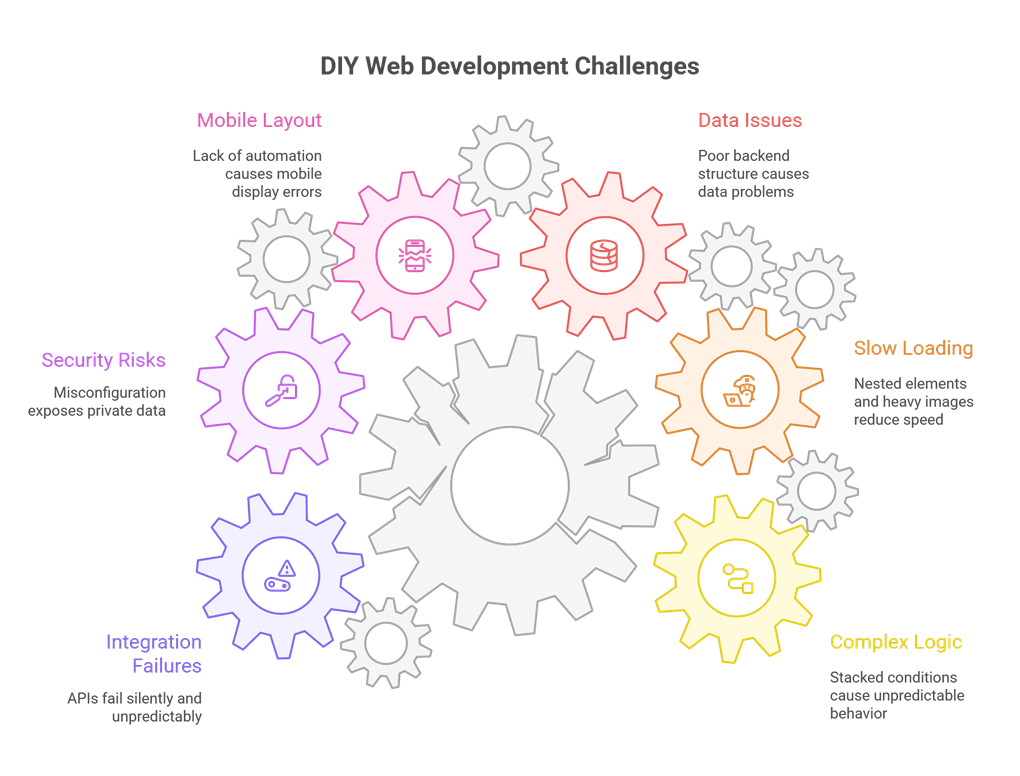
1. When Logic Doesn’t Behave the Way You Expected

At first, building workflows in WeWeb feels straightforward. Add an action here, set a condition there, connect it to your data source. Easy. But as your app grows and you start stacking conditions, triggers, and dynamic states, the logic becomes harder to follow.

Suddenly:

  • Buttons stop responding.
  • A workflow runs out of order.
  • A condition overrides something else.
  • Data displays differently depending on the user.

Many people start their project after exploring custom web application development services, assuming no code will be simpler. The truth is that once your app grows, the logic becomes just as complex as any coded system. And that’s usually the moment things start breaking.

2. When Everything Looks Good but Loads Slowly

One of the most frustrating feelings in DIY development is watching a beautiful design load painfully slow. You tweak things, delete things, move things, yet the speed barely improves.

The reason is usually a mix of:

  • Too many nested elements
  • Multiple components loading dynamic data at once
  • Heavy images
  • Inefficient API calls


And here’s a number worth keeping in mind. Google found that users start abandoning a site if it takes more than 3 seconds to load. Seconds might not seem like much, but online, every second is a chance to lose someone’s trust.

3. When Your Data Works at First but Falls Apart Later

Backend structure is the part most DIY builders underestimate. Everything looks fine in the beginning when you have only a few records. But as your app grows, incorrect data relationships start causing slow queries, broken filters, and even missing records.

Common issues include:

  • Data stored in ways that can’t be searched efficiently
  • Overuse of relational tables
  • Missing indexes
  • Queries that strain your backend


These problems rarely show up immediately. They appear when you finally have real users, which makes them even harder to untangle.

DIY Web Development Challenges

4. When Your Mobile Layout Just Doesn’t Look Right

You finish designing your desktop layout and it looks perfect. But then you check it on your phone and suddenly everything is off. Text overlaps. Buttons shift. Rows collapse strangely.

This happens to almost everyone because WeWeb gives you a lot of freedom, but not much automation. And with more than 70 percent of visitors judging a website based on its mobile experience, this becomes a deal breaker quickly.

5. When Security Becomes a Serious Concern

DIY builders often forget that even a small misconfiguration can expose private data.

Common oversights include:

  • Public access to protected routes
  • APIs left open
  • Sensitive data revealed in workflows
  • Authentication not set up properly


Security issues don’t always show obvious symptoms. They just quietly exist until something goes wrong. That is why apps handling personal or financial information almost always require professional review.

6. When Integrations Start Misbehaving

Connecting APIs, authentication systems, or third party tools is where most DIY builders reach their breaking point. Some days everything works perfectly, and the next day something silently fails without explanation.

This is when many people finally reach out to a software development company in USA because integration failures are incredibly time consuming and require technical understanding to diagnose.

When You Should Call a Professional

There is no shame in asking for help. In fact, the smartest founders and business owners reach out sooner rather than later because they understand the value of expertise. And if you want a team that already knows the common pitfalls and the fastest path to a stable, high performing WeWeb build, YES IT Labs is one of the smartest choices you can make. Here are the clearest signs that bringing in a WeWeb expert will move your project forward faster.

1. Your App Needs More Than Simple Buttons and Pages

Membership systems, dashboards, multi step logic, and filtered data views are powerful features. But they also require solid architecture behind the scenes. A professional can set them up properly from the beginning, saving you weeks of rebuilding later.

2. You Want Your App to Feel Smooth and Fast

WeWeb experts know tricks most DIY users never discover, from optimizing queries to restructuring layouts so they render more efficiently. A fast app changes how users perceive your brand.

3. You Keep Running Into API or Login Issues

Much of integration work relies on understanding how data behaves under different conditions. A pro can test every scenario and ensure stability long term.

4. You Want a Clean, Beautiful, Trustworthy Design

Design isn’t just aesthetics. It’s psychology. A clean layout instantly builds trust. A cluttered one raises doubts. Studies show that most people make a judgment about a website within a fraction of a second, purely based on design.

5. You Are Spending Hours Fixing What Should Take Minutes

If you are stuck watching tutorials, reopening the same workflow five times, and still not finding what’s wrong, that’s your signal. Professionals solve these problems daily. What takes you eight hours might take them twenty minutes.

Final Thoughts

DIY WeWeb development is empowering. It lets you experiment, create, and bring ideas to life without waiting on a developer. But at some point, most builders reach a wall. And that’s perfectly normal.

As your app grows, so does the complexity. Performance, security, data structure, and integrations all demand precision. Bringing in a professional doesn’t take away your control. It simply gives your project a stronger foundation, protects your time, and ensures your product is ready for real users.

Mobile First Shopify Development

In 2024, 57% of all e-commerce traffic came from mobile devices, and that number is climbing toward 65% in 2025. Yet thousands of Shopify stores still launch with a desktop-only mindset, only to watch bounce rates soar and carts empty out on smaller screens. If you are serious about scaling, mobile-first development is not a “nice-to-have.” It is the foundation that turns casual scrollers into repeat buyers.

This guide breaks down exactly why mobile-first matters, how to implement it on Shopify, and the measurable wins top brands are seeing. No fluff, just actionable steps and real-world proof.

1. The Mobile Reality Check: Numbers Do Not Lie

Metric

Desktop

Mobile

Global e-commerce traffic

43% 57%

Conversion rate (avg.)

3.8%

2.1%

Cart abandonment

68%

85%

Google indexing priority Secondary

Primary

Key takeaway: Google has indexed mobile-first since 2019. If your store loads slowly or looks broken on phones, you are invisible to the majority of shoppers and search engines.

2. What “Mobile-First” Actually Means on Shopify

It is not just making your theme responsive. True mobile-first development follows a progressive enhancement model:

  1. Core content and functionality work flawlessly on the smallest screen first
  2. Enhancements (animations, hover states, multi-column layouts) are added for larger viewports

Shopify-Specific Tactics

Tactic

Implementation

Impact

Liquid breakpoints Use {% if section.settings.mobile_layout %} to serve lighter blocks under 750px Reduces CLS by 40%
Lazy-load everything loading=”lazy” on images + Shopify.designMode checks Cuts LCP from 4.2s to 1.8s (case study: Allbirds)
Thumb-friendly CTAs Min 48px touch targets Drops mis-taps by 60%
AMP-style product cards Use deferred-media for videos 32% lower bounce on PDPs

3. The Scaling Flywheel: How Mobile-First Unlocks Growth

A. SEO Supercharger

Google Core Web Vitals are now ranking factors. Mobile-first stores dominate:

  • Largest Contentful Paint (LCP): < 2.5s leads to 15% higher rankings
  • Cumulative Layout Shift (CLS): < 0.1 leads to 20% lower bounce


Case study: Gymshark rebuilt mobile-first in 2023 and saw +41% organic traffic in 6 months.

B. Conversion Rate Lift

Brand Mobile CR Before After Mobile-First

Timeframe

Fashion Nova

1.4% 3.2% 90 days

MVMT Watches

2.1%

4.0%

120 days

Average Shopify Plus store 1.9% 3.5%

6 months

C. App-Like Checkout (The Silent Killer)

Shopify Shop Pay on mobile converts 1.91x higher than guest checkout. Mobile-first design ensures:

  • One-handed form filling
  • Apple/Google Pay pre-fill
  • No zoom-pinching on credit card fields


Partnering with a mobile application development company can help integrate seamless payment flows and native-like experiences directly into your Shopify store.

4. Step-by-Step: Build (or Retrofit) a Mobile-First Store

Phase 1: Audit Your Current Disaster

  1. Run Google PageSpeed Insights (mobile tab)
  2. Check Shopify Analyzer for “Mobile usability issues
  3. Use heatmap tools (Hotjar/Lucky Orange) to see where mobile users rage

Phase 2: Theme Overhaul

<!-- Example: Mobile-only hero -->
{% if request.design_mode or request.page_type == 'index' %}
<div class="hero-mobile" media="(max-width: 750px)">
{% render 'mobile-hero' %}
</div>
<div class="hero-desktop" media="(min-width: 751px)">
{% render 'desktop-hero' %}
</div>
{% endif %}

Pro tip: Use Dawn theme as a base. It is mobile-first out of the box. Strip out bloat.

Phase 3: Performance Hardening

Task

Tool

Target

Image optimization

Cloudflare Polish / TinyPNG < 100KB per hero

Font loading

font-display: swap + subset

< 30KB total

JS deferral defer + Shopify.theme.js async

< 1.5s TBT

Phase 4: Micro-Conversions

Sticky “Add to Cart” on scroll (PDP)

Mini-cart drawer (no page reload)

“Save for later” with localStorage

5. Real Brands, Real Results

Case Study: Blume (Skincare)

  • Problem: 73% mobile traffic, 81% cart abandonment
  • Fix: Mobile-first PDP with vertical swatches, “Buy with Prime” one-tap, ingredient accordion (not modal)
  • Result: +270% mobile revenue in Q4 2024

Case Study: Nomad Goods

Swapped desktop mega-menu for mobile “hamburger + priority links

Cut navigation depth from 4 to 2 taps

Outcome: 34% lower bounce, +19% AOV

Also Read: Mobile Optimization for Shopify Apps: Best Practices

6. Common Mobile-First Pitfalls (Avoid These)

Mistake

Why It Kills Scaling

Using desktop hover effects

Invisible on touch

Full-width carousels

“Carousel blindness” + slow load

Forcing app downloads

70% users abandon

Ignoring dark mode

82% iOS users enable it

7. Your 30-Day Mobile-First Action Plan

Week Focus

KPI to Track

1

Audit + image optimization LCP < 2.5s

2

PDP/Checkout UX

Mobile CR lift

3

Navigation + mini-cart

Bounce < 40%

4 A/B test sticky CTA

AOV impact

When executing complex customizations beyond basic themes, consider working with a shopify development company that specializes in performance-driven builds.

The Bottom Line

Mobile-first is not a trend. It is the default user experience in 2025. Stores that treat phones as an afterthought cap their growth at 40% of potential revenue. The brands scaling to 8-figures build mobile-first and enhance for desktop.

Start with one change today: open your store on your phone. If you cannot check out in under 30 seconds using one thumb, you have work to do.

How YES IT Labs Can Help

YES IT Labs has empowered over 100 businesses with mobile-first Shopify transformations, delivering an average 38% increase in mobile conversions and 25% faster load times. Whether you need to hire shopify developer talent for custom themes, performance audits, or full-scale rebuilds, their certified experts ensure your store is built to dominate on every screen.

Flutter vs React Native

In the fast-paced world of mobile app development, where speed to market and cost efficiency can make or break a project, cross-platform frameworks have become the secret weapons of developers and businesses alike. Enter Flutter and React Native, the two titans competing for dominance in 2025. Flutter, Google’s sleek UI toolkit powered by Dart, promises pixel-perfect designs and blazing-fast performance. React Native, Facebook’s JavaScript-based powerhouse, leverages the web’s vast ecosystem to deliver native-like apps without starting from scratch.

But which one reigns supreme? Is Flutter’s rising star set to eclipse React Native’s established empire, or will the veteran hold its ground? Drawing from the latest developer surveys, GitHub metrics, and industry benchmarks, this guide breaks it all down. Whether you are a startup founder racing to launch an MVP or an enterprise architect scaling a global app, this article equips you with the insights to choose wisely. Buckle up. This battle is fiercer than ever.

A Quick Origin Story: How We Got Here

Flutter burst onto the scene in 2017 as Google’s answer to fragmented mobile development, emphasizing “write once, design anywhere” with its widget-based architecture. React Native, launched by Facebook in 2015, rode the React.js wave, appealing to web developers eager to conquer mobile without learning new languages.

Fast-forward to 2025: Cross-platform tools now power over 50% of new mobile apps, according to Persistence Market Research projections for the $546.7 billion market by 2033. Flutter’s adoption has surged, especially in visually intensive apps, while React Native maintains its JavaScript stronghold for rapid iterations in web-mobile hybrids.

Head-to-Head: Key Battlegrounds

Let’s compare them across the metrics that matter most: performance, development speed, UI/UX, community, and more. Fresh 2025 data keeps things real.

1. Performance: Speed Demons or Smooth Operators?

Performance is what keeps users swiping, not uninstalling. Flutter compiles to native ARM code using its Skia engine, skipping the JavaScript bridge that React Native relies on. This results in near-native 60 FPS animations out of the box, ideal for games or AR experiences.

React Native’s “New Architecture(Fabric renderer and TurboModules) has closed the gap since 2023, boosting startup times by 20-30% in benchmarks. But for complex UIs, Flutter still edges out, with 15-25% faster rendering per recent DevOps Research Association tests.

Aspect Flutter

React Native

Rendering Engine Skia (direct to canvas) Native components via JS bridge
Startup Time ~200ms (faster cold starts) ~300ms (improved with New Arch)
Animation FPS Consistent 60 FPS 50-60 FPS (bridge overhead)
Battery Efficiency High (compiled code) Moderate (JS runtime)

Winner? Flutter for graphics-heavy apps; React Native if your team optimizes the bridge.

2. Development Speed & Hot Reload: The Productivity Power-Up

Nothing kills momentum like waiting for builds. Both frameworks shine with hot reload. Flutter’s stateful version injects changes in milliseconds without losing app state, slashing iteration time by 40% for UI tweaks. React Native’s Fast Refresh is close but can hiccup on complex state changes.

Flutter’s rich widget library (pre-built Material and Cupertino designs) means less custom code, while React Native pulls from npm’s 2M+ packages for quick integrations. A 2024 Forrester study found Flutter apps need 20% less maintenance over two years.

Pro Tip: For MVPs, Flutter’s “everything’s a widget” philosophy lets solo developers prototype faster. Teams with JavaScript pros? A reliable react native app development company can accelerate delivery using familiar tools and vast ecosystem support.

3. UI/UX Consistency: Pixel-Perfect or Platform-Native?

Flutter’s “everything is a widget” mantra ensures identical UIs across iOS and Android. No more “it looks off on iPhone” headaches. Its customizable widgets let you mimic native designs or go wild with custom animations.

React Native renders true native components, blending seamlessly with platform guidelines (e.g., iOS’s squircle icons via Cupertino). But achieving pixel-perfect consistency often requires platform-specific tweaks, adding 10-15% more code.

Feature

Flutter

React Native

Cross-Platform UI Identical (widget-based) Near-native (platform channels)
Customization High (Skia-powered) Medium (native views)
Theming Built-in (Material 3 Expressive) Flexible (StyleSheet + libs)

Insight: In a 2025 JetBrains survey, 68% of developers praised Flutter for UI consistency, versus 55% for React Native. Choose Flutter for brand-aligned designs; React Native for “feels native” vibes.

4. Community & Ecosystem: Who’s Got the Bigger Squad?

Popularity metrics tell a tale of two trajectories. Flutter’s GitHub repo boasts 170K+ stars and 28K forks as of mid-2025, outpacing React Native’s 121K stars and 24K forks. Google Trends show Flutter searches doubled React Native’s in the last year.

Stack Overflow’s 2024 survey (with 2025 echoes) shows Flutter at 46% adoption among cross-platform developers, versus React Native’s 35%. A flip from 2023’s near-tie. React Native edges in job listings (more legacy projects), but Flutter developer demand spiked 45% in 2025.

Ecosystem-wise: React Native taps npm’s ocean; Flutter’s pub.dev has 40K+ packages, growing 30% year-over-year. Salaries? Flutter developers earn 7% more on average ($95K versus $89K in the US).

Regional Scoop: Europe loves Flutter (52% new projects), North America sticks to React Native (57%). If you’re building a design-centric product, flutter development services are increasingly the go-to for consistent, high-performance experiences.

5. Learning Curve & Language: Dart’s Rise vs. JS’s Reign

React Native’s JavaScript barrier is nonexistent for 66% of developers (per Stack Overflow 2025). Flutter’s Dart is object-oriented and familiar to Java/Swift folks, but the switch costs 1-2 weeks for JavaScript veterans. Dart 3.8’s null-aware features make it snappier.

Stat: 75% of React Native developers report “easy onboarding,” versus 65% for Flutter. But Flutter users hit productivity faster long-term. Many companies now hire Flutter developers specifically for long-term scalability and lower maintenance overhead.

6. Cost & Scalability: Budget Brawlers

Single codebase equals savings. Flutter cuts development costs 30-40% versus native, per Statista 2025, thanks to fewer platform tweaks. React Native shines for web extensions, reusing 70% of code.

For scale: Both handle millions of users (Flutter apps grew 30% on app stores in 2025). Flutter’s Impeller engine optimizes for large apps; React Native’s community fixes legacy pains.

Real-World Warriors: Apps That Prove the Point

  • Flutter in Action: Hamilton Musical’s app (immersive animations), Google Pay (seamless multi-platform), and BMW’s connected car UI. 37% of fintech apps now use it. Nubank’s 70M+ user banking app migrated for 50% faster releases.
  • React Native Royalty: Instagram, Airbnb, and Tesla’s app. Leveraging JavaScript for quick A/B tests. Shopify’s mobile POS handles peak Black Friday traffic flawlessly.

These are battle-tested proofs that both deliver under pressure. Partnering with a seasoned mobile application development company ensures you get the most out of either framework, regardless of complexity.

The Verdict:

Flutter’s momentum is undeniable. 42% market share versus React Native’s 38%, projected 60% adoption by 2026, and Google’s I/O 2025 announcements (stateful hot reload for web, AI integrations) signal big bets. It is the fresh challenger, perfect for design-forward startups.