Resources

CRM in Manufacturing

The manufacturing sector is undergoing a massive transformation. With the rise of Industry 4.0, smart factories, and increasingly complex global supply chains, the old ways of managing customer relationships, sales, and even production are no longer sufficient. If you are still relying on fragmented spreadsheets, siloed data, and legacy systems, you are likely experiencing two major pain points: excessive downtime and stagnant Return on Investment (ROI).

The solution bridging the gap between the factory floor and the front office is Customer Relationship Management (CRM) software tailored for manufacturing. If you are transitioning from legacy systems, partnering with a top CRM Software Development Company in USA can help map out this digital transformation seamlessly.

While traditionally viewed as a tool just for sales and marketing, modern CRM systems have evolved into centralized hubs that drive operational efficiency. Let’s explore how a robust CRM can become your most powerful asset for minimizing downtime and maximizing ROI.

The True Cost of Downtime in Manufacturing

Downtime is the enemy of profitability in manufacturing. Whether it is planned (maintenance) or unplanned (equipment failure, supply chain issues), every minute a machine is not running costs money.

Industry Insight: According to a study by Aberdeen Research, the average cost of unplanned downtime across all businesses is a staggering $260,000 per hour. In heavy manufacturing, that number can be significantly higher.

Downtime isn’t just about lost production; it impacts several critical areas:

  • Customer Trust: Late deliveries lead to dissatisfied customers and potential contract losses.
  • Labor Costs: Paying workers who are idle due to machine failure drains resources.
  • Overhead: Facility costs remain constant even when production stops.

So, how does a CRM, a system built for customer management, help with machine downtime?

How CRM Minimizes Downtime

The key lies in integration and visibility. Modern manufacturing CRMs do not operate in a vacuum; they integrate seamlessly with Enterprise Resource Planning (ERP) systems, Manufacturing Execution Systems (MES), and IoT (Internet of Things) devices on the factory floor. Leveraging expert Third Party API Integration Services is often the best way to ensure these complex systems communicate flawlessly without data silos.

1. Predictive Maintenance Through IoT Integration

When your CRM is connected to IoT sensors on your machinery, it transforms how you handle maintenance. Instead of waiting for a machine to break (reactive) or performing maintenance on a rigid schedule (preventative), you can use predictive maintenance.

  • The Process: Sensors detect anomalies (e.g., unusual vibration, temperature spikes). This data flows into the CRM/ERP ecosystem. The CRM automatically triggers a service ticket for the maintenance team before the machine fails.
  • The Result: You schedule repairs during non-peak hours, dramatically reducing catastrophic failures and unplanned downtime.

2. Proactive Supply Chain Management

Downtime isn’t always caused by broken machines; often, it is a lack of raw materials. A CRM provides a unified view of your pipeline, allowing for better demand forecasting.

  • Visibility: Sales teams input accurate forecasts based on customer conversations recorded in the CRM.
  • Action: This data alerts procurement to adjust raw material orders, ensuring the production line never stops due to a stockout.

3. Streamlined Communication and Issue Resolution

When a production issue arises that affects an order, communication is critical. A CRM acts as the single source of truth.

  • Internal Alignment: Production teams can update the status of an order directly in the system.
  • External Transparency: Customer service reps can instantly see the delay and proactively communicate with the client, managing expectations and preserving the relationship.

Driving ROI: Beyond the Sales Funnel

While reducing downtime inherently saves money, a manufacturing CRM actively drives revenue and increases ROI across multiple departments.

The ROI Reality: A study by Nucleus Research found that for every dollar spent on CRM, the average return is $8.71. For manufacturing companies that fully leverage integration, this number can climb even higher.

Here is how a CRM specifically boosts ROI in the manufacturing sector:

1. Shortening the Sales Cycle for Complex Products

Manufacturing sales cycles are notoriously long and complex, often involving custom quotes, engineering approvals, and multiple stakeholders.

  • CPQ (Configure, Price, Quote) Integration: Many manufacturing CRMs include or integrate with CPQ tools. This allows sales reps to quickly generate accurate, complex quotes without needing to constantly consult engineering or production.
  • Impact on ROI: Faster quoting means faster closing. You win more deals simply by being the first to respond with an accurate proposal.

2. Improved Customer Retention and Upselling

Acquiring a new customer costs significantly more than retaining an existing one. A CRM helps you maximize the lifetime value of every client.

  • 360-Degree View: You have a complete history of every interaction, past purchase, and service ticket.
  • Proactive Account Management: The CRM can alert sales reps when a customer is due to reorder a consumable part or when their equipment is nearing the end of its lifecycle, prompting an upgrade conversation.
  • Impact on ROI: Increased recurring revenue and higher average order values through targeted upselling and cross-selling.

3. Data-Driven Decision Making

Gut feeling” doesn’t scale. A CRM provides the analytics necessary to make profitable business decisions.

  • Identifying Profitable Segments: You can analyze which product lines, customer segments, or geographic regions are driving the highest margins.
  • Resource Allocation: By understanding your most profitable avenues, you can allocate marketing and sales resources more effectively, ensuring the highest possible return on your efforts.

4. Enhancing the Partner/Dealer Channel

Many manufacturers sell through distributors or dealers. A CRM with a Partner Portal empowers your indirect sales channels. If your platform requires custom branding or unique portal features outside of the out-of-the-box options, you might decide to hire Web Development Team professionals to build an interface that perfectly fits your channel strategy.

  • Empowerment: Partners get access to product information, marketing materials, and the ability to register leads or request quotes directly.
  • Impact on ROI: You make it easier for your partners to sell your products over the competition, driving channel revenue with minimal internal overhead.

Choosing the Right CRM for Manufacturing

Not all CRMs are created equal. A system built for a retail boutique will not work for a heavy machinery manufacturer. When evaluating solutions, look for:

  • ERP Integration Capability: This is non-negotiable. The CRM must talk to your ERP (like SAP, Oracle, or Microsoft Dynamics) to provide a complete picture of inventory, pricing, and production.
  • Customization: Manufacturing processes are unique. Your CRM must be customizable to fit your specific workflows, not the other way around.
  • Mobile Access: Field sales teams and service technicians need real-time access to data via mobile devices.
  • Robust Reporting and Dashboards: You need easy-to-understand visualizations of your key performance indicators (KPIs).

Conclusion: A Strategic Imperative

In today’s hyper-competitive landscape, a CRM is no longer an optional “nice-to-have” tool for manufacturing companies; it is a strategic imperative. By bridging the gap between customer data and operational execution, a manufacturing-focused CRM tackles two of the industry’s biggest challenges head-on.

It transforms downtime from an unpredictable disaster into a manageable metric through predictive maintenance and better forecasting. Simultaneously, it drives ROI by streamlining complex sales cycles, fostering long-term customer loyalty, and enabling data-driven decision-making.

To guarantee success, working with an experienced Manufacturing Software Development Company in USA ensures your system is built precisely for your unique operational workflows. Investing in the right CRM, and more importantly, ensuring company-wide adoption and integration, is one of the most effective steps a manufacturer can take to secure long-term profitability and operational excellence.

Frequently Asked Questions (FAQs)

1. Is a manufacturing CRM different from a standard CRM like Salesforce or HubSpot?

While you can customize standard CRMs, a manufacturing-specific CRM (or a heavily customized instance) is designed to handle complex supply chains, integrate natively with ERPs and MES systems, and manage long, multi-stakeholder quoting processes (CPQ).

2. How long does it typically take to see an ROI after implementing a manufacturing CRM?

While the exact timeline varies based on the complexity of the implementation and user adoption rates, many manufacturing companies start seeing measurable ROI within 6 to 12 months. This is often driven first by shortened quoting cycles and better pipeline visibility.

3. We already have an ERP system. Do we really need a CRM?

Yes. Your ERP is excellent at managing back-office operations like inventory, financials, and production planning. A CRM manages front-office operations, such as customer relationships, sales pipelines, and service histories. Integrating the two provides the complete, 360-degree view necessary to minimize downtime and maximize revenue.

4. Can a CRM help us if we sell primarily through distributors, not direct-to-consumer?

Absolutely. Many modern CRMs include Partner Portal features. This allows your distributors to register leads, access updated marketing materials, request custom quotes, and check order statuses. This level of support strengthens your channel relationships and drives indirect sales.

5. What is the biggest challenge in adopting a CRM in a manufacturing environment?

The biggest challenge is rarely the technology itself, it is user adoption. Transitioning teams from familiar spreadsheets to a new system requires comprehensive training, clear communication of the benefits, and ensuring the CRM actually simplifies their daily tasks rather than adding administrative burden.
Predictive AI is Changing Supply Chain Management

Global supply chains are becoming more complex every year. Rising customer expectations, fluctuating demand, transportation delays, labor shortages, and geopolitical disruptions have made traditional supply chain models less effective. Businesses are now turning to predictive AI to improve visibility, reduce risks, and make faster decisions.

Predictive AI is transforming supply chain management by analyzing historical data, identifying patterns, and forecasting future outcomes with remarkable accuracy. From inventory planning to route optimization, artificial intelligence is helping companies create smarter and more resilient supply chains.

According to recent industry reports, AI adoption in supply chain operations is expected to grow rapidly over the next few years, with organizations reporting cost reductions of up to 20% and forecasting accuracy improvements of nearly 50%. These numbers show why predictive AI is becoming essential rather than optional.

What is Predictive AI in Supply Chain Management?

Predictive AI uses machine learning algorithms, historical datasets, and real time analytics to forecast future supply chain events. Instead of reacting to disruptions after they happen, businesses can anticipate issues and take proactive measures.
Predictive AI systems analyze massive amounts of data, including:

  • Customer buying behavior
  • Weather conditions
  • Traffic patterns
  • Inventory levels
  • Supplier performance
  • Market trends
  • Shipping timelines


The goal is simple: make supply chains faster, smarter, and more efficient.
A modern Supply Chain Software Development Company often integrates predictive AI capabilities into enterprise platforms to help organizations automate operations and improve decision making across the entire logistics network.

Why Traditional Supply Chains Struggle Today

Conventional supply chain systems rely heavily on manual planning and historical assumptions. This creates several limitations:

  • Delayed responses to disruptions
  • Overstocking or understocking inventory
  • Inefficient warehouse operations
  • Poor demand forecasting
  • Lack of real time visibility
  • Higher operational costs


The pandemic exposed many of these weaknesses. Companies across industries experienced severe shortages, shipping delays, and inventory imbalances. Businesses realized they needed intelligent systems capable of adapting quickly to changing conditions.
Predictive AI addresses these challenges by turning raw operational data into actionable insights.

Key Ways Predictive AI is Transforming Supply Chains

1. Smarter Demand Forecasting

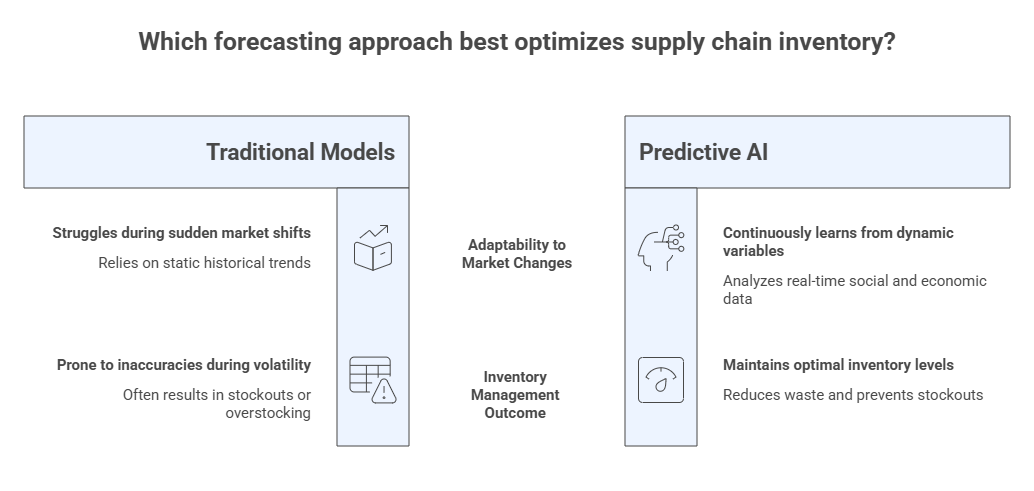
One of the biggest advantages of predictive AI is accurate demand forecasting. Traditional forecasting models often fail during sudden market changes because they depend on static historical trends.

AI powered systems continuously learn from:

  • Seasonal buying patterns
  • Economic conditions
  • Social media trends
  • Customer behavior
  • Competitor activity


This enables businesses to predict customer demand more accurately and maintain optimal inventory levels.

For example, major retail brands use predictive AI to forecast shopping trends during peak seasons. Instead of relying solely on previous year sales, AI models analyze current market behavior in real time to improve stocking decisions.

The result is:

  • Fewer stockouts
  • Reduced waste
  • Higher customer satisfaction

2. Inventory Optimization

Maintaining excess inventory increases storage costs, while insufficient inventory leads to lost sales. Predictive AI helps businesses find the right balance.
AI systems monitor inventory movement across warehouses and predict future stock requirements. This allows companies to:

  • Reduce carrying costs
  • Improve warehouse efficiency
  • Prevent inventory shortages
  • Minimize product expiration risks


Large ecommerce companies already use predictive analytics to position products closer to customers before demand spikes occur.

This proactive strategy significantly reduces delivery times and operational expenses.

3. Intelligent Route Planning and Logistics

Transportation is one of the most expensive parts of supply chain operations. Predictive AI improves logistics efficiency by analyzing traffic, weather, fuel costs, and delivery schedules.

Modern Logistics Software Development Services increasingly rely on AI driven route optimization tools to help businesses reduce delivery delays and improve fleet management.

AI powered logistics platforms can:

  • Identify the fastest delivery routes
  • Predict shipment delays
  • Optimize fuel usage
  • Reduce transportation costs
  • Improve last mile delivery performance


For instance, global courier companies use predictive algorithms to dynamically reroute vehicles during traffic congestion or severe weather conditions.
This level of automation improves both operational efficiency and customer experience.

Table: How Predictive AI Improves Supply Chain Operations

Supply Chain Area Traditional Approach Predictive AI Approach Key Benefit
Demand Forecasting Historical estimates Real time predictive analytics Better accuracy
Inventory Management Manual stock planning Automated inventory predictions Reduced waste
Logistics & Delivery Fixed route planning Dynamic route optimization Faster deliveries
Supplier Management Reactive issue handling Risk prediction and alerts Fewer disruptions
Equipment Maintenance Scheduled maintenance Predictive maintenance models Reduced downtime
Customer Experience Delayed responses Real time updates and tracking Higher satisfaction

4. Supplier Risk Management

Supply chain disruptions often begin at the supplier level. Predictive AI helps businesses evaluate supplier reliability and identify potential risks before they impact operations.

AI models analyze supplier data such as:

  • Delivery performance
  • Financial stability
  • Compliance history
  • Market reputation
  • Regional risks


If the system detects unusual patterns, businesses can take preventive action by sourcing alternative suppliers or adjusting inventory plans.
This creates stronger and more resilient supply chain ecosystems.

5. Predictive Maintenance for Equipment

Manufacturing and warehouse equipment failures can lead to costly downtime. Predictive AI uses sensor data and machine learning to forecast maintenance needs before breakdowns occur.

This approach allows businesses to:

  • Schedule maintenance proactively
  • Extend equipment lifespan
  • Reduce repair costs
  • Prevent production delays


Manufacturers using predictive maintenance strategies report significant reductions in unplanned downtime and operational disruptions.

Industry Trends Driving Predictive AI Adoption

Increased Investment in AI Technologies

Organizations worldwide are investing heavily in AI driven supply chain technologies. Companies recognize that automation and predictive analytics are essential for long term competitiveness.
Businesses are increasingly seeking AI Software Development Services USA to build customized predictive analytics platforms tailored to their operational requirements.
These solutions help enterprises improve agility, automate workflows, and enhance data driven decision making.

Rise of Real Time Data Analytics

The availability of IoT devices, cloud computing, and connected systems has made real time supply chain monitoring possible.
AI platforms can now process live data from:

  • Smart warehouses
  • Delivery vehicles
  • GPS systems
  • Sensors
  • Inventory tracking devices


This creates a more transparent and responsive supply chain environment.

Growth of Autonomous Supply Chains

The future of supply chain management is moving toward autonomous operations where AI systems can make decisions with minimal human intervention.
Examples include:

  • Automated warehouse robots
  • Self optimizing inventory systems
  • AI powered procurement platforms
  • Autonomous delivery vehicles


These technologies are expected to redefine supply chain efficiency over the next decade.

Real World Examples of Predictive AI in Supply Chains

Amazon

Amazon uses predictive AI to anticipate customer demand and position inventory closer to likely buyers before orders are placed.

This predictive shipping model reduces delivery times and improves operational efficiency.

Walmart

Walmart uses AI powered analytics to optimize inventory management and forecast demand across thousands of retail stores.

Their systems analyze purchasing patterns and weather data to improve stock availability during emergencies and seasonal events.

DHL

DHL leverages predictive analytics for route optimization, warehouse automation, and shipment visibility.

AI helps the company improve delivery performance while lowering transportation costs.

Benefits of Predictive AI in Supply Chain Management

Businesses adopting predictive AI solutions gain several competitive advantages.

Improved Operational Efficiency

AI automates repetitive processes and reduces manual intervention, allowing teams to focus on strategic decision making.

Better Customer Experience

Faster deliveries, accurate inventory availability, and fewer disruptions improve customer satisfaction and brand loyalty.

Reduced Costs

Predictive AI minimizes waste, improves resource utilization, and lowers transportation and inventory expenses.

Enhanced Decision Making

Real time insights help supply chain managers make faster and more informed decisions.

Stronger Risk Management

Predictive analytics identifies vulnerabilities early, reducing the impact of disruptions.

Challenges Businesses Face When Implementing Predictive AI

Despite its advantages, predictive AI adoption comes with several challenges.

Data Quality Issues

AI systems depend heavily on accurate and consistent data. Poor quality data can lead to unreliable predictions.

Integration Complexity

Many organizations still rely on outdated legacy systems that are difficult to integrate with modern AI platforms.

High Initial Investment

Implementing predictive AI solutions requires investment in infrastructure, software, and skilled professionals.

Talent Shortage

There is growing demand for AI specialists, machine learning engineers, and data scientists.

Many organizations now choose to Hire AI/LLM Developers to accelerate digital transformation initiatives and build scalable AI driven supply chain solutions.

Cybersecurity Concerns

As supply chains become more connected, protecting sensitive operational data becomes increasingly important.

Solutions for Successful AI Adoption

Businesses can overcome implementation challenges by following a strategic approach.

Start with Clear Objectives

Define specific business goals such as improving forecasting accuracy or reducing delivery delays.

Invest in Quality Data

Clean and organized data is essential for effective predictive analytics.

Choose Scalable Technology

AI platforms should support future growth and integrate with existing systems.

Train Employees

Upskilling teams helps organizations maximize the value of AI investments.

Work with Experienced Technology Partners

Collaborating with experienced software development providers can simplify implementation and reduce technical risks.

The Future of Predictive AI in Supply Chains

Predictive AI will continue reshaping supply chain management over the next decade. Future advancements may include:

  • Fully autonomous warehouses
  • AI driven procurement systems
  • Hyper personalized delivery experiences
  • Advanced robotics integration
  • Real time global supply chain simulations


As technology evolves, businesses that embrace predictive AI early will gain a significant competitive advantage.

Organizations that continue relying on outdated manual processes may struggle to keep up with changing market demands and customer expectations.

Actionable Takeaways for Businesses

If your business is considering predictive AI adoption, here are some practical steps to begin:

  • Evaluate current supply chain challenges
  • Identify processes suitable for automation
  • Invest in data collection and analytics
  • Start with pilot AI projects
  • Monitor measurable performance improvements
  • Scale AI initiatives gradually


Even small AI implementations can create meaningful operational improvements when executed strategically.

Conclusion

Predictive AI is no longer a futuristic concept. It is rapidly becoming a core component of modern supply chain management. From demand forecasting and inventory optimization to intelligent logistics and supplier risk management, AI is helping businesses operate more efficiently and respond faster to disruptions.

Companies that invest in predictive analytics today are building smarter, more agile, and more resilient supply chains for the future.

As customer expectations continue rising and global supply chains grow more complex, predictive AI will play a critical role in driving operational success.

Businesses looking to stay competitive should begin exploring AI powered supply chain solutions now. The earlier organizations adopt intelligent technologies, the stronger their position will be in an increasingly data driven world.

Cloud Costs in Field Service Operation

Field service businesses are under constant pressure to deliver faster service, reduce operational expenses, and improve customer satisfaction, all while managing mobile teams, vehicles, equipment, scheduling, and unpredictable service demands.

This is exactly why cloud-based field service solutions have become a major investment area for companies in industries such as HVAC, utilities, telecom, healthcare, plumbing, logistics, construction, and equipment maintenance.

Instead of relying on outdated spreadsheets, paper-based workflows, or expensive on-premise software, organizations are moving to cloud platforms that centralize operations, automate workflows, and provide real-time visibility into field activities.

According to industry research, cloud-based field service management platforms can improve team productivity by 20–25%, while many businesses report significant reductions in operational delays, manual errors, and service delivery costs.

At the same time, the global cloud field service management market is expected to grow from approximately $3.59 billion in 2025 to nearly $9.65 billion by 2035, showing how rapidly organizations are adopting cloud technologies to improve operational efficiency.

What Are Cloud Solutions in Field Service Operations?

Cloud solutions are internet-based software platforms that help businesses manage field operations remotely and in real time.

These systems typically include:

  • Work order management
  • Technician scheduling
  • Dispatching
  • GPS tracking
  • Inventory management
  • Customer communication
  • Mobile technician apps
  • Reporting and analytics
  • Automated invoicing
  • Predictive maintenance tools


Unlike traditional on-premise systems that require expensive servers and internal infrastructure, cloud systems operate through web-based platforms accessible from any connected device.

Many modern businesses now invest in advanced Field Services Management App Development Solutions to streamline technician coordination, automate dispatching, and improve operational efficiency across multiple service locations.

Popular cloud field service platforms include:

  • Salesforce Field Service
  • ServiceTitan
  • Jobber
  • Oracle Field Service
  • Microsoft Dynamics 365 Field Service


Why Field Service Operations Are Traditionally Expensive

Field service operations involve multiple moving parts that can quickly increase costs if not managed efficiently.

Common cost drivers include:

1. Fuel and Travel Costs

Poor route planning often leads to excessive travel time, higher fuel consumption, and lower technician productivity.

2. Scheduling Inefficiencies

Manual dispatching can result in:

  • Missed appointments
  • Double bookings
  • Idle technicians
  • Delayed service calls

3. Paper-Based Processes

Paper forms and manual reporting create:

  • Administrative overhead
  • Human errors
  • Slow invoicing cycles
  • Lost documentation

4. Equipment Downtime

Without real-time monitoring, businesses may only react after equipment fails, leading to emergency repairs and dissatisfied customers.

5. Communication Delays

Disconnected teams often struggle with:

  • Status updates
  • Inventory tracking
  • Customer notifications
  • Service documentation


Cloud technology directly addresses these inefficiencies.

How Cloud Solutions Reduce Operational Costs

1. Lower IT Infrastructure Costs

One of the biggest financial advantages of cloud systems is the elimination of costly on-premise infrastructure.

Traditional systems usually require:

  • Dedicated servers
  • Data centers
  • Hardware maintenance
  • Internal IT teams
  • Software licensing upgrades


Cloud platforms operate on subscription-based models, reducing upfront capital investment.

Businesses no longer need to:

  • Purchase expensive servers
  • Manage backups manually
  • Handle infrastructure maintenance
  • Perform complex software updates


Research shows that organizations increasingly prefer cloud environments because of their scalability and cost efficiency. Many enterprises also rely on AWS cloud development services to build scalable field service applications capable of handling large operational data securely and efficiently.

2. Smarter Scheduling and Dispatching

Cloud-based dispatch systems use automation and AI-driven scheduling to assign the right technician to the right job.

This reduces:

  • Technician idle time
  • Overtime expenses
  • Unnecessary travel
  • Missed appointments


Advanced systems consider:

  • Technician location
  • Skill set
  • Traffic conditions
  • Job urgency
  • Availability


According to field service technology reports, AI-enhanced scheduling significantly improves resource utilization and reduces travel-related operational costs.

Example:

A plumbing company with 30 technicians may reduce daily travel by several hours simply through route optimization and automated dispatching.

That directly lowers:

  • Fuel expenses
  • Vehicle wear and tear
  • Labor costs

3. Reduced Paperwork and Administrative Expenses

Cloud systems digitize operational workflows.

Technicians can:

  • Upload service reports from mobile devices
  • Capture customer signatures digitally
  • Submit invoices instantly
  • Access work orders remotely


This removes the need for:

  • Paper forms
  • Manual data entry
  • Physical filing systems
  • Administrative rework


Digital workflows also reduce billing delays because invoices can be generated immediately after service completion.

For many businesses, faster invoicing improves cash flow and reduces accounts receivable delays.

4. Real-Time Visibility Improves Efficiency

One of the most valuable benefits of cloud solutions is real-time operational visibility.

Managers can monitor:

  • Technician locations
  • Job progress
  • Inventory usage
  • Service completion times
  • Customer status updates


This visibility helps organizations:

  • Identify inefficiencies faster
  • Reduce downtime
  • Improve workforce utilization
  • Prevent scheduling bottlenecks


Cloud systems can process and synchronize field data instantly across teams and devices, enabling faster decision-making.

5. Predictive Maintenance Cuts Repair Costs

Modern cloud platforms often integrate with IoT (Internet of Things) devices and sensors.

These systems monitor equipment performance in real time and predict failures before breakdowns occur.

Benefits include:

  • Reduced emergency repair costs
  • Fewer equipment failures
  • Lower downtime
  • Extended asset lifespan


For industries like manufacturing, utilities, and telecommunications, predictive maintenance can save millions annually in equipment-related expenses.

Research indicates growing IoT integration in cloud field service management because proactive maintenance dramatically improves operational efficiency.

6. Improved Workforce Productivity

Cloud-based mobile apps give field technicians instant access to:

  • Customer history
  • Service manuals
  • Inventory status
  • Troubleshooting guides
  • Real-time updates


This reduces time wasted on:

  • Calling dispatchers
  • Searching paperwork
  • Returning to offices
  • Waiting for approvals


Industry studies suggest cloud platforms can increase operational productivity by up to 25%.

More productive technicians mean:

  • More completed jobs per day
  • Higher revenue potential
  • Lower labor costs per task


7. Faster Customer Response Times

Customers increasingly expect:

  • Real-time updates
  • Faster service
  • Transparent communication


Cloud solutions improve customer experience through:

  • Automated appointment reminders
  • Live technician tracking
  • Faster issue resolution
  • Digital service records


Satisfied customers often lead to:

  • Better retention rates
  • More referrals
  • Reduced customer acquisition costs


Organizations focused on customer experience improvements through cloud systems can achieve measurable increases in customer retention.

Real-World Cost Saving Areas

Operational Area

How Cloud Solutions Reduce Costs

Fuel Costs Route optimization and GPS tracking
Labor Costs Automated scheduling and mobile workflows
IT Expenses No expensive on-premise infrastructure
Downtime Predictive maintenance and real-time monitoring
Administrative Costs Digital forms and automated invoicing
Training Costs Centralized systems and easier onboarding
Customer Support Costs Faster issue resolution and communication

Industries Benefiting Most from Cloud Field Service Solutions

Many industries are rapidly adopting cloud platforms because field operations are inherently expensive and complex.

Telecommunications

Used for:

  • Network maintenance
  • Infrastructure monitoring
  • Technician dispatching

HVAC and Plumbing

Cloud scheduling reduces emergency response delays and technician inefficiencies.

Utilities

Real-time monitoring improves maintenance planning and outage management.

Healthcare Equipment Services

Technicians can access compliance records and service histories instantly.

Construction and Heavy Equipment

Cloud systems help manage remote job sites and maintenance workflows.

Many organizations also collaborate with a Custom Web Development Company in USA to create customized dashboards, service portals, and cloud-integrated applications tailored to specific operational requirements.

Cloud Solutions vs Traditional On-Premise Systems

Feature Cloud-Based Solutions

Traditional Systems

Upfront Costs

Lower

Higher

Scalability

High

Limited

Remote Access

Easy

Often difficult

Maintenance

Provider-managed

Internal IT required

Updates

Automatic

Manual

Deployment Speed

Fast

Slower

Real-Time Collaboration

Excellent

Limited

Flexibility

High Moderate

Organizations increasingly prefer cloud systems because they support scalability, remote operations, and operational flexibility without requiring heavy infrastructure investments.

Challenges Businesses Should Consider

While cloud solutions offer major advantages, businesses should also evaluate potential challenges.

Internet Dependency

Cloud platforms require reliable internet connectivity for optimal performance.

Subscription Costs

Long-term subscription expenses can increase over time if not managed properly.

Data Security Concerns

Companies handling sensitive customer or operational data should ensure:

  • Compliance standards
  • Encryption protocols
  • Access control policies

Migration Complexity

Transitioning from legacy systems may require:

  • Staff training
  • Data migration
  • Process restructuring


Successful cloud adoption requires careful planning and cost optimization strategies.

Future Trends in Cloud Field Service Operations

The future of field service management is becoming increasingly intelligent and automated.

Key emerging trends include:

AI-Powered Dispatching

AI systems will optimize technician assignments automatically.

Predictive Analytics

Businesses will use data models to forecast maintenance needs and operational risks.

IoT Integration

Connected devices will provide real-time equipment monitoring.

Mobile-First Operations

Field technicians will increasingly rely on mobile apps instead of office systems.

Remote Assistance and AR

Augmented reality tools may help technicians resolve issues faster without senior staff traveling onsite.

The cloud field service market is expected to continue growing rapidly due to increasing demand for operational efficiency, automation, and remote workforce management.

Final Thoughts

Cloud solutions are no longer optional for modern field service operations. They are becoming essential for controlling costs, improving efficiency, and staying competitive.

By reducing infrastructure expenses, automating workflows, improving scheduling, and enabling real-time visibility, cloud technology helps organizations operate faster and smarter while lowering operational waste.

Features of a Small Business CRM in 2026

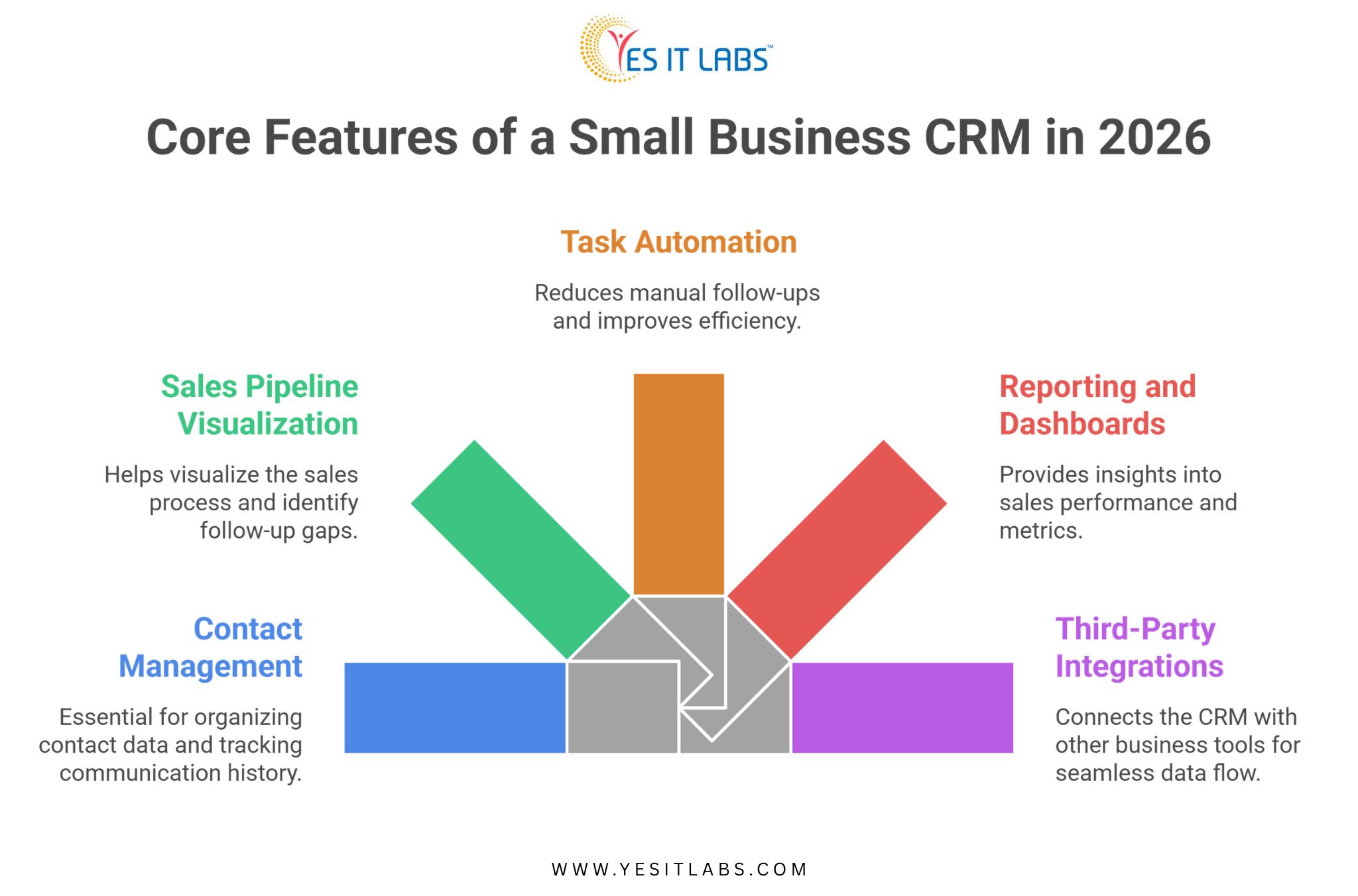
If you’re running a small business and evaluating CRM options, the short answer is this: a good CRM for small businesses in 2026 needs contact management, pipeline tracking, task automation, reporting, and integrations with the tools you already use. 

But the features of a small business CRM that actually matter depend heavily on your sales process, team size, and how your customers move through your funnel. Generic off-the-shelf platforms often miss that nuance entirely.

Why Small Businesses Need a Different Kind of CRM

Enterprise CRM platforms are built for complexity. Hundreds of users, multiple departments, global pipelines. For a small business with 5 to 50 people, that kind of system creates more friction than it removes. You end up paying for features you’ll never touch while the things you actually need, like a simple follow-up reminder or a clear view of which leads went cold, are buried under menus.

A custom-built CRM flips that dynamic. You get exactly what your team needs, nothing more, and the system grows with you instead of forcing you to adapt to it.

According to Salesforce’s State of CRM report, businesses that implement CRM systems tailored to their workflows see up to 29% improvement in sales productivity. That number climbs even higher when the CRM is purpose-built rather than configured from a bloated template. (source)

What Are the Core Features of a Small Business CRM in 2026?

This is where most buying guides get vague. Let’s be specific.

Contact and Lead Management

This is the foundation. Your CRM needs to store contact data, track communication history, log calls and emails, and let you segment contacts by status, source, or deal stage. For small businesses, simplicity here is everything. If your sales rep has to click through four screens to find the last email they sent to a prospect, the system is already failing.

A well-built contact module also handles duplicate detection and merge rules, which sounds minor until you realize how quickly messy data compounds when your team is importing leads from multiple sources.

Sales Pipeline Visualization

A drag-and-drop pipeline board is now table stakes. What separates a good CRM from a mediocre one is how that pipeline behaves. Can you set custom deal stages that match your actual sales process? Can you get deal aging alerts when something has been sitting in one stage too long? Can you pull a quick report showing your average close time by lead source?

Small businesses lose deals not because of price or product, but because of follow-up gaps. A pipeline view built around your specific workflow closes those gaps.

Task Automation and Follow-Up Sequences

Manual follow-ups are where small business revenue leaks. Someone gets busy, a lead goes cold, and three months later you find out they signed with a competitor.

Automation in a CRM context doesn’t need to mean complex drip sequences. Even simple rules, like automatically creating a follow-up task when a deal moves to a specific stage, or sending a reminder email when no activity has been logged in seven days, can meaningfully change your close rate.

Reporting and Dashboards

You need to know what’s working. A CRM without solid reporting is just a glorified contact list. The metrics small businesses typically care about:

  • lead conversion rate by source,
  • average deal value,
  • sales cycle length, and,
  • rep-level activity.

A good dashboard surfaces these without requiring a data analyst to configure them.

Third-Party Integrations

Your CRM doesn’t live in isolation. It needs to talk to your email platform, your accounting software, your calendar, and depending on your business, your inventory or support tools. If the CRM can’t integrate cleanly with what you’re already using, you’re looking at manual data entry, which defeats the whole purpose.

Want to know more about the features before you evaluate any platform? Read our guide on- Key Factors to Consider When Choosing a CRM

core features of a small business crm


Custom CRM vs. Off-the-Shelf: A Practical Comparison

Feature Area

Off-the-Shelf CRM

Custom CRM

Setup Time

Fast (days to weeks)

Longer (weeks to months)

Cost Structure

Recurring subscription

One-time build + maintenance

Feature Fit

Generic, may require workarounds

Built around your workflow

Scalability

Limited by vendor roadmap

Scales on your terms

Integration Flexibility

Pre-built connectors only

Custom API connections possible

Data Ownership

Vendor-controlled

You own everything

For businesses with straightforward needs, off-the-shelf works fine at the start. But as your team grows and your process becomes more defined, the gaps in a generic platform start showing up in lost time and lost deals.

Still weighing your options? Here’s a guide on 5 reasons why your business needs a custom CRM solution

What Role Does ERP Play in a Small Business CRM Setup?

This comes up more than people expect. When a small business scales past a certain point, the CRM starts bumping into inventory, invoicing, and operational data. That’s where ERP Software Development Services become relevant, not as a replacement for CRM but as a complementary layer.

A CRM handles the customer-facing side of the business: leads, deals, communication, and relationships. An ERP handles the operational side: inventory, procurement, finance, and fulfillment. When these two systems are integrated, your sales team can see real-time inventory levels before promising delivery timelines. Your finance team can pull revenue data that aligns with what sales is reporting. That kind of alignment is a competitive advantage, even at a small business scale.

Challenges Small Businesses Face When Building a Custom CRM

Getting a CRM built isn’t automatically a smooth process. Here are the friction points that show up most often.

Scope Creep During Development

Small businesses tend to add feature requests mid-build. What starts as a focused CRM ends up with a project management module, a customer portal, and a support ticketing system. That’s not necessarily wrong, but it delays launch and inflates cost. The discipline to build an MVP first and layer features in later is something most teams underestimate.

User Adoption

A CRM only works if your team actually uses it. If the interface is clunky or the data entry feels like a chore, people will go back to spreadsheets. Investing in UX during the build phase isn’t optional, it’s what determines whether the system gets used at all.

Choosing the Right Development Partner

This is probably the most consequential decision. If you’re evaluating a platform-specific approach for instance SugarCRM, the decision to hire SugarCRM developers talent versus building something fully from scratch is worth thinking through carefully. SugarCRM, for instance, is a strong open-source foundation for small business CRM builds, it gives you a working core and lets developers customize around it rather than building every module from zero. That can significantly reduce time to launch.

Not sure what to look for in a development partner? Here are our guide on the 6 key traits to look for when hiring a CRM developer

Practical Advice Before You Start Building

Before you write a spec or talk to a development firm, do this first: map your current sales process on paper. Every stage, every handoff, every tool you currently use. That document becomes the foundation for your CRM requirements. Developers can’t build what they can’t understand, and most CRM projects go sideways because requirements were vague upfront.

Also think about your data. Where does it live right now? Spreadsheets, email, a legacy platform? Data migration is consistently underestimated in terms of effort and cost. Plan for it explicitly.

If your business already uses Microsoft tools heavily, it’s worth exploring whether to hire Microsoft Dynamics CRM developers to extend what you already have rather than starting from scratch. Dynamics integrates natively with Outlook, Teams, and the broader Microsoft 365 ecosystem, which reduces friction for teams already living in that stack.

Finally, build for where your business will be in two years, not where it is today. The CRM that fits perfectly right now might not accommodate a second sales team, a new product line, or a partner channel you haven’t launched yet.

FAQ: Small Business CRM Features

What is the most important feature of a CRM for small businesses?

Contact and pipeline management. If a CRM can’t give your team a clear, current view of every active deal and the history behind each contact, nothing else matters. Most small businesses lose revenue not from bad products but from inconsistent follow-up, and that’s exactly what solid contact and pipeline features are designed to fix.

How much does it cost to build a custom CRM for a small business?

Rough range is $15,000 to $80,000 depending on complexity, integrations, and the development team you work with. A basic CRM with core features will sit at the lower end. Add automation, custom reporting, and multi-system integrations and you move toward the higher end. Ongoing maintenance typically runs 15 to 20 percent of the build cost annually.

Is a custom CRM better than Salesforce or HubSpot for small businesses?

Not always. If your needs are standard, HubSpot’s free or starter tier handles them well. A custom CRM makes more sense when your sales process is non-standard, when you need integrations that off-the-shelf platforms don’t support, or when recurring subscription costs at scale exceed what a custom build would cost over three to five years.

How long does it take to build a custom small business CRM?

A focused MVP with core features typically takes 10 to 16 weeks. That timeline extends when scope is broad, requirements are unclear, or the data migration process is complex. Businesses that invest time upfront in defining requirements almost always launch faster than those that figure it out during development.

Can a small business CRM integrate with accounting or inventory software?

Yes, and it should. API-based integrations with tools like QuickBooks, Xero, or inventory management platforms are standard in custom builds. This is one of the stronger arguments for custom CRM software development services over off-the-shelf options, since generic platforms often limit which integrations are available or charge extra for them.

Conclusion

The features of a small business CRM in 2026 aren’t dramatically different from what they were three years ago. Contact management, pipeline visibility, automation, and integrations still form the core. What has changed is the expectation. Buyers are more informed, sales cycles are more competitive, and the gap between businesses with clean systems and those without is more visible than ever.

A CRM that fits how you actually sell, built on a foundation that can grow with you, is worth the investment. The key is being deliberate about what you build, choosing the right technical foundation, and making sure your team will actually use it.

Top Microlearning Tools for Building

Microlearning has rapidly become a cornerstone of modern training strategies. Instead of long, overwhelming courses, it delivers short, focused lessons (1 to 10 minutes) that learners can consume anytime, anywhere. This approach is not just a trend. It is supported by strong data and measurable outcomes.

Why Microlearning Matters (Key Stats & Insights)

  • Microlearning improves knowledge retention by 25% to 60% compared to traditional learning formats
  • Learners forget up to 90% of information within a week, which highlights the need for shorter, reinforced content
  • Completion rates reach 80 to 90% for micro-courses, while long-form training often stays near 30%
  • More than 60% of organizations now use microlearning as a core part of training
  • Around 85% of companies use video-based microlearning, increasing engagement and learner satisfaction

Microlearning works because it aligns with modern attention spans, mobile usage, and on-demand learning habits.

What Makes a Great Microlearning Tool?

Before choosing a platform, focus on the features that directly impact engagement and performance:

  • Mobile-first experience for learning anytime
  • Interactive formats such as quizzes, scenarios, and gamification
  • Personalized learning paths powered by AI
  • Detailed analytics and reporting
  • Simple content creation tools
  • Integration with LMS and HR systems


Many organizations also partner with an eLearning App Development Company in USA to build customized microlearning solutions that align with their internal workflows and training goals.

Top Microlearning Tools (Detailed Breakdown)

1. EdApp (by SafetyCulture)

Best for: Mobile-first training and gamification

Key Features:

  • Designed specifically for microlearning
  • AI-powered course creation
  • Gamification elements such as rewards and leaderboards
  • Offline learning support


Why it stands out:
EdApp focuses on bite-sized mobile learning, making it highly effective for frontline teams and remote employees.

2. TalentCards

Best for: Quick and simple knowledge delivery

Key Features:

  • Flashcard-style learning approach
  • Mobile-friendly interface
  • Fast content creation
  • Suitable for compliance and onboarding training


Why it stands out:
It delivers focused learning in short bursts, which is ideal for busy teams with limited time.

3. Axonify

Best for: Enterprise-level training and performance improvement

Key Features:

  • AI-driven personalized learning paths
  • Continuous reinforcement learning
  • Advanced reporting and analytics

Why it stands out:
Axonify focuses on measurable performance outcomes and behavior improvement, not just content delivery.

4. iSpring Learn

Best for: Combining LMS functionality with microlearning

Key Features:

  • Integrated authoring tools
  • SCORM support
  • Mobile accessibility
  • Detailed reporting system


Why it stands out:
It offers a balance between structured LMS capabilities and flexible microlearning content.

5. 7taps

Best for: Fast and efficient course creation

Key Features:

  • Create lessons within minutes
  • Clean and simple interface
  • Easy sharing options


Why it stands out:
7taps is ideal for teams that need to produce and deploy training content quickly.

6. MobieTrain

Best for: Frontline workforce engagement

Key Features:

  • Mobile-first learning experience
  • Gamification features
  • Personalized learning journeys


Why it stands out:
It supports continuous learning and engagement, especially in retail and hospitality environments.

7. Docebo

Best for: AI-driven enterprise learning

Key Features:

  • Smart content recommendations
  • Social learning capabilities
  • Highly scalable platform


Why it stands out:
Docebo blends AI and microlearning to create adaptive and personalized training ecosystems.

Comparison Table of Top Tools

Tool

Best For Key Strength

Ideal Users

EdApp

Mobile learning Gamification and AI

Retail and frontline teams

TalentCards

Quick learning Flashcard simplicity

Small businesses and compliance

Axonify

Performance training AI-driven reinforcement

Enterprises

iSpring Learn

LMS integration Authoring tools

Corporate teams

7taps

Rapid creation Simplicity

Startups and L&D teams

MobieTrain

Workforce training Mobile engagement

Retail and hospitality

Docebo

Enterprise learning AI scalability

Large organizations

How to Choose the Right Microlearning Tool

Choosing the right tool depends on your training objectives:

  • For quick deployment: 7taps or TalentCards
  • For engagement and gamification: EdApp or MobieTrain
  • For analytics and performance tracking: Axonify or Docebo
  • For LMS-based learning systems: iSpring Learn


Organizations looking to scale training infrastructure often invest in eLearning Portal Development Services to build centralized platforms that support microlearning, analytics, and user management in one place.

Best Practices for Creating Engaging Microlearning Modules

1. Keep It Short and Focused

Each module should address a single learning objective within a few minutes.

2. Use Visual Content

Visual formats help learners process and retain information more efficiently.

3. Add Interactivity

Include quizzes, polls, and scenarios to improve engagement.

4. Reinforce Learning

Use repetition and follow-up modules to strengthen knowledge retention.

5. Design for Mobile Users

Ensure content is optimized for smartphones and tablets.

Businesses that require deeper customization and control often rely on custom LMS development services to design platforms tailored to their industry, workflows, and compliance requirements.

Final Thoughts

Microlearning is a powerful approach for modern training. It improves engagement, increases retention, and supports flexible learning environments.

The tools covered in this guide help organizations create scalable and impactful training modules. Whether you are training a small team or managing a global workforce, the right microlearning platform can significantly improve learning outcomes.

Ecommerce CRM Software

Launching an online store today is easier than ever. With ready-made platforms, digital payment systems, and digital marketing tools, businesses can go live in a matter of days. However, building an ecommerce store is only the beginning. The real challenge lies in sustaining growth, managing customers, and driving repeat revenue.
A large number of ecommerce businesses fail within the first few years. This failure is rarely due to poor products alone. In most cases, it comes down to the lack of systems that help businesses understand and manage their customers effectively.
This is where Ecommerce CRM software becomes essential.

Understanding the Real Problem Behind Ecommerce Failures

Many ecommerce businesses invest heavily in driving traffic through ads, SEO, and social media. While these efforts bring visitors, they do not guarantee long-term success.
The real problem begins after the first interaction.
Without a structured system, businesses struggle with:

  • Low repeat purchases
  • Poor customer retention
  • Unstructured customer data
  • Lack of personalization

Studies indicate that retaining customers is far more cost-effective than acquiring new ones. Yet, many online stores fail to build meaningful customer relationships.

What Is Ecommerce CRM Software

Ecommerce CRM software helps businesses manage customer data, interactions, and purchase history across multiple channels in a centralized system.
Instead of relying on disconnected tools, businesses gain a complete view of each customer, which allows them to:

  • Track customer journeys
  • Understand buying behavior
  • Personalize communication
  • Improve decision-making

Without CRM, ecommerce operations become reactive. With CRM, they become strategic and data-driven.
Why Most Online Stores Fail Without CRM

1. Lack of Customer Understanding

Without CRM, businesses cannot track customer preferences, behavior, or engagement patterns. This leads to generic marketing strategies that fail to convert.
Today’s consumers expect personalized experiences, and businesses that fail to deliver lose customers quickly.

2. Poor Customer Retention

Focusing only on customer acquisition is one of the biggest mistakes in ecommerce.
Without CRM, businesses cannot:

  • Send targeted follow-ups
  • Offer personalized discounts
  • Build loyalty programs

This results in high churn rates and increased marketing costs.

3. Disconnected Data Systems

Ecommerce businesses often rely on multiple tools for sales, marketing, and support. Without CRM, these systems create data silos.
This leads to:

  • Inconsistent communication
  • Duplicate data entries
  • Limited visibility into customer behavior

A centralized CRM system ensures all data is connected and accessible.

4. Missed Sales Opportunities

Every abandoned cart or missed inquiry represents lost revenue.
CRM systems help businesses recover these opportunities through:

  • Automated follow-ups
  • Cart recovery campaigns
  • Customer segmentation

Without CRM, these opportunities often go unnoticed.

5. Ineffective Marketing Campaigns

Marketing without CRM is based on assumptions instead of insights.
Businesses often:

  • Target the wrong audience
  • Send irrelevant content
  • Fail to measure campaign performance

CRM enables data-driven marketing, improving engagement and conversions.

Building a Strong Ecommerce Foundation

To scale successfully, ecommerce businesses need more than just marketing tools. They need a strong technical infrastructure that supports integration, automation, and performance.
Many growing brands rely on Ecommerce Software Development Services USA to build scalable ecommerce platforms that seamlessly integrate with CRM systems, ensuring smooth operations and long-term growth.

6. Poor Customer Experience

Customer experience is one of the biggest differentiators in ecommerce.
Without CRM, businesses struggle to provide:

  • Quick responses
  • Personalized recommendations
  • Consistent communication

This leads to poor customer satisfaction and reduced brand loyalty.

7. Lack of Automation

Manual processes slow down operations and increase errors.
Without CRM, businesses depend on:

  • Manual data entry
  • Disconnected workflows
  • Time-consuming processes

CRM systems automate tasks such as email follow-ups, order updates, and customer segmentation, improving efficiency and scalability.

8. Limited Business Insights

Without CRM, businesses lack access to actionable insights.
CRM systems provide:

  • Customer lifetime value analysis
  • Sales performance tracking
  • Customer behavior insights

These insights enable better decision-making and long-term planning.

Choosing the Right CRM Solution

Selecting the right CRM system depends on business size, goals, and operational complexity.
For businesses that require tailored solutions, working with a trusted CRM Software Development Company USA ensures the CRM aligns with specific workflows and supports future scalability.

Advanced CRM for Enterprise Growth

As businesses grow, they require more advanced CRM systems that can handle large datasets, automation, and integrations.
In such cases, organizations often choose to hire microsoft dynamics CRM developer professionals who can build and manage enterprise-level CRM solutions tailored to complex business needs.

Key Differences: Stores With CRM vs Without CRM


Aspect Without CRM With CRM
Customer Data Scattered and incomplete Centralized and organized
Marketing Generic campaigns Targeted and personalized
Customer Retention Low High
Sales Opportunities Frequently missed Actively tracked and recovered
Decision Making Based on assumptions Data-driven
Scalability Limited High
Customer Experience Inconsistent Seamless and personalized

The Future of Ecommerce Without CRM

The ecommerce landscape is becoming more competitive every year. Customers now expect:

  • Personalized experiences
  • Real-time engagement
  • Seamless omnichannel interactions

Technologies like AI and automation are raising expectations even further.
Businesses that fail to adopt CRM systems will struggle with inefficiencies, missed opportunities, and declining customer loyalty.

Final Thoughts

Most online stores do not fail because of poor products or lack of effort. They fail because they lack the systems needed to manage customer relationships effectively.
Ecommerce CRM software provides the structure, insights, and tools required to build a sustainable and scalable business.
It helps businesses understand customers, improve engagement, and drive long-term growth.
In today’s competitive market, CRM is no longer optional. It is a necessity for survival and success.

FAQs

1. What is Ecommerce CRM software?
Ecommerce CRM software helps businesses manage customer data, track interactions, and improve relationships across multiple channels.
2. Why is CRM important for ecommerce?
CRM improves customer retention, enables personalized marketing, and increases overall sales efficiency.
3. Can small ecommerce businesses benefit from CRM?
Yes, CRM helps small businesses organize data, automate processes, and improve customer engagement.
4. How does CRM increase revenue?
CRM identifies opportunities using data insights, enabling better targeting, improved conversions, and higher sales.
5. Is CRM necessary for growing ecommerce businesses?
Yes, CRM supports scalability, improves operations, and helps businesses grow sustainably over time.

Computer Vision Projects in Healthcare

Computer vision projects in healthcare are actively reshaping how clinicians detect disease, interpret medical images, and act on diagnostic data. In short, they work by training algorithms on massive labeled datasets of scans, slides, and images so the system learns to flag anomalies that human eyes might miss or catch too late. The impact is measurable and growing fast.

What Is Computer Vision in Healthcare Diagnostics?

At its core, computer vision in healthcare means teaching machines to “see” medical images and extract clinically meaningful information from them. This covers a wide range of inputs: X-rays, MRIs, CT scans, pathology slides, retinal images, dermoscopy photos, and even surgical video feeds.

The technology does not replace radiologists or pathologists. What it does is handle the volume problem. A single radiologist might review 50 to 100 scans in a shift. An AI-assisted system can process thousands, flagging priority cases and filtering out routine ones. The physician then focuses cognitive energy on the hard calls, not the administrative sorting.

According to research published in medical AI journals, diagnostic errors contribute to approximately 40,000 to 80,000 deaths annually in the United States alone. Computer vision tools that improve early detection rates directly address this gap. (source)

How Do Computer Vision Projects in Healthcare Actually Work?

The pipeline starts with data. Healthcare institutions collect enormous quantities of imaging data over years of clinical operation. This data gets annotated by domain experts, essentially telling the model: this region is a tumor, this cell morphology is abnormal, this opacity is consistent with pneumonia.

The model trains on these labeled examples using deep learning architectures, particularly convolutional neural networks, which are well-suited for spatial pattern recognition. Once trained, the model can analyze new images and produce outputs ranging from binary flags to segmentation maps that outline the exact boundaries of a lesion.

Clinical deployment is where things get nuanced. A model trained on data from one hospital system may perform differently when deployed at another due to variations in imaging equipment, patient demographics, or scan protocols. This is why validation across diverse datasets matters before any system goes live.

Beyond radiology, computer vision is being used to analyze pathology slides at the cellular level, identify diabetic retinopathy from fundus photographs, detect skin cancers from dermatology images, and guide robotic surgical systems in real time.

Key Diagnostic Challenges These Systems Address

Volume and Backlog

Imaging volumes have grown faster than the radiologist workforce in most developed countries. In the United Kingdom, NHS imaging waiting lists have exceeded 1.5 million patients at various points in recent years. Computer vision tools can pre-screen images, automatically route urgent cases, and reduce the time from scan to report significantly.

Consistency Across Readings

Two radiologists reviewing the same scan do not always reach the same conclusion. Inter-reader variability is a documented problem, especially in mammography and chest imaging. Algorithmic reading introduces a consistent baseline that can be audited, updated, and validated systematically.

Early Detection at Scale

Early-stage cancers are notoriously difficult to catch. A subtle nodule in a lung CT, a tiny irregularity in a mammogram, the early signs of glaucoma in a retinal image. Human readers working under time pressure miss these. Computer vision models, when trained on early-stage positive cases, are tuned specifically to catch what is easy to overlook.

Geographic and Resource Gaps

Not every hospital has access to subspecialty radiologists. Remote or underserved regions often rely on general practitioners interpreting imaging that would ideally go to a specialist. AI-assisted diagnostic tools help bridge this gap by bringing subspecialty-level pattern recognition to settings where that expertise is unavailable in person.

Comparing Traditional Diagnostics vs. Computer Vision-Assisted Diagnostics

Factor

Traditional Workflow

CV-Assisted Workflow

Image review speed

Minutes to hours per scan

Seconds to minutes

Consistency

Variable across readers

Standardized baseline

After-hours coverage

Delayed or on-call only

Continuous

Early detection sensitivity

Dependent on experience

Optimized for subtle findings

Scalability

Limited by workforce

Scales with compute

Cost over time

Fixed staffing costs

Decreasing per-unit cost

This comparison is not meant to suggest that automation eliminates the need for clinical judgment. It shows where computer vision adds the most measurable value within an existing diagnostic workflow.

What Makes Computer Vision Project Implementation Actually Difficult in Healthcare

The technology itself is increasingly mature. The harder problems are organizational, regulatory, and technical in ways that do not get discussed as often.

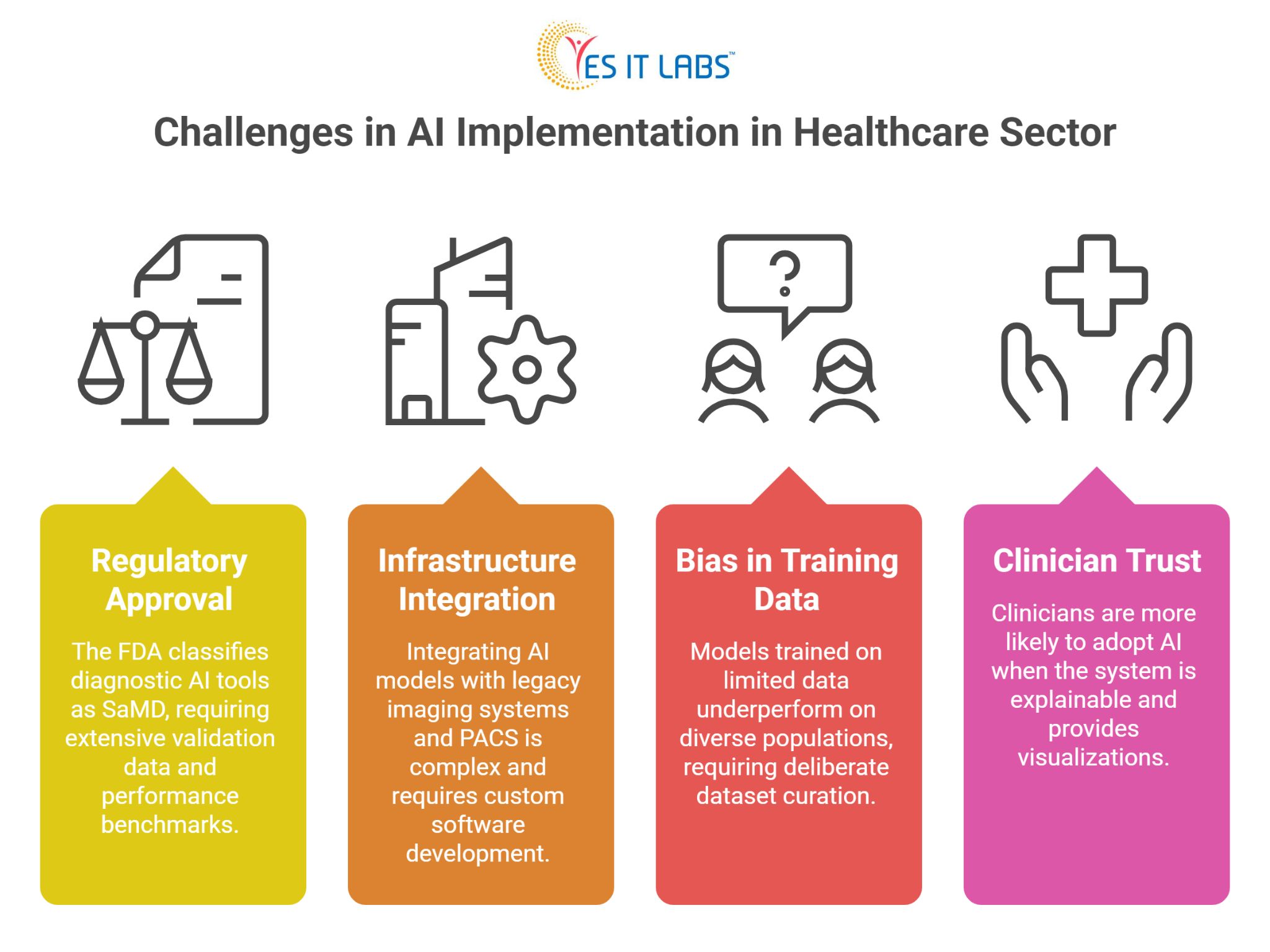
Regulatory Approval

In the United States, the FDA classifies most diagnostic AI tools as Software as a Medical Device (SaMD), which requires clearance before clinical use. The approval pathway demands extensive validation data, performance benchmarks across demographic subgroups, and sometimes a predicate device comparison. This process takes time and resources.

Integration with Existing Infrastructure

Most hospitals operate on legacy imaging systems using DICOM standards that were not designed with AI ingestion in mind. Getting a computer vision model to talk to a PACS (Picture Archiving and Communication System) and return structured output into an electronic health record is not trivial. It requires careful custom medical software development solutions that account for workflow specifics, data formats, and security requirements.

Bias in Training Data

If a model trains primarily on data from a specific patient population, it will underperform on others. Skin tone affects dermatology model accuracy. Demographic differences affect disease prevalence and presentation. Building models that perform equitably requires deliberate dataset curation, which is time-consuming and expensive.

Clinician Trust and Adoption

Even a well-performing model struggles if clinicians do not trust it. Explainability matters here. Physicians are more likely to act on an AI recommendation when the system can show, through a heatmap or similar visualization, which regions of the image influenced the output.

Computer Vision Project Implementation challenges

Practical Advice for Healthcare Organizations Exploring This Space

1. Start with a well-defined problem rather than a broad ambition. “Improve diagnostics” is too vague. “Reduce time to report for chest X-rays flagged as urgent” is actionable and measurable.

2. Invest in data governance before you invest in models. The quality and completeness of your imaging archive will determine the ceiling of what any model can achieve.

3. When building or procuring these systems, it is worth considering whether to hire dedicated full stack developers with healthcare IT experience, as integration work across imaging systems, EHRs, and clinical interfaces requires a specific combination of backend depth and regulatory awareness.

4. Pilot in a low-stakes clinical context first. Use the pilot to measure real-world performance against your validation benchmarks, gather clinician feedback, and identify edge cases before scaling.

5. Do not underestimate the change management dimension. Technical deployment is one piece. Getting radiologists, pathologists, and referring physicians to actually use the tool in their daily workflow is a separate project with its own requirements.

6. Organizations exploring enterprise-wide rollouts often find that business automation software development experience is directly applicable to healthcare imaging workflows, particularly when the goal is automating routing, worklist prioritization, and reporting rather than just the image analysis itself.

7. For cloud-integrated deployments and platforms built on Microsoft Azure Health Data Services or Azure AI, it can make sense to hire Microsoft developers with healthcare cloud experience, since much of the regulatory-grade infrastructure in this space is built on Azure’s FHIR-compliant data layer.

FAQ: Computer Vision in Healthcare Diagnostics

What types of medical conditions can computer vision help diagnose?

Computer vision is currently in clinical use or active validation for detecting lung nodules, breast cancer in mammography, diabetic retinopathy, glaucoma, skin lesions, bone fractures, intracranial hemorrhage, cardiac abnormalities, and various cancers in pathology slides. The range is expanding as more training data becomes available across specialties.

How accurate are computer vision diagnostic tools compared to human clinicians?

Accuracy varies widely by task, dataset, and model design. In narrow, well-defined tasks like diabetic retinopathy screening from fundus photographs, some FDA-cleared systems have demonstrated sensitivity and specificity comparable to specialist ophthalmologists. For more complex diagnostic tasks, AI tools typically perform best when used to support rather than replace clinical judgment.

What data is needed to build a healthcare computer vision model?

You need large volumes of labeled medical images relevant to your target condition, ideally representing demographic diversity. For rare conditions, data augmentation and transfer learning from related datasets can help. Annotation must be done by qualified clinicians, not crowdsourced, as the labeling quality directly determines the model’s clinical reliability.

How long does it take to deploy a computer vision system in a hospital?

Timeline depends heavily on the scope and regulatory pathway. A proof-of-concept on internal data might take three to six months. A production deployment with regulatory clearance, EHR integration, and change management can take two to four years. Organizations that underestimate the non-technical phases consistently run over schedule.

Is computer vision in healthcare cost-effective for smaller hospitals?

Smaller hospitals often lack the internal data and technical infrastructure to build proprietary models. The more practical path is procuring validated third-party solutions designed to integrate with common hospital systems. Cloud-based deployment models have reduced the upfront cost significantly, making the technology accessible outside large academic medical centers.

Conclusion

Computer vision projects in healthcare are not a future possibility. They are a present operational reality in many health systems, and the gap between early adopters and late movers is widening. The technology addresses real diagnostic bottlenecks, consistency problems, and access gaps that have persisted in clinical medicine for decades.

The organizations seeing the most success are not the ones with the flashiest AI ambitions. They are the ones that defined a specific problem, built the data infrastructure to support model development, integrated carefully with existing clinical workflows, and treated clinician adoption as a core project deliverable rather than an afterthought.

The diagnostic challenges in healthcare are significant and largely unsolved at scale. Computer vision is one of the few tools with both the technical capability and the growing evidence base to make a measurable difference.

Healthcare App Development Cost

The healthcare industry is undergoing rapid digital transformation, and startups are playing a major role in this shift. From telemedicine to AI-driven diagnostics, healthcare apps have become essential tools for patients, providers, and insurers alike.

One of the most common questions founders ask is simple: How much does it cost to build a healthcare app?

This guide explains the complete cost structure, key influencing factors, hidden expenses, and practical insights so you can plan effectively and avoid budget surprises.

Market Insights: Why Healthcare Apps Are Growing Fast

Before discussing costs, it helps to understand the market opportunity.

  • The global mHealth market reached approximately $36.6 billion in 2024 and is projected to exceed $88 billion by 2032, according to market research estimates from firms including Grand View Research and Fortune Business Insights. Note that projections vary across sources, with some forecasting figures significantly higher.
  • Healthcare apps are growing at an estimated 11 to 15 percent CAGR, driven by rising demand for remote care and digital health infrastructure.
  • Subscription-based healthcare apps typically generate $25 to $65 per user each month, depending on the service model.


This is a fast-growing but highly regulated and competitive space that rewards careful planning and compliance-first product thinking.

Average Healthcare App Development Cost

Healthcare app costs vary based on complexity, features, platform choices, and compliance requirements. The figures below represent industry estimates based on typical development engagements.

Cost by Complexity

App Type

Cost Range

Timeline

Basic MVP

$40,000 to $80,000 3 to 5 months

Mid-level App

$80,000 to $200,000

5 to 9 months

Advanced App $200,000 to $500,000+

9 to 14 months

Most startups begin with an MVP that typically falls between $50,000 and $120,000. Many founders start by consulting a Healthcare Software Development Company in USA to better understand realistic budgets and timelines before committing to a full build.

Cost by Healthcare App Type

Different types of healthcare apps require different levels of investment.

App Type

Estimated Cost Range

Telemedicine App

$100,000 to $400,000+

Patient Portal

$30,000 to $250,000+

Mental Health App

$40,000 to $120,000+

Remote Patient Monitoring

$150,000 to $500,000+

Note: The lower end of the mental health app range reflects offshore MVP builds with limited features. Any HIPAA-compliant mental health app with secure messaging and scheduling will realistically start at $40,000 or more. When planning Custom Telemedicine App Development, startups must account for real-time video, secure data exchange, and full compliance requirements.

Key Factors That Influence Cost

1. App Complexity and Features

The number and sophistication of features directly drive cost.

  • Basic features include scheduling, reminders, and user profiles
  • Mid-level features include chat, payment processing, and analytics dashboards
  • Advanced features include AI diagnostics, IoT device integration, and real-time monitoring

Example feature cost estimates:

Feature

Estimated Cost

Telemedicine video functionality

$40,000 to $100,000

AI symptom checker

$20,000 to $80,000

Secure authentication and encryption

$5,000 to $15,000

2. Compliance and Security

Healthcare apps that handle patient data must comply with regulations such as HIPAA in the United States and GDPR in Europe.

  • Compliance requirements can increase total development cost by 20 to 30 percent
  • HIPAA implementation alone can add $40,000 to $100,000 depending on scope, data handling complexity, and integration requirements
  • Apps with virtual care or telehealth features face the highest compliance overhead due to real-time data transmission and multi-role access requirements


An important regulatory distinction: not all healthcare apps require FDA clearance. FDA oversight applies specifically to Software as a Medical Device (SaMD), meaning apps that diagnose, treat, or monitor clinical conditions. General wellness apps, appointment schedulers, and standard telehealth platforms typically do not require FDA approval. Founders should consult a healthcare regulatory attorney to determine whether their product qualifies as SaMD.

3. Development Team Location

Hourly development rates vary significantly by region:

Region

Hourly Rate

United States

$100 to $200 per hour

Europe

$50 to $100 per hour

India and Southeast Asia

$25 to $50 per hour

Choosing between a US-based Mobile App Development Company or an offshore partner affects both total cost and product quality. Many startups adopt a hybrid model, using a US-based product lead with offshore development to balance cost and quality control.

4. Platform Choice

Platform decisions affect both development time and total cost.

  • Native iOS and Android apps require separate codebases, which roughly doubles front-end development effort
  • Cross-platform frameworks like Flutter and React Native can reduce costs by up to 40 percent by sharing a single codebase, though some performance and platform-specific feature trade-offs apply

5. UI and UX Design

Healthcare apps must be simple, accessible, and easy to use for diverse audiences including older adults and patients with limited technical literacy.

  • UI and UX design for a basic healthcare app typically costs $5,000 to $15,000
  • Full product design for a mid-to-advanced healthcare app ranges from $15,000 to $40,000+
  • Poor design directly impacts user adoption and retention, which has downstream effects on revenue

Data Security and Architecture Costs

Beyond compliance, technical architecture is a major cost driver in healthcare app development.

Key security components include:

  • End-to-end encryption for all patient data in transit and at rest
  • Role-based access control to limit data visibility by user type
  • Secure cloud infrastructure with HIPAA-compliant hosting providers
  • Audit logs and real-time monitoring systems


Security architecture typically consumes 15 to 25 percent of total development effort, particularly in regulated environments that require documented security controls for compliance audits.

AI and LLM Integration Costs

Modern healthcare apps are increasingly powered by artificial intelligence. Common use cases include:

  • AI chatbots for patient intake and triage
  • Clinical decision support systems
  • Predictive analytics for patient risk scoring


Advanced AI features often require working with specialized AI development teams experienced in building healthcare-grade LLM-powered systems.

AI Integration Type

Estimated Cost

Basic AI chatbot

$20,000 to $50,000

Clinical decision support

$50,000 to $150,000+

Ongoing API and model costs

Variable; budget monthly

EHR and EMR Integration Costs

Integration with electronic health record systems is one of the most technically demanding components of a healthcare app.

  • Popular EHR platforms include Epic Systems and Oracle Cerner
  • Integration typically uses HL7 or FHIR standards for data exchange
  • Cost ranges from $10,000 to $50,000+ depending on the number of systems and data complexity


EHR integration is essential for any app requiring real-time patient data exchange and is a non-negotiable requirement for clinical workflow tools.

Hidden Costs Startups Often Miss

Maintenance and Updates

Annual maintenance typically costs 15 to 25 percent of the original development cost. This covers bug fixes, OS and library updates, and minor feature iterations.

Infrastructure and Hosting

  • Small-scale apps: $50 to $200 per month
  • Mid-size apps: $200 to $600 per month
  • Large-scale platforms: $1,000 or more per month

Compliance and Security Audits

Ongoing compliance audits are required to maintain HIPAA and GDPR standards. Budget for annual third-party security assessments and penetration testing.

Third-Party Integrations

Recurring costs for payment gateways, lab APIs, insurance verification APIs, and medical database subscriptions add up over time and must be included in operating budgets.

Testing and Quality Assurance

Healthcare apps require more rigorous testing than standard consumer apps.

  • Functional and performance testing
  • Security and penetration testing
  • Compliance validation testing


Testing typically accounts for 15 to 20 percent of total development cost.

Legal and Certification Costs

  • HIPAA legal documentation and Business Associate Agreements (BAAs): $5,000 to $15,000
  • FDA clearance for SaMD products: $15,000 to $100,000+ (consult a regulatory specialist)
  • General legal review and terms of service: $3,000 to $10,000

Go-to-Market and Launch Costs

Launching a healthcare app involves additional investment beyond development.

  • App Store Optimization (ASO) and listing setup
  • Paid digital marketing campaigns targeting patients and providers
  • Partnerships and co-marketing with healthcare institutions


Estimated initial launch budget: $10,000 to $50,000 depending on target market and acquisition strategy.

Real Startup Cost Example: Telemedicine MVP

Below is a representative cost breakdown for a lean telemedicine MVP built with an offshore development team.

Component

Estimated Cost

UI and UX design

$8,000 to $12,000

Backend development

$30,000 to $45,000

Video integration (e.g., Twilio, Daily.co)

$20,000 to $30,000

HIPAA compliance implementation

$15,000 to $25,000

Testing and QA

$10,000 to $15,000

Total Estimated Range

$83,000 to $127,000

Note: If built entirely with a US-based team, this same scope would typically cost $120,000 to $200,000. Backend development costs in particular are higher when real-time video, multi-role access controls, and HIPAA compliance are fully integrated from the start.

Development Timeline Breakdown

Phase

Estimated Duration

Discovery and planning

2 to 4 weeks

UI and UX design

3 to 6 weeks

Core development

3 to 6 months

Testing and QA

4 to 8 weeks

Launch preparation

2 to 3 weeks

How Startups Can Reduce Costs Without Cutting Corners

  • Build an MVP first to validate market fit before investing in advanced features
  • Use cross-platform frameworks (Flutter or React Native) to reduce front-end build time
  • Leverage existing APIs for payments, video, and identity verification rather than building from scratch
  • Plan compliance architecture from day one rather than retrofitting it later, which is significantly more expensive
  • Work with experienced teams who have delivered regulated healthcare products, not just general app developers

Revenue Potential for Healthcare Apps

Healthcare apps offer strong monetization opportunities across multiple models.

Revenue Model

Typical Range

Subscription (patient-facing)

$10 to $80 per month

Teleconsultation fee

$25 to $150 per session

Remote monitoring subscription

$50 to $200 per month

B2B licensing (to providers/insurers)

$500 to $5,000+ per month

Final Thoughts

Healthcare app development requires a meaningful financial commitment, but it offers strong long-term returns for founders who plan carefully and build for compliance from the start.

Key Takeaways

  • Budget $50,000 to $150,000 for a well-built MVP
  • Compliance and security are non-negotiable and must be planned from day one
  • Hidden and ongoing costs are substantial and must be included in your financial model
  • Smart platform and team decisions can significantly reduce costs without sacrificing quality
  • The mHealth market continues to grow rapidly, making this a high-opportunity space for well-executed products

Pro Tip for Founders

Before beginning development, clearly define the following four elements. Founders who complete this step save months of rework and tens of thousands of dollars.

  • Target users: Who are they and what are their core jobs to be done?
  • Core features: What is the minimum feature set needed to deliver real value?
  • Compliance scope: Does your product qualify as SaMD? Which regulations apply?
  • Monetization strategy: How will the app generate revenue, and on what timeline?


A discovery sprint with your development team before committing to a full build is one of the highest-ROI investments a healthcare startup can make.

FAQs

1. How much does it cost to develop a healthcare app for startups?

The cost typically ranges from $40,000 to $150,000 for a basic MVP, while advanced healthcare apps can exceed $300,000 depending on features, integrations, and compliance requirements.

2. What factors influence healthcare app development cost the most?

Key factors include app complexity, features, compliance requirements like HIPAA, development team location, platform choice, and third-party integrations such as EHR systems.

3. How long does it take to build a healthcare app?

A basic healthcare app may take 3 to 5 months, while more complex applications with advanced features and integrations can take 6 to 12 months or longer.

4. Why is compliance important in healthcare app development?

Compliance ensures patient data security and legal protection. Regulations like HIPAA and GDPR are essential to avoid penalties and build user trust.

5. Can startups reduce healthcare app development costs?

Yes, startups can reduce costs by building an MVP first, using cross-platform frameworks like Flutter, leveraging third-party APIs, and outsourcing to experienced development teams.

Migrating to Microservices Architecture

Migrating to microservices architecture is one of the most impactful technical decisions a growing business can make, and when done right, it does not have to bring your operations to a halt. The short answer: successful migration depends on phasing the transition carefully, starting with the right services, and keeping your existing system functional throughout the process.

Businesses that approach this incrementally, rather than as a full rewrite, report significantly fewer disruptions and faster time-to-value.

What Is Microservices Architecture and Why Does It Matter for Business?

Before getting into the how, it helps to be clear on the what. Microservices architecture is a design approach where a software application is broken down into small, independent services that each handle a specific business function. These services communicate with each other through APIs and can be developed, deployed, and scaled independently.

For businesses running on monolithic systems, this matters a lot. A monolith means one large codebase where everything is connected. Update one part, and you risk breaking another. Scale one feature, and you have to scale the entire system. That gets expensive and slow, fast.

According to a survey by O’Reilly, over 77% of organizations that have adopted microservices report improved scalability and deployment frequency. That is not a minor operational improvement. That is a structural shift in how fast a business can move. (source)

How to Migrate to Microservices Architecture Without Grinding Operations to a Stop

This is the core question most engineering leaders and CTOs are wrestling with. The fear is real: what if the transition breaks something critical? What if customers notice? What if the team cannot keep up?

The answer lies in a phased, service-by-service extraction strategy rather than a big-bang rewrite. Here is how that typically unfolds.

Start with a Service Inventory

Map out every function your current monolith handles. Payments, user authentication, notifications, reporting, and so on. Not all of these need to be extracted at once. In fact, some may never need to be.

Identify the Right First Services

The best services to extract first are those that are relatively self-contained, have clear inputs and outputs, and are causing the most pain in your current setup. A billing module that slows down every deployment is a strong candidate. Your core user database probably is not.

Use the Strangler Fig Pattern

This is the most widely recommended migration approach. You build new microservices alongside the existing monolith, gradually routing traffic to the new services while the old system continues to operate. Over time, the monolith shrinks and the microservices take over. The business keeps running throughout.

Set up API Gateways Early

This is non-negotiable. An API gateway acts as a single entry point for all client requests, routing them to the appropriate microservice. Without this, inter-service communication becomes a mess very quickly.

Invest in Observability from Day One

Logging, monitoring, and distributed tracing need to be in place before you go live with any microservice. When something breaks across five different services, you need to know exactly where and why.

Monolith vs. Microservices: A Practical Comparison for Business Leaders

Factor Monolithic Architecture Microservices Architecture
Deployment Full system redeployment Independent service deployment
Scalability Scale everything or nothing Scale only what you need
Development speed Slows as codebase grows Teams work independently
Fault isolation One bug can affect all Failures stay contained
Initial complexity Lower Higher
Long-term maintenance Gets harder over time Easier with proper setup

This table tells a clear story. Microservices introduce upfront complexity, but they pay off significantly as your product and team scales. For businesses handling high transaction volumes, complex workflows, or rapid feature development, the trade-off is almost always worth it.

The Role of ERP Systems in Microservices Migration

One area that often trips businesses up is their ERP ecosystem. Enterprise resource planning systems are deeply embedded in operations, touching finance, inventory, HR, and more. When you are restructuring your application layer, ERP integration cannot be an afterthought.

If your business requires custom-built ERP Software Development Services, the migration plan needs to account for how those services will communicate with your new microservices layer. In most cases, you will need to expose ERP functionality through well-documented APIs and treat the ERP as a service rather than a central hub everything else depends on.

Why Third Party Integrations Need Special Attention

Modern businesses run on dozens of connected tools:

  • Payment gateways,
  • CRMs, marketing platforms,
  • Logistics providers.

When you migrate to microservices, each of these connections needs to be re-evaluated.

This is where third party API integration services become critical. Rather than hardwiring these integrations into your new microservices, the smarter approach is to create dedicated integration layers or adapter services. This way, if a third-party provider changes their API or you switch vendors entirely, you only update one service instead of rearchitecting half your system.

Common Challenges Businesses Face During Migration

Migration projects do not fail because the technology does not work. They fail because of planning gaps and team misalignment. Here are the challenges that come up most consistently.

Data management complexity

In a monolith, all services share one database. In microservices, each service ideally owns its own data store. Moving from shared to distributed data is genuinely hard and requires careful design to avoid data inconsistency.

Team structure does not match the architecture

Microservices work best when organized around the Conway’s Law principle: your team structure should mirror your service structure. If you have one large team managing everything, the benefits of microservices are harder to realize.

Underestimating DevOps requirements

Running microservices means running containers, orchestration tools like Kubernetes, CI/CD pipelines, and more. If your DevOps capability is not ready, the operational overhead can outweigh the benefits.

Latency between services

What was a simple in-process function call in a monolith becomes a network call in microservices. This adds latency. Good architecture design minimizes this, but it never disappears entirely.

Common Challenges for Businesses Face During Migration

Practical Advice: Building the Right Team for Migration

No migration succeeds without the right people executing it. This is not a project you hand off to a junior team or try to manage with part-time attention.
If your internal team lacks microservices experience, the pragmatic move is to hire dedicated full stack developers who have worked on distributed systems before. Full stack developers are particularly valuable in microservices contexts because each service often spans frontend interfaces, backend logic, and database interactions.

Similarly, if you are managing this at scale and need to move quickly, the decision to hire a web development team with microservices expertise rather than building that capability from scratch internally can cut months off your timeline. External teams bring pattern recognition from previous migrations that internal teams simply do not have yet.

FAQ: Migrate to Microservices Architecture

What is the best migration strategy for moving from monolith to microservices?

The Strangler Fig pattern is the most practical approach for most businesses. It allows you to build and deploy new microservices incrementally while the monolith continues to operate. This avoids the high risk of a full system rewrite and keeps your operations running during the transition. Most successful migrations take six to eighteen months depending on system complexity.

How do we know which services to extract first?

Start with services that are loosely coupled from the rest of the system, have clearly defined boundaries, and are causing the most friction in your current setup. Avoid extracting anything that shares heavy data dependencies with multiple other parts of the system early on. Quick wins early in the process build team confidence and prove the approach before tackling harder extractions.

Will microservices migration affect our customers?

If done correctly, customers should notice nothing except improvements. The goal of a phased migration is to keep the user-facing system fully operational throughout. That said, poor planning around API versioning or data migration can cause visible issues, which is why the planning phase matters as much as the execution phase.

How much does microservices migration typically cost?

Costs vary significantly based on system size and team composition. A mid-size business migrating a moderately complex monolith can expect to invest anywhere from $150,000 to $500,000 or more when accounting for development time, infrastructure changes, and testing. The ROI typically comes through reduced infrastructure costs at scale, faster deployment cycles, and lower maintenance overhead over time.

Do we need to migrate everything to microservices?

No, and this is an important point. Not every part of your system needs to become a microservice. Some functions are stable, low-risk, and not worth the effort of extracting. A hybrid architecture where the core legacy system handles some functions while new microservices handle others is a completely valid and often more practical end state.

Conclusion

Migration is not a technical problem with a technical solution. It is an organizational decision that requires technical execution. The businesses that get this right are the ones that treat migration as an ongoing process rather than a one-time project, invest in the right team early, and resist the pressure to move faster than their infrastructure and team readiness can support.

Microservices architecture offers real, measurable advantages in scalability, deployment speed, and fault tolerance. But those advantages only show up if the migration itself is handled with the same level of rigor you would apply to any mission-critical business initiative. Plan the phases. Extract thoughtfully. Monitor obsessively. And build with the long term in mind.

Online Learning With AI and Machine Learning

Online learning has come a long way from basic video lessons and static course modules. Today, it is evolving into a dynamic, intelligent, and highly personalized experience powered by Artificial Intelligence and Machine Learning. These technologies are not just enhancing digital education but reshaping how learners interact with content, how educators deliver knowledge, and how organizations measure success.

As the demand for flexible and scalable education continues to grow, AI is becoming the backbone of modern online learning systems.

The Rapid Growth of AI in Online Learning

The global eLearning industry is expanding at a remarkable pace. It is expected to surpass 300 billion dollars in value by the end of this decade. This growth is driven by increased internet access, mobile learning, and the need for continuous skill development in a competitive world.

AI is playing a major role in this expansion. Studies indicate that more than 70 percent of organizations are already using or planning to adopt AI in their learning and development strategies. This shift highlights a clear trend toward smarter, more efficient, and data-driven education systems.

How AI and Machine Learning Are Transforming Learning

Personalized Learning at Scale

One of the most impactful contributions of AI is personalization. Traditional learning methods often fail to address individual needs, but AI changes this by analyzing learner behavior, performance, and preferences.

AI-powered systems can:

  • Recommend courses based on user goals
  • Adjust content difficulty in real time
  • Provide customized learning paths

This approach improves engagement, enhances learning efficiency, and helps learners progress at their own pace.

Intelligent Tutoring Systems

AI-driven virtual tutors are transforming the way learners receive support. These systems can answer questions instantly, provide explanations, and offer guidance in real time.

Unlike traditional classrooms, where support may be limited, AI tutors are available 24/7, ensuring continuous learning. This leads to better knowledge retention and improved performance outcomes.

Automation of Routine Tasks

AI is simplifying many administrative and operational tasks within online learning platforms. From grading assignments to tracking learner progress, automation reduces manual effort and increases efficiency.

Key benefits include:

  • Faster assignment evaluation
  • Instant feedback for learners
  • Automated scheduling and notifications

This allows educators and organizations to focus more on strategy and content quality.

Real-Time Analytics and Insights

Machine Learning enables platforms to collect and analyze large amounts of data. This data provides valuable insights into learner behavior and course effectiveness.

With AI-driven analytics, organizations can:

  • Identify learning gaps
  • Predict dropout risks
  • Improve course design

These insights lead to better decision making and improved learning outcomes.

Adaptive Learning Systems

Adaptive learning is one of the most advanced applications of AI in education. These systems continuously adjust content based on a learner’s progress.

For example:

  • Learners struggling with a topic receive additional support and resources
  • Advanced learners are introduced to more complex concepts

This ensures a personalized and effective learning experience for every user.

AI in Content Creation and Management

AI is also revolutionizing how educational content is created and managed.

Automated Content Development

AI tools can generate quizzes, summaries, and even structured lessons, reducing development time and ensuring consistency.

Smart Content Recommendations

Machine Learning algorithms analyze user behavior to suggest relevant and personalized content.

Multilingual Capabilities

AI-powered tools enable real-time translation, making learning accessible to a global audience.

This is particularly valuable for businesses offering  elearning Portal Development Services, as it allows them to build scalable, intelligent, and user-focused platforms.

Key Benefits of AI in Online Learning

Enhanced Engagement

AI-driven features such as chatbots, gamification, and interactive content significantly increase learner participation.

Improved Knowledge Retention

Personalized and adaptive learning paths help learners retain information more effectively.

Faster Learning Outcomes

AI ensures learners focus only on relevant content, reducing unnecessary learning time.

Scalability and Flexibility

AI-powered platforms can support thousands of users simultaneously without compromising performance.

Challenges in AI-Driven Learning

While AI offers many advantages, there are challenges that organizations must address.

Data Privacy and Security

AI systems rely heavily on user data, making data protection and compliance critical.

High Development Costs

Building AI-powered platforms requires significant investment in technology and expertise.

Ethical Concerns

Issues such as algorithm bias and over-automation need careful monitoring.

Skill Requirements

Organizations need skilled professionals to implement and manage AI-driven systems effectively.

Future Trends in AI-Powered Learning

Hyper-Personalization

Future platforms will deliver deeply customized learning experiences using advanced analytics and behavioral insights.

Immersive Learning Experiences

The integration of AI with AR and VR technologies will create interactive and engaging environments.

Voice-Based Learning

Conversational AI and voice assistants will make learning more natural and accessible.

AI-Driven Career Guidance

Platforms will offer career recommendations, skill mapping, and learning paths based on real-time data.

Integration with Advanced CMS Platforms

Efficient content delivery will rely on strong CMS solutions. Partnering with the Best CMS Development Company ensures seamless integration, scalability, and optimized performance.

Why Businesses Are Investing in AI Learning Solutions

Organizations across industries are recognizing the value of AI in learning and development. AI-powered platforms help businesses train employees faster, reduce operational costs, and boost productivity.

Key reasons for adoption include:

  • Continuous skill development
  • Improved workforce performance
  • Cost-effective training solutions
  • Data-driven insights for decision making

This growing demand is also increasing the need for Custom LMS Development Services that deliver tailored and scalable learning solutions.

AI in Corporate Training

Corporate training is undergoing a major transformation with the help of AI. Companies are using intelligent learning platforms to provide personalized and efficient training programs.

AI enables:

  • Real-time performance tracking
  • Customized learning paths
  • Automated compliance training
  • Continuous skill enhancement

This ensures employees stay updated and organizations remain competitive in a fast-changing market.

The Road Ahead

The future of online learning is closely connected to advancements in Artificial Intelligence and Machine Learning. These technologies are making education more accessible, engaging, and result-oriented.

As AI continues to evolve, learning platforms will become more intuitive, adaptive, and data-driven. Organizations that invest in AI-driven learning today will be better prepared for tomorrow’s challenges.

Conclusion

AI and Machine Learning are redefining the landscape of online learning. From personalized experiences to intelligent tutoring and real-time analytics, these technologies are transforming how education is delivered and consumed.

The shift toward AI-powered learning is not just a trend but a long-term transformation. Businesses, educators, and learners must adapt to fully benefit from its potential.

As digital education continues to expand, embracing AI-driven solutions will be essential for creating future-ready, scalable, and impactful learning experiences.