
Resources

how poor database optimization impacts business revenue

Poor database optimization is quietly draining business revenue right now, across industries, at a scale most organizations underestimate. Slow query times, bloated tables, missing indexes, and inefficient data retrieval don’t just frustrate developers. They slow down customer-facing applications, break internal workflows, and create compounding operational costs that eventually show up on the bottom line. 

Database optimization impacts business revenue in ways that are both direct and surprisingly hard to trace, which is exactly why the problem persists.

What Database Optimization Actually Means

Before getting into the damage, let’s be clear about what this term covers. Database optimization refers to the practice of structuring, indexing, querying, and maintaining a database so that it performs efficiently under real-world load conditions. This includes things like query tuning, proper indexing strategies, schema normalization, connection pooling, caching layers, and regular maintenance routines like vacuuming or defragmentation depending on the database engine.

It’s not a one-time setup task. Databases degrade over time as data volumes grow, usage patterns change, and application logic evolves without corresponding schema updates. What performed fine at 10,000 records starts choking at 10 million. (source)

The problem is that this degradation is gradual. There’s rarely a single dramatic failure event. Instead, things just get slower, buggier, and more expensive to run, often without anyone pinpointing the database as the root cause.

How Database Optimization Impacts Business Revenue: The Real Cost Breakdown

This is where things get concrete. Poor database performance hits revenue through several distinct channels, and understanding each one makes the business case for fixing it much easier.

Application Performance and Customer Abandonment

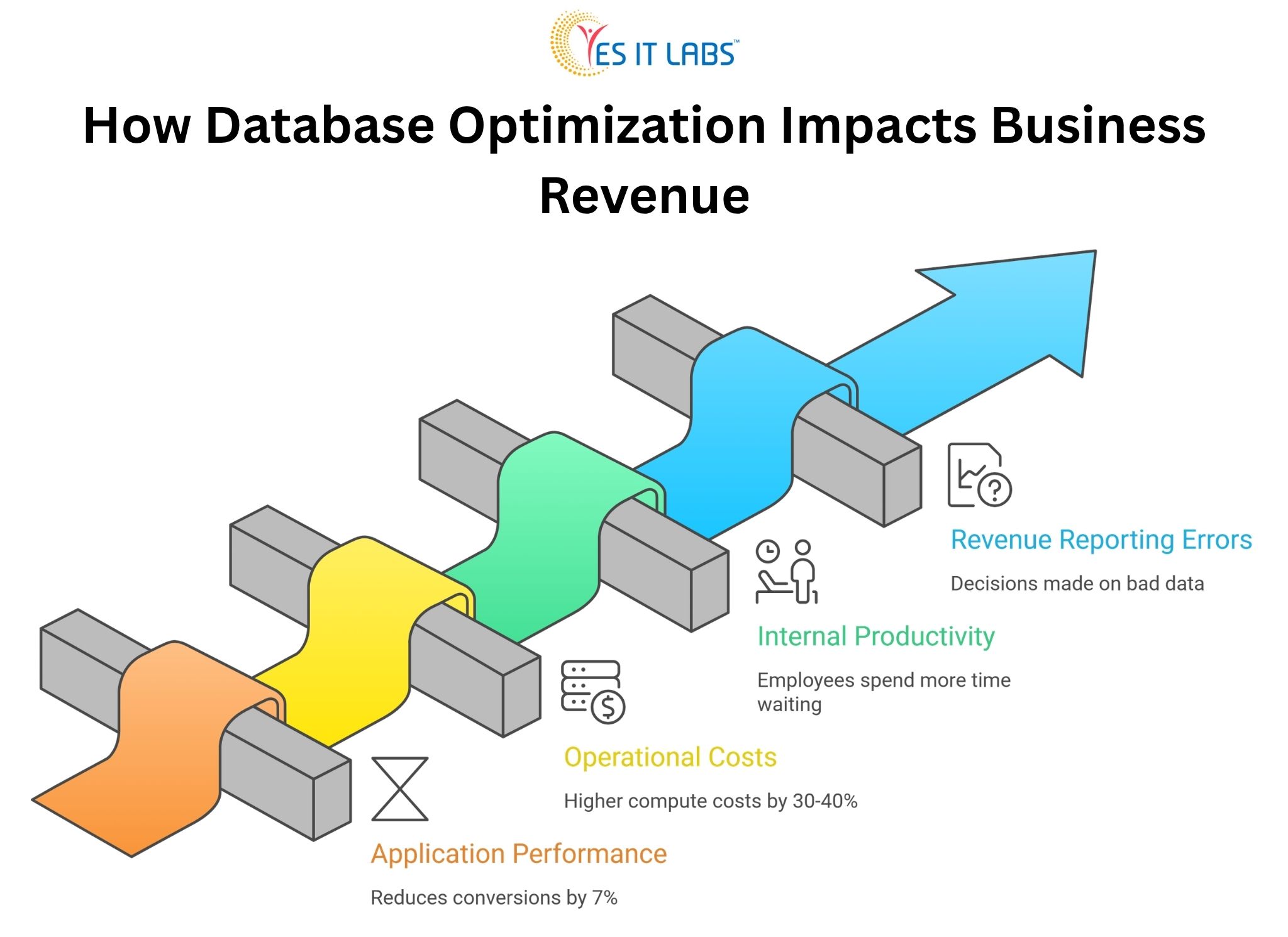
Every 100 milliseconds of additional load time reduces conversions by roughly 7 percent, according to research that has been replicated across e-commerce, SaaS, and financial platforms. Most of that latency doesn’t come from network speed or frontend rendering. It comes from slow database queries.

A product listing page that queries an unindexed table with 5 million rows, running five times per second during peak traffic, will visibly lag. Users don’t know why. They just leave.

Operational Costs That Compound

Unoptimized databases consume more server resources. That means higher cloud infrastructure bills, more frequent scaling events, and more engineering hours spent firefighting performance incidents rather than building new features.

Companies running AWS RDS or Azure SQL without proper query optimization often see 30 to 40 percent higher compute costs compared to well-tuned equivalents handling the same workload. (source)

If rising infrastructure costs are becoming a concern, it’s often a sign of deeper system inefficiencies. See our guide on Maximizing ROI with Cloud ERP Solutions

Internal Productivity Loss

This one gets ignored constantly. When internal tools like dashboards, reporting systems, or admin panels run on poorly optimized databases, employees spend more time waiting on data. Finance teams running reports that take 20 minutes instead of 2 minutes lose hours per week. Multiply that across a company and it becomes a meaningful productivity drain.

Revenue Reporting Errors and Bad Decisions

Slow or inconsistent database reads sometimes produce stale or incomplete data in reporting pipelines. Business decisions made on bad data carry their own financial consequences that often never get traced back to the database layer.
how database optimization impacts business revenue


The CRM and ERP Problem Is Bigger Than You Think

Custom-built internal systems are often where database problems quietly accumulate the most damage. When companies invest in CRM system development services, there’s enormous focus on feature scope, UI design, and integrations during the build phase. Database architecture sometimes gets treated as a secondary concern. Indexes are set up for the initial data volume, relationships are modeled for early use cases, and then the system gets handed off.

Two years later, the CRM is holding 3 million contact records with activity logs, pipeline entries, email histories, and custom fields. Queries that were fine at launch now scan full tables. The sales team complains the CRM is slow. Nobody connects it to the database.

The same pattern plays out with ERP systems. Organizations that invest in ERP software development services often inherit complex relational schemas with dozens of interconnected tables. Purchase orders linking to vendors, inventory, accounting, and production records create deeply nested query paths.

Without proper indexing and query planning, even simple lookups become expensive. In one documented enterprise case, an ERP system generating daily inventory reports was executing a query that took 18 minutes. After index restructuring and query rewriting, the same report ran in 47 seconds.

If your CRM is slowing down as data grows, it may be time to rethink the architecture. Explore how a custom-built approach solves these issues in our guide- 5 Reasons Why Your Business Needs a Custom CRM Solution

A Comparison: Optimized vs. Unoptimized Database Under Load

Metric

Unoptimized Database

Optimized Database

Average query response time

800ms to 3000ms

50ms to 200ms

Peak CPU usage (same load)

85 to 95%

30 to 50%

Monthly cloud compute cost (mid-scale app)

$4,200

$2,600

Developer hours on performance incidents/month

12 to 20 hours

2 to 4 hours

Application error rate (timeout-related)

4 to 8%

Below 0.5%

These are representative benchmarks from common optimization engagements, not a single specific case. Real results vary based on stack, data volume, and query complexity, but the directional difference is consistent.

Common Causes of Poor Database Optimization

Understanding what causes the problem is useful before jumping to solutions.

Missing or Redundant Indexes

This is the single most common culprit. A table without proper indexes forces the database engine to perform full sequential scans. At low data volumes this is invisible. At scale it’s catastrophic. Redundant indexes on the other hand waste write performance and storage.

N+1 Query Problems

This is a classic ORM-related issue where instead of fetching related data in a single joined query, an application fires one query per record. Loading 500 orders and then querying each order’s customer record separately means 501 database hits where 1 join would do. Frameworks like Sequelize, Hibernate, and ActiveRecord all produce this pattern when developers aren’t careful about eager loading.

Schema Design That Doesn’t Reflect Real Query Patterns

A schema designed for data integrity doesn’t automatically support efficient reads. Highly normalized schemas are great for storage but can require expensive multi-table joins for common queries. Denormalization in strategic places, or introducing materialized views, can dramatically improve read performance for specific use cases.

No Connection Pooling

Opening a new database connection for every request is expensive. Without pooling, high-traffic applications spend a disproportionate amount of time just establishing connections, which contributes to latency even when the queries themselves are efficient.

Lack of Regular Maintenance

Tables get fragmented. Statistics become stale. The autovacuum doesn’t run properly. Logs fill up. These are operational hygiene issues that gradually degrade performance without triggering obvious alarms.

What to Do About It: Actionable Fixes for Businesses

Start With Slow Query Logging

Every major database engine supports this. Enable it, set a reasonable threshold (100ms is a good starting point), and spend a week collecting the worst offenders. Real data about actual slow queries is more valuable than any amount of theoretical architecture review.

Run EXPLAIN ANALYZE on Everything That Hurts

Before rewriting a query or adding an index, understand what the query planner is doing. The EXPLAIN output tells you where full scans are happening, which indexes are being used, and where the cost concentrates. Guessing at the fix without this step wastes time.

Address the N+1 Problem at the Application Layer

If you’re working with a Node.js backend, hire node.js experts who understand the ORM behavior of their tools deeply. The N+1 problem isn’t a database issue, it’s an application issue that the database suffers for. Fixing it requires code changes, not just database configuration.

Introduce Caching Strategically

Not everything needs to hit the database on every request. Reference data, configuration values, frequently accessed lookups, and aggregated reports are good caching candidates. Redis and Memcached are the standard choices. The key is invalidating caches correctly, which requires careful thought about data mutation patterns.

Normalize Schema Review Into Development Workflow

Schema changes should require the same rigor as API changes. Migration files should be reviewed for performance implications before they run in production. Adding a foreign key without an index on the referencing column is a common oversight that’s easy to catch in code review and painful to fix after the fact.

Bring in Full Stack Expertise for Complex Systems

For applications where the database is deeply integrated into business logic across multiple layers, you often need professionals who understand the full picture. When companies hire dedicated full stack developers for performance-focused engagements, they get people who can trace a slow user-facing action through the API layer, the ORM configuration, the query structure, and the database execution plan without siloing the problem.

Frequently Asked Questions: How Database Optimization Impacts Business Revenue

How do I know if my database is the reason my application is slow?

The clearest signal is high database response time visible in APM tools or server monitoring. If your application server CPU is low but page load times are high, the bottleneck is almost certainly I/O, and unoptimized database queries are the most common cause. Tools like New Relic, Datadog, and even built-in PostgreSQL statistics views can confirm this quickly.

What’s the first thing to optimize if I have no idea where to start?

Enable slow query logging and identify the five worst-performing queries by total execution time. Don’t sort by single-run duration, sort by total cumulative time across all executions. A 200ms query running 10,000 times a day is far more damaging than a 5-second query running twice a week. Fix the former first.

Does database optimization require downtime?

Adding indexes on PostgreSQL using the CONCURRENTLY option requires no table lock and no downtime. Most query rewrites and application-side caching changes also require no downtime. Schema restructuring is trickier and may require maintenance windows depending on the size of the tables involved. The majority of high-impact optimizations can be done without service interruption.

How often should database performance be reviewed?

For actively developed applications, a performance review should happen at major data volume milestones (10x growth is a good trigger), after significant new features that add tables or change query patterns, and as a scheduled quarterly practice for production systems with more than a few hundred thousand records. Waiting for performance complaints is reactive and expensive.

Can a cloud-managed database service handle optimization automatically?

Partially. Managed services like AWS RDS, Google Cloud SQL, and Azure Database for PostgreSQL handle operational maintenance like patching, backup, and basic autovacuuming. They do not automatically fix bad indexes, rewrite inefficient queries, or resolve application-level problems like N+1 patterns. Automated insights from services like RDS Performance Insights can surface problem queries, but the actual fixes require human decisions and code changes.

Conclusion

Poor database performance is not a technical curiosity. It is a business problem with measurable revenue consequences, and it rarely resolves itself without deliberate intervention. The gap between a well-optimized database and a neglected one shows up in customer experience, infrastructure costs, employee productivity, and ultimately in revenue numbers that get attributed to other causes because nobody thought to look at query plans.

The good news is that database optimization doesn’t require rebuilding from scratch. Most of the highest-impact improvements come from identifying the worst-performing queries and fixing them systematically. That work is well-understood, repeatable, and delivers results quickly when approached with the right expertise and the right tools.
Factors to Consider When Choosing a CRM

Choosing a CRM sounds like a straightforward task until you actually get into it. You start comparing options, sitting through demos, reading feature lists, and everything begins to look the same. Every platform promises better sales tracking, smoother workflows, and stronger customer relationships.

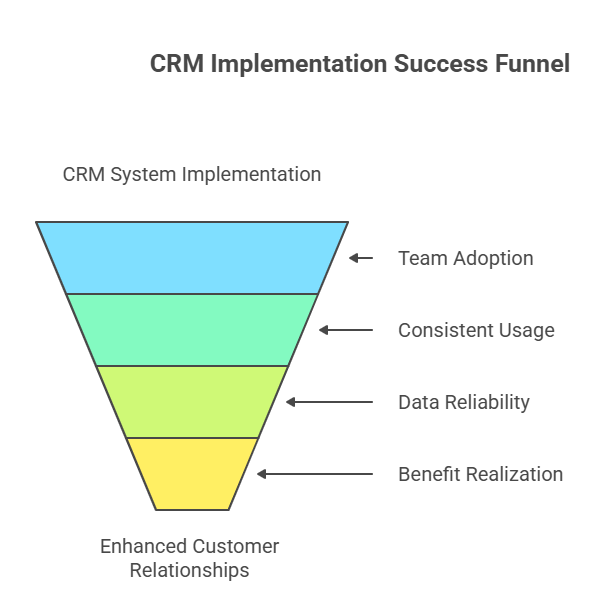
But here is what often gets missed. A CRM does not fail because it lacks features. It fails because it does not fit the way your team works.

Many businesses invest in a CRM with high expectations, only to see it slowly get ignored. Data becomes incomplete. Teams fall back to spreadsheets. Managers stop trusting reports. It is not a technology problem. It is a fit problem.

A well-chosen CRM feels natural. It supports your team instead of slowing them down. It helps people stay organized without forcing them into complicated processes. That is what you should aim for.

Why Choosing the Right CRM Matters

CRM systems are now at the center of how businesses manage customer relationships. They are no longer just contact databases. They influence how leads are handled, how deals move forward, and how customers are retained.

When a CRM is used properly, it can:

  • Improve sales consistency by keeping pipelines visible
  • Increase customer retention through better follow-ups
  • Reduce internal confusion by centralizing information
  • Support better decision-making with reliable data

But these benefits only show up when the system is actually used. If your team avoids it or uses it inconsistently, even the best CRM becomes ineffective.

That is why the selection process matters so much.

1. Start with Your Business Needs

Before looking at any CRM platform, spend some time understanding your current situation.

Where are things breaking down?

Maybe leads are coming in but not being followed up on time. Maybe your sales team has no clear view of the pipeline. Or maybe different teams are working with different sets of data.

You do not need a perfect process mapped out. You just need clarity on what is not working.

Some businesses focus mainly on sales tracking, while others care more about customer support or long-term relationship management. Your priorities will shape your decision.

A simple exercise helps here. Write down the top three problems your team faces daily. That list will guide your CRM selection better than any feature comparison.

2. Ease of Use and User Adoption

This is one of the most important factors, yet it is often underestimated.

If your team finds the CRM difficult to use, they will avoid it. Not intentionally, but gradually. They will delay updates, skip entries, or use their own methods to track work.

That is when problems start:

  • Data becomes unreliable
  • Reports lose accuracy
  • Managers lose visibility

Look for a system that feels simple from the beginning:

  • Clean interface that does not overwhelm users
  • Easy navigation with minimal steps
  • Quick data entry without unnecessary fields

You can test this during demos. Imagine a new employee using the system for the first time. If it feels confusing, it probably is.

3. Customization and Flexibility

Every business has its own way of working. Even companies in the same industry can have very different processes.

A rigid CRM forces you to adapt to it. That rarely works well in the long run.

Instead, look for flexibility:

  • Custom fields to match your data
  • Workflow adjustments based on your process
  • Dashboards that reflect your priorities

This is where working with a CRM Software Development Company becomes useful. Instead of trying to fit into a predefined system, you can build or customize a CRM that aligns with your business.

Flexibility is not just about comfort. It directly affects how efficiently your team can work.

4. Integration with Existing Tools

Your CRM is not the only system your business uses. You probably already have tools for email, marketing, accounting, and customer support.

If these systems do not connect with your CRM, it creates extra work:

  • Entering the same data multiple times
  • Dealing with inconsistent information
  • Switching between platforms constantly

A CRM that integrates well reduces these issues. It creates a single source of truth for your data.

Before choosing a CRM, check how easily it connects with your existing tools. Not just whether integration exists, but how smoothly it works in practice.

5. Automation Capabilities

Automation can make a noticeable difference in daily operations.

It helps reduce repetitive tasks and ensures that important actions are not missed.

Common automation features include:

  • Lead assignment to the right team member
  • Follow-up reminders to keep deals moving
  • Email triggers based on customer actions
  • Task scheduling to organize workloads

But there is a balance to maintain. Too much automation can create noise. Too many alerts or unnecessary triggers can overwhelm your team.

Start with simple automation. Focus on tasks that are repeated every day. Once your team is comfortable, you can expand gradually.

6. Data Management and Accuracy

A CRM is only as useful as the data it holds.

If the data is outdated, duplicated, or incomplete, it affects everything:

  • Sales forecasts become unreliable
  • Customer interactions feel disconnected
  • Decisions are based on guesswork

Look for features that support clean and accurate data:

  • Duplicate detection
  • Easy editing and updates
  • Clear data structure

More importantly, think about usability. If it is easy for your team to update data, they will do it consistently. That is what keeps your CRM reliable over time.

7. Scalability for Future Growth

Your business will not stay the same. It will grow, change, and evolve.

Your CRM should be able to handle that growth without becoming a limitation.

Consider:

  • Can it support more users without slowing down
  • Can workflows become more advanced
  • Can it handle larger volumes of data

Many companies work with a Custom Software Development Company in USA to build systems that are designed for long-term scalability.

Switching CRMs later can be expensive and disruptive, so it is better to think ahead now.

8. Cost vs Value

Cost is important, but it should not be the only factor.

A low-cost CRM may seem attractive, but it can create problems if it lacks essential features or slows down your team.

Instead, focus on value:

  • Time saved through better organization
  • Productivity gains from automation
  • Revenue impact from improved sales processes

A CRM should justify its cost by improving how your business operates.

9. Support and Training

Even a well-designed CRM requires proper onboarding.

Without guidance, your team may struggle to use the system effectively.

Look for:

  • Responsive support when issues arise
  • Training resources for new users
  • Clear documentation for everyday use

Good support makes a big difference, especially in the early stages of adoption.

10. Security and Compliance

Customer data is sensitive. Protecting it is essential.

Your CRM should include:

  • Data encryption
  • Role-based access control
  • Secure authentication

Security is not just about avoiding risks. It also builds trust with your customers.

11. Mobile Accessibility

Work does not happen only at desks anymore.

Sales teams and managers often need access to information while traveling or working remotely.

A mobile-friendly CRM allows:

  • Quick updates
  • Real-time data access
  • Faster response times

This keeps your team productive, no matter where they are.

12. Industry-Specific Requirements

Some businesses need more specialized features than others.

For example:

  • Real estate businesses need property tracking
  • Healthcare organizations need strict compliance
  • E-commerce companies focus on customer journeys

In such cases, businesses often choose to Hire Microsoft Dynamics CRM Developer to customize advanced CRM platforms based on their specific needs.

Choosing a CRM that aligns with your industry reduces setup time and improves usability.

Key CRM Factors at a Glance

Factor Why It Matters
Ease of Use Drives adoption and daily usage
Customization Aligns CRM with your workflow
Integration Connects tools and reduces manual work
Automation Saves time and improves consistency
Data Quality Supports accurate decisions
Scalability Prepares your business for growth
Security Protects customer information


Final Thoughts

Choosing a CRM is not something you rush. It is a decision that affects how your team works every day.

The right CRM feels simple. Your team uses it without resistance. Information stays organized. Workflows become smoother.

The wrong CRM does the opposite. It creates friction, confusion, and extra effort.

Take your time. Focus on what your team actually needs, not what looks impressive in a demo.

Because in the end, the best CRM is not the one with the most features. It is the one your team trusts, uses consistently, and relies on to get their work done.

Custom Logistics Software Benefits

In today’s fast-moving, delivery-focused economy, logistics plays a critical role in business success. Companies that rely on manual systems or rigid, off-the-shelf tools often face rising operational costs, delayed shipments, and limited visibility across their supply chain.

Custom logistics software addresses these challenges by aligning technology with your exact business processes. The result is a more efficient, scalable, and cost-effective logistics operation that also improves delivery performance.

What Is Custom Logistics Software?

Custom logistics software is a tailored solution designed to manage and optimize your supply chain operations. Unlike generic platforms, it adapts to your workflows instead of forcing you to adjust to the software.

Most custom solutions include a combination of core logistics capabilities, such as:

  • Transportation management systems (TMS)
  • Warehouse management systems (WMS)
  • Inventory tracking tools
  • Route optimization engines
  • Real-time shipment tracking
  • Analytics and reporting dashboards


Because everything is customized, businesses gain better control, flexibility, and efficiency across operations. Many organizations partner with a transportation and logistics software development company to build solutions that align perfectly with their operational needs and long-term goals.

How Custom Logistics Software Cuts Costs

Reducing logistics costs is one of the biggest reasons companies invest in custom solutions. Instead of addressing one issue at a time, custom software improves multiple cost drivers simultaneously.

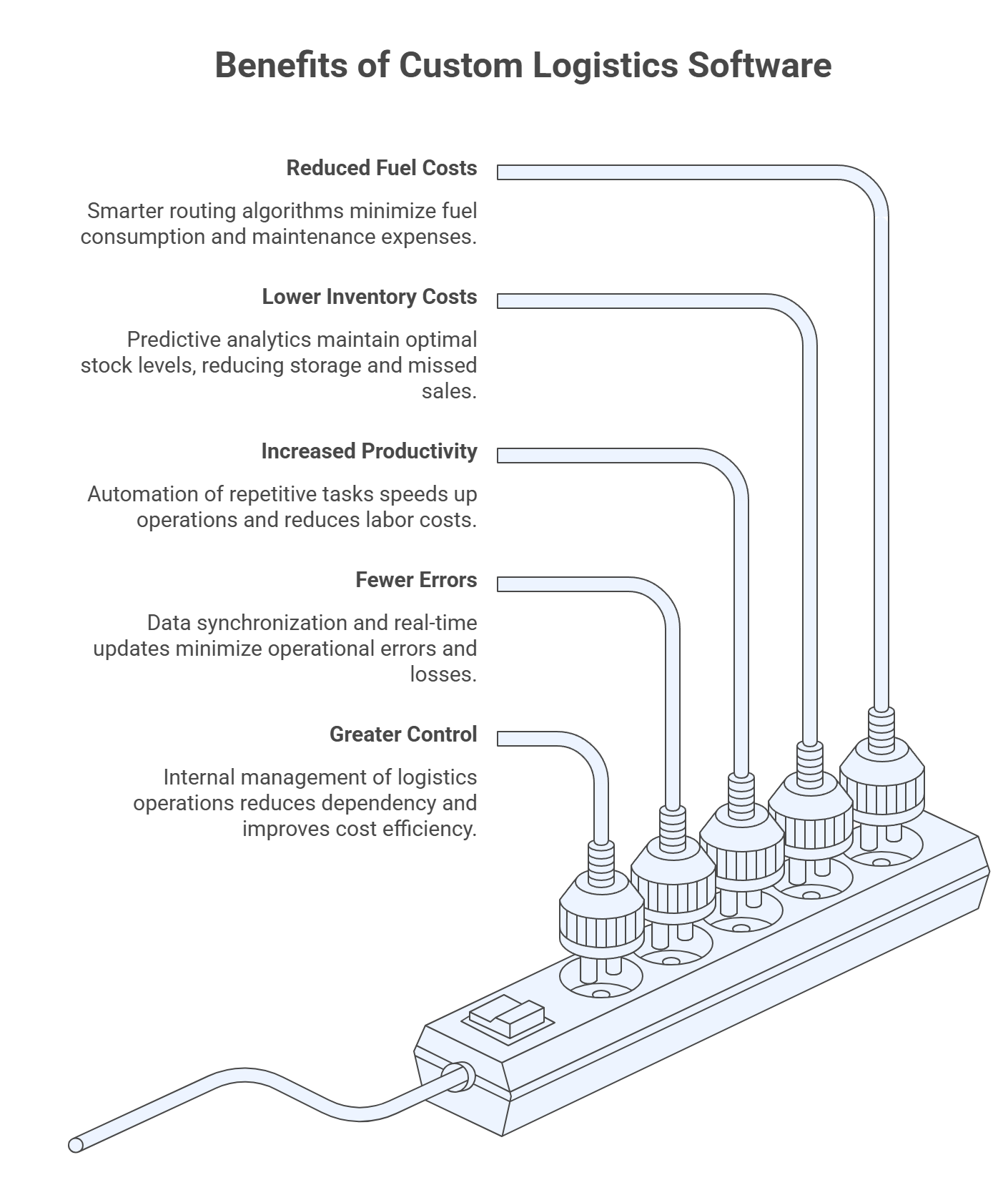
How Custom Logistics Software Cuts Costs

1. Smarter Route Optimization

Transportation costs often take up a significant portion of logistics budgets. Custom software uses intelligent routing algorithms combined with real-time data to improve efficiency.

This allows businesses to:

  • Reduce fuel consumption
  • Avoid traffic delays
  • Minimize empty return trips


As a result, companies often see noticeable savings in fuel and fleet maintenance costs while improving delivery timelines.

2. Better Inventory Management

Inventory inefficiencies can quietly drain profits. Overstocking increases storage costs, while understocking leads to missed sales opportunities.

With predictive analytics and demand forecasting, custom systems help businesses:

  • Maintain optimal stock levels
  • Reduce excess inventory
  • Improve warehouse space utilization


Many companies report a 20 to 30 percent reduction in inventory-related costs after implementing smarter systems.

3. Automation of Repetitive Tasks

Manual processes slow down operations and increase labor costs. Tasks like order entry, dispatch planning, and invoicing can be fully automated with custom logistics software.

This leads to:

  • Faster processing times
  • Reduced human error
  • Lower administrative workload


Over time, automation significantly improves productivity without increasing headcount. Businesses looking to scale efficiently often invest in Custom Software Development Services USA to ensure their logistics systems are built for performance, security, and scalability.

4. Error Reduction Across Operations

Errors in logistics can be expensive and damaging to customer trust. These include incorrect shipments, missed deliveries, or data mismatches.

Custom software improves accuracy by:

  • Synchronizing data across systems
  • Eliminating duplicate entries
  • Providing real-time updates


Businesses can reduce operational errors by up to 23 percent, leading to fewer losses and better customer satisfaction.

5. Greater Control Over Logistics Operations

Relying heavily on third-party providers can increase costs and reduce flexibility. Custom logistics platforms give businesses more control over their operations.

With the right system in place, companies can:

  • Compare carrier performance
  • Optimize vendor selection
  • Manage shipments internally


This reduces dependency on external providers and improves cost efficiency.

How It Boosts Delivery Speed

Speed is a major competitive advantage in logistics. Custom software helps businesses meet growing customer expectations by streamlining the entire delivery process.

1. Real-Time Visibility and Tracking

One of the biggest advantages of custom logistics software is complete visibility.

Businesses can:

  • Track shipments in real time
  • Receive instant alerts on delays
  • Provide accurate delivery estimates to customers


This level of transparency allows faster decision-making and quicker issue resolution.

2. Faster Order Processing

Delays often begin at the order processing stage. Custom software removes bottlenecks by automating workflows and improving coordination.

Key improvements include:

  • Instant order confirmation
  • Faster dispatch scheduling
  • Seamless communication between departments


Many companies experience up to a 30 percent improvement in processing speed.

3. Optimized Last-Mile Delivery

Last-mile delivery is often the most complex part of the logistics chain. Custom solutions improve this stage through intelligent planning and real-time coordination.

This includes:

  • Dynamic route adjustments
  • Efficient delivery batching
  • Driver tracking and updates


Businesses can achieve up to 15 percent faster delivery times with optimized last-mile strategies.

4. Predictive Planning and Risk Management

Delays are often caused by unforeseen disruptions. Custom logistics software uses predictive analytics to identify risks before they occur.

It helps businesses:

  • Anticipate demand fluctuations
  • Identify potential bottlenecks
  • Take proactive action


This leads to smoother operations and fewer unexpected delays.

5. Seamless Integration with Existing Systems

Custom software integrates with your existing technology stack, including ERP, CRM, and e-commerce platforms.

This ensures:

  • Real-time data sharing
  • Faster communication
  • Improved coordination across departments


Organizations working with a reliable Supply Chain Software Development Company can build fully integrated ecosystems that enhance both speed and operational efficiency.

Industry Insights and Trends

The growing adoption of logistics technology highlights its impact on business performance:

  • 72 percent of logistics companies report improved efficiency after adopting custom solutions
  • 78 percent of operators now use cloud and AI-powered logistics systems
  • The logistics software market is expected to grow from 17.8 billion dollars in 2025 to 42.8 billion dollars by 2035


These trends clearly show that digital transformation in logistics is accelerating.

Key Features That Drive Results

To maximize both cost savings and delivery speed, effective custom logistics software typically includes:

  • Route optimization tools
  • Smart inventory management systems
  • Real-time GPS tracking
  • Advanced analytics dashboards
  • AI-driven demand forecasting
  • API integrations with existing systems


Each of these features contributes to a more efficient and scalable logistics operation.

Real Business Impact and ROI

Investing in custom logistics software delivers measurable results across multiple areas of the business.

Companies commonly achieve:

  • 10 to 15 percent reduction in supply chain costs
  • 8 to 12 percent lower freight expenses
  • 5 to 40 percent improvement in warehouse productivity
  • Positive return on investment within 8 to 15 months


These improvements make custom logistics software a high-value investment for growing businesses.

When Should You Invest in Custom Logistics Software?

You should consider implementing a custom solution if your business is facing challenges such as:

  • Increasing delivery delays
  • Rising logistics costs
  • Limited visibility into operations
  • Poor integration between systems
  • Rapid business growth


Addressing these issues early can prevent larger operational problems in the future.

Final Thoughts

Custom logistics software is not just about improving operations. It is about building a smarter, faster, and more cost-efficient business.

By combining automation, real-time data, and intelligent planning, businesses can reduce costs while significantly improving delivery performance.

As customer expectations continue to rise, especially for faster delivery timelines, companies that invest in tailored logistics solutions will be better positioned to compete and grow in a demanding market.

Cloud ERP is no longer a “technology upgrade” that companies experiment with on the side. It has become the backbone of how modern businesses run operations, control costs, and make decisions faster than competitors.

But here is the honest part most vendors will not tell you clearly enough. Cloud ERP does not automatically improve ROI. It only improves ROI when the business behind it is ready to change how it works.

If the processes are messy, ERP will not fix them. It will just make the mess more visible.

When done right though, the impact is very real.

What ROI actually means in Cloud ERP (in real terms)

Most people think ROI is just saving money. That is incomplete.

In real business environments, ROI comes from a combination of financial and operational improvements.

Key areas where ROI actually shows up

  • Less time spent fixing and reconciling data
  • Faster decision-making at leadership level
  • Reduced dependency on manual reporting
  • Lower operational friction between departments
  • Better forecasting accuracy

It is not one big win. It is many small wins stacking together every single day.

ROI breakdown in a practical structure

Here is how Cloud ERP typically impacts ROI across business layers:

Area What improves Business impact ROI outcome
Infrastructure No servers or physical setup needed Lower capital expense Immediate cost reduction
Operations Automation of daily workflows Faster execution Productivity gain
Finance Real-time tracking of expenses Better financial control Reduced wastage
Data Single source of truth Fewer errors and confusion Better decisions
IT management Vendor handled maintenance Less internal workload Reduced overhead

This table is important because ROI is not coming from one place. It is coming from multiple systems improving together.

Why businesses are shifting to Cloud ERP faster than expected

Older ERP systems worked, but they were heavy. Expensive upfront investment, long deployment cycles, and constant upgrade headaches.

Cloud ERP removes most of that friction.

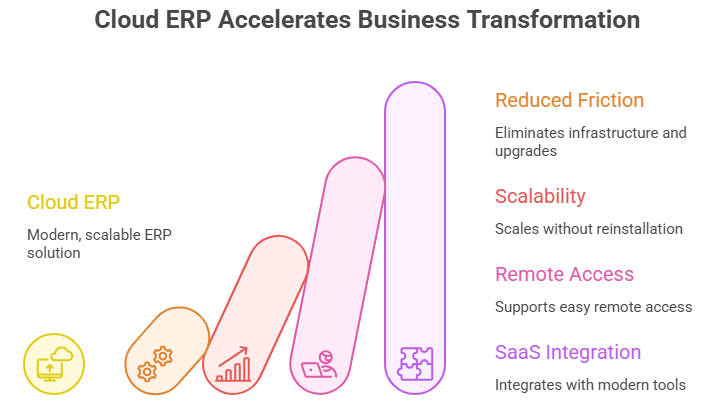
Companies are now moving toward systems that:

  • Do not require physical infrastructure
  • Can scale without reinstallation
  • Support remote access easily
  • Integrate with modern SaaS tools

But the deeper reason is flexibility.

Businesses today do not stay the same for five years anymore. They change faster, and ERP has to keep up.

Where cost savings actually come from

Cost reduction is usually the first visible benefit, but it is more layered than people assume.

1. Infrastructure elimination

No servers, no hardware rooms, no cooling systems, no maintenance contracts.

2. Reduced IT dependency

Internal teams stop spending time maintaining systems and start focusing on actual business problems.

3. Predictable pricing

Subscription-based models remove unpredictable upgrade costs.

4. Reduced downtime losses

Cloud systems are more stable, which means fewer interruptions in daily operations.

Each one may look small individually, but together they create strong financial ROI over time.

Operational efficiency is where ROI compounds quietly

This is where most companies underestimate Cloud ERP.

When all departments work in separate tools, inefficiencies are unavoidable. Data gets duplicated. Reports conflict. Teams spend time correcting mistakes instead of moving forward.

Cloud ERP changes that completely.

Operational improvements usually include

  • Faster month-end closing cycles
  • Real-time inventory visibility
  • Reduced duplicate data entry
  • Faster internal approvals
  • Better coordination between teams

It is not dramatic at first, but over months, it changes how the entire organization feels.

Work stops being fragmented.

Real-time data changes decision-making completely

One of the biggest shifts Cloud ERP brings is timing.

Earlier, decisions were based on reports that were already outdated by the time they reached management.

Now, data is available almost instantly.

That means leadership can:

  • Track performance as it happens
  • React to supply chain issues faster
  • Adjust pricing or inventory quickly
  • Reduce financial blind spots
  • Identify risks early instead of late

This is where ERP stops being an operations tool and starts becoming a decision-making system.

ROI comparison: Traditional ERP vs Cloud ERP

Factor Traditional ERP Cloud ERP
Setup cost Very high upfront investment Low initial cost
Deployment time Long (months to years) Faster rollout
Maintenance Internal IT required Managed by provider
Scalability Complex and expensive Easy and flexible
Updates Manual and disruptive Automatic and continuous
ROI timeline Slow Faster realization

This comparison makes one thing clear. Cloud ERP does not just reduce cost. It changes how ROI is generated in the first place.

Why implementation quality decides ROI success

Even the best ERP system fails if it is implemented poorly.

A lot of companies rush deployment and skip the most important step, which is fixing their internal processes first.

This is where working with an experienced ERP Development Company in USA becomes important. The value is not just technical setup. It is process mapping, workflow redesign, and aligning ERP with actual business operations.

Without this, companies often end up digitizing broken systems instead of improving them.

Cloud ERP as part of a larger SaaS ecosystem

ERP does not operate alone anymore. It connects with multiple tools like CRM, analytics platforms, HR systems, and inventory tools.

This ecosystem approach is where modern businesses are heading.

A Saas Development Company in USA typically builds systems that are modular and integration-friendly. That matters because businesses no longer want rigid software. They want systems that evolve as they grow.

This flexibility directly improves long-term ROI because companies do not need to rebuild systems every time they expand.

Infrastructure matters more than people realize

ERP performance is not just about software design. It depends heavily on the cloud infrastructure supporting it.

A Google Cloud Development Company helps organizations build systems that can handle large-scale data processing, maintain speed under heavy usage, and ensure uptime across global operations.

If infrastructure is weak, even the best ERP setup will feel slow and frustrating. And slow systems always reduce ROI because they affect productivity.

Where companies lose ROI without realizing it

Most ERP failures are not technical. They are behavioral.

Common issues include:

  • Processes not cleaned before implementation
  • Employees not trained properly
  • Resistance to adopting new workflows
  • Over-customization that makes systems complex
  • Lack of usage tracking after deployment

These issues quietly reduce ROI even if the system is working technically.

The real ROI timeline (what actually happens over time)

Cloud ERP does not deliver full ROI instantly. It builds in stages.

Stage 1: Setup phase

System setup, data migration, and training. ROI is not visible yet.

Stage 2: Adjustment phase

Teams are learning. Some resistance and slowdowns happen.

Stage 3: Efficiency phase

Automation starts working. Manual effort reduces significantly.

Stage 4: Optimization phase

Businesses start using data for planning, not just operations.

Stage 5: Strategic phase

ERP becomes part of decision-making and growth strategy.

This progression is where long-term ROI becomes meaningful.

Practical ways to maximize Cloud ERP ROI

Here is what actually works in real businesses:

  • Fix internal processes before digitizing them
  • Train employees continuously, not just during launch
  • Keep workflows simple and practical
  • Use dashboards daily, not occasionally
  • Track system adoption regularly

Nothing complex. Just disciplined execution.

Final thoughts

Cloud ERP is not a magic solution. It does not fix businesses on its own.

But when implemented properly, it changes how a company functions at every level.

Costs reduce, yes. But more importantly, efficiency improves, communication becomes smoother, and decision-making becomes faster and more accurate.

The difference between high ROI and poor ROI is rarely the software. It is how seriously a business treats the transformation.

Companies that approach Cloud ERP as a strategic shift, not just an IT upgrade, almost always see stronger long-term results.

And in today’s competitive environment, that operational clarity is often what separates growing businesses from struggling ones.

Next.js vs Node.js for business applications

Next.js vs Node.js for business applications is one of those comparisons that comes up often, but it’s worth clarifying upfront: these two technologies are not direct competitors. Node.js is a runtime environment. Next.js is a React-based frontend framework that runs on top of Node.js. 

The more accurate question is which one plays the bigger role in your specific business application, and the answer depends entirely on what you’re building. For most modern web applications, you’ll likely end up using both.

What Is Next.js and What Is Node.js?

Node.js, released in 2009, allows JavaScript to run on the server side. Before Node.js, JavaScript was strictly a browser language. Node.js changed that, making it possible to build backend services, APIs, real-time applications, and command-line tools entirely in JavaScript. It uses Google’s V8 engine and has built one of the largest package ecosystems in software development, with over 2 million packages available on NPM.

Next.js, created by Vercel and first released in 2016, is a framework built on top of React. It handles routing, server-side rendering, static site generation, and API routes out of the box. It runs on Node.js under the hood but focuses on the frontend layer and the bridge between frontend and backend.

The 2023 Stack Overflow Developer Survey showed Next.js ranked among the most popular web frameworks, with over 16% of developers reporting regular use. (source)

These are tools that solve different problems. Understanding that distinction is the first step toward making a smarter technology decision for your business.

Next.js vs Node.js: What Does Each One Actually Handle?

When businesses ask about next js vs node js, they’re usually trying to figure out where to focus their architecture. Here’s how to think about it practically.

Node.js is the engine room. It powers your server, handles your database connections, manages authentication logic, processes background jobs, and exposes API endpoints. If you’re building a standalone backend service, a REST or GraphQL API, or a real-time application like a chat system or live dashboard, Node.js is the layer doing that work.

Next.js is the front of the house. It manages what users see, how pages load, how fast they render, and how the application behaves in a browser. Its server-side rendering capability means pages can be pre-rendered on the server before reaching the user, which directly improves SEO and initial load performance. Its API routes feature also allows lightweight backend logic to live inside the same Next.js project, which reduces complexity for smaller applications.

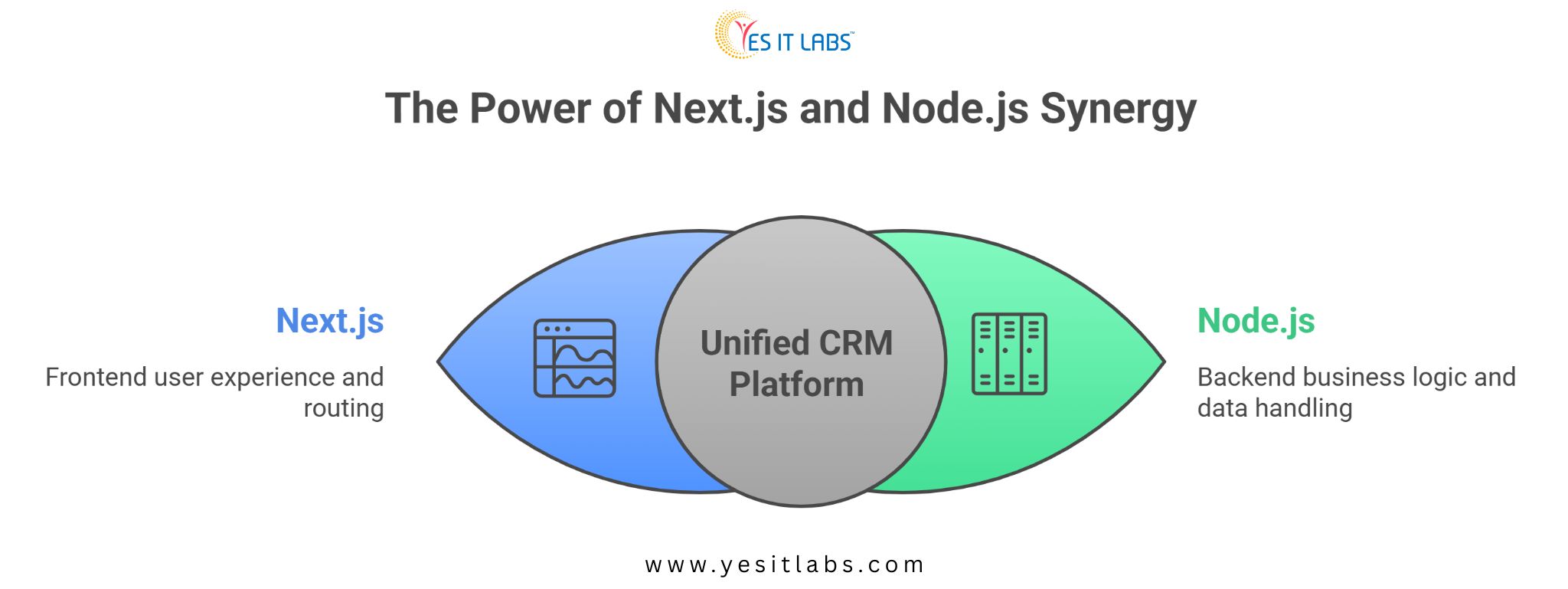
For a business building a customer-facing web platform, Next.js handles the experience layer while Node.js handles the data and logic layer behind it. They’re complementary, not competing.

How the Two Technologies Compare Across Business Use Cases

Factor

Node.js

Next.js

Primary Role

Server-side runtime Frontend React framework
Backend Logic Full backend capability

Limited via API routes

SEO Optimization

Not applicable directly Built-in SSR and SSG

Real-time Apps

Strong (WebSockets, etc.)

Limited

Full-stack Projects Paired with a frontend

Can handle both layers

Learning Curve

Moderate

Moderate to low for React devs

Deployment Flexibility

High

High (Vercel, AWS, self-hosted)

Enterprise Adoption Very high

Growing rapidly


When Node.js Should Lead Your Architecture

There are project types where Node.js needs to be the primary focus and Next.js may not even be necessary.

High-throughput APIs that serve mobile apps, third-party integrations, or microservices architectures don’t need a frontend framework at all. Node.js with Express, Fastify, or NestJS handles these scenarios cleanly. If your business is building backend infrastructure that other systems consume, Next.js adds no value.

Real-time applications are another Node.js stronghold. Live order tracking, collaborative tools, event-driven systems, and anything using WebSockets benefits from Node.js’s non-blocking I/O model. It handles concurrent connections efficiently, which is why companies like LinkedIn and Netflix have used it for specific high-concurrency services.

If your team is working on content management system development for a larger platform, the backend data layer, user permissions, content storage, and API delivery will all run through Node.js regardless of what frontend framework sits above it.

When Next.js Should Lead Your Architecture

Next.js earns its place when the user-facing experience is a priority and SEO matters.

E-commerce platforms, marketing sites, SaaS dashboards, and any web application where search visibility drives traffic should lean heavily on Next.js. Its static site generation and server-side rendering capabilities mean pages load fast and index well. Page speed directly affects conversion rates. Google’s Core Web Vitals are a ranking factor, and Next.js is built with those metrics in mind.

For businesses that need a full-stack solution without the overhead of maintaining a completely separate backend, Next.js API routes handle lightweight server logic well enough to cover many common use cases. This makes it particularly attractive for early-stage products trying to ship quickly without over-engineering.

Teams looking to hire Next.js developers will find a growing and skilled talent pool, particularly among React developers who have adopted the framework as their default choice for production applications.

The Case for Using Both Together

Most serious business applications end up using Next.js on the frontend and Node.js on the backend as separate services or within the same monorepo. This combination is increasingly common because it gives you the best of both.

Next.js handles routing, rendering, and the client-side experience. Node.js, often through a framework like NestJS or Express, handles business logic, database operations, authentication, and third-party service integrations. The two communicate via internal APIs.

This architecture scales well. It separates concerns cleanly. And it allows frontend and backend teams to work independently without stepping on each other.

For businesses building something like CRM system development services or a custom CRM platform, this split architecture is particularly sensible. The CRM frontend, dashboards, contact views, pipeline management, sits in Next.js. The backend, data models, workflow automation, integrations with email and calendar services, lives in Node.js.

next js and node js for business apps


Challenges and Honest Considerations

Next.js has a few real limitations worth acknowledging. The framework evolves quickly. The App Router introduced in Next.js 13 was a significant architectural shift, and teams that had built patterns around the Pages Router had to adapt. Keeping up with breaking changes requires active effort.

Node.js, on the other hand, has a more stable release cadence with clearly defined LTS versions. For businesses that need long-term maintainability, Node.js infrastructure tends to be more predictable to support over time.

Neither technology is the right choice for every team. A business with a small development team might do better with a more opinionated full-stack framework rather than stitching together Next.js and a Node.js backend separately. The architecture that looks clean on a whiteboard can become a maintenance burden if the team doesn’t have the bandwidth to manage it properly.

Practical Advice for Making the Right Call for Next.js vs Node.js

Start by mapping your application’s actual requirements before picking a technology.

If SEO matters, users interact directly with the frontend, and you need fast page loads, Next.js should be a central part of your stack. If you’re building data-heavy backend services, APIs, or real-time features, Node.js takes priority.

For teams that need backend flexibility and are scaling an existing product, it makes sense to hire node js app developers with experience in production-grade API architecture. The backend decisions made early have long-term consequences that are harder to undo than frontend choices.

For most modern web applications, the honest recommendation is to use both. Next.js for the frontend and Node.js for the backend is a well-understood, well-documented pattern with strong community support. Trying to force one to do the job of the other usually creates problems that could have been avoided.

FAQ: Next.js vs Node.js for Business Applications

Is Next.js a replacement for Node.js?

No. Next.js runs on top of Node.js and cannot replace it. Next.js is a React framework focused on frontend rendering and user experience. Node.js is the runtime environment that powers the server. They serve different purposes and are often used together in the same application stack.

Can Next.js handle backend logic on its own?

To a limited extent. Next.js API routes allow you to write server-side logic within the same project, which works well for simple operations like form submissions or data fetching. For complex backend requirements involving heavy database operations, background jobs, or extensive business logic, a dedicated Node.js backend is a more appropriate choice.

Which is better for SEO, Next.js or Node.js?

Next.js is better for SEO because it supports server-side rendering and static site generation, both of which help search engines crawl and index content effectively. Node.js alone doesn’t handle frontend rendering, so SEO depends on what frontend framework or rendering approach is layered on top of it.

Which technology is more in demand for hiring?

Both are in high demand, but in different contexts. Node.js developers are sought for backend and API roles. Next.js developers are sought for frontend and full-stack roles. Teams building complete web applications often look for developers comfortable with both, since modern projects tend to use them together.

How does this choice affect project cost?

Using Next.js alone for a simple application can reduce initial costs by avoiding a separate backend service. However, as an application grows, the cost of working around Next.js’s backend limitations often exceeds the savings. Starting with a clear separation between Next.js and a Node.js backend from the beginning tends to be more cost-effective at scale.

Conclusion

The next js vs node js comparison is really a question about which layer of your application needs the most attention. Node.js powers the server, the data, and the logic. Next.js powers the experience, the rendering, and the SEO. For most business applications of any real complexity, the answer isn’t choosing between them. It’s understanding how to use each one where it actually belongs.

Technology decisions made on surface-level comparisons tend to create problems later. Map your requirements honestly, match the tool to the job, and you’ll spend less time undoing decisions that looked good on paper.

AI in Manufacturing Industry

Walk into most modern factories today and something feels different. It is not just the machinery or the layout. There is a quieter kind of intelligence running underneath everything, one that watches, learns, and adjusts faster than any human team ever could. Artificial intelligence has moved well past the buzzword phase in manufacturing. It is now embedded in daily operations, and the plants that have embraced it are pulling ahead in ways that are increasingly difficult to ignore.

This article gets into the specifics. How AI is actually changing efficiency on the factory floor, which platforms are doing the heavy lifting, and what the real numbers look like for companies that have already made the move.

The Numbers Tell You Everything You Need to Know

Here is the simplest way to understand how seriously the industry is taking this shift: money. The global AI in manufacturing market was valued at $34.18 billion in 2025 and is on track to hit $155.04 billion by 2030, growing at a CAGR of 35.3%. That kind of investment does not happen on hype alone. It happens when results are showing up in quarterly reports.

Zoom out further and the picture gets even bigger. AI is expected to contribute up to $15.7 trillion to the manufacturing industry and push overall productivity up by 40% by 2035 Those figures sound almost too large to be meaningful, but they become very tangible when you see what individual manufacturers are reporting at the plant level.

For companies trying to build the right foundation to tap into these gains, investing in specialized IT Services for Manufacturing has become a practical first step. Setting up the cloud infrastructure, IoT connectivity, and data pipelines that AI systems need to function is not glamorous work, but it is the work that separates manufacturers who scale AI successfully from those who stall at the proof-of-concept stage.

Predictive Maintenance: The Use Case That Converts Skeptics

Ask any operations manager who has lived through a major unplanned equipment failure and they will tell you the same thing. The cost is never just the repair. It is the halted line, the missed shipments, the overtime scramble, and the customer conversations nobody wants to have.

In 2024, predictive maintenance emerged as the leading AI application in manufacturing, driven by the urgent need to minimize equipment failures, reduce operational downtime, and get more out of existing assets. The reason it consistently tops adoption lists is that the ROI is fast and visible.

Traditional maintenance follows a schedule. Change the oil every three months, service the compressor twice a year. The problem is that machinery does not fail on schedule. AI-powered systems monitor equipment continuously, learning what normal sensor readings look like and alerting teams the moment something starts drifting toward failure. It is the difference between reacting to a problem and preventing one.

The financial case is straightforward. AI can cut manufacturing maintenance costs by 25 to 40%. On top of that, predictive maintenance reduces unplanned downtime by up to 30% and can extend equipment life by as much as 40%. In automotive manufacturing, where a single line stoppage can run $50,000 to $500,000 per hour, even a modest reduction in downtime events pays for an AI deployment many times over.

Quality Control: Catching What Human Eyes Miss

There is a limit to how long a person can stare at a production line and maintain full concentration. It is not a criticism of workers. It is just biology. AI-powered vision systems do not have that problem. They do not tire after four hours, they do not get distracted, and they do not call in sick on a Monday.

AI-powered visual inspection now achieves defect detection accuracy above 97%, compared to 60 to 70% with traditional manual inspection. At the same time, inspection cycle times have dropped by up to 30%. That combination of speed and accuracy is something no manual process can realistically replicate at volume.

The ripple effects on waste reduction are significant too. Some manufacturing sectors have reported waste reductions of up to 25% after deploying AI-driven quality control systems. Siemens is one of the most cited examples here. Its AI visual inspection implementation improved defect detection rates by 25%, with a measurable improvement in customer satisfaction following the rollout.

What is perhaps most interesting is where quality control is now entering the product journey. By 2025, more than 60% of new product introductions in the manufacturing sector are expected to use generative AI in the design and concept stage. Quality is no longer just an end-of-line concern. It is being engineered into products from the first sketch.

Supply Chain Optimization: Finally Getting Forecasting Right

Supply chain disruptions over the past several years exposed just how fragile traditional forecasting models really are. Spreadsheet-based demand planning and gut-feel procurement decisions look increasingly inadequate when markets can shift overnight. AI does not eliminate uncertainty, but it handles uncertainty far better than the tools most manufacturers were relying on before.

AI-powered forecasting can reduce supply chain prediction errors by 50% and cut losses from unplanned downtime by the same margin. That accuracy comes from models pulling in signals that human analysts never had time to process together: historical order patterns, real-time logistics data, supplier performance records, and external risk indicators.

A 50% improvement in forecast accuracy changes the economics of inventory management entirely. Less cash tied up in buffer stock, fewer emergency procurement situations, and a supply chain that bends rather than breaks when conditions change.

Purpose-built Supply Chain Software Development Services are increasingly what manufacturers turn to when off-the-shelf platforms cannot connect their specific systems cleanly. A custom-developed layer that links procurement data, warehouse management, and supplier networks gives AI models the structured, consistent data feed they need to perform at their best rather than working with fragmented exports from a dozen different legacy systems.

Energy Efficiency: The Efficiency Gain Nobody Talks About Enough

Energy is one of the largest operating costs in heavy manufacturing, and it is also one of the areas where AI is delivering some of its quietest but most consistent wins.

AI-driven energy management systems have achieved average energy savings of 12% across facilities that have deployed them. The mechanism is not complicated. AI monitors consumption in real time across the entire facility, identifies where power is being used inefficiently, and makes adjustments automatically based on actual production loads rather than fixed schedules.

Volkswagen’s experience is worth highlighting here. Through AI-powered manufacturing optimizations, Volkswagen reduced factory energy consumption by over 20% Averroes across its production network. That figure represents both meaningful cost reduction and a significant drop in carbon emissions, which matters increasingly to both regulators and customers.

Across the industry, 78% of production facilities using AI have reported measurable waste reduction. When you stack energy savings on top of reduced material waste and lower maintenance costs, the compounding efficiency gains start to look like a fundamentally different cost structure rather than just incremental improvement.

Production Planning: Where AI Gets Genuinely Complex

Production planning is one of those functions that looks simple from the outside and is extraordinarily difficult in practice. Balancing machine availability, order priority, workforce scheduling, material flow, and delivery commitments simultaneously requires processing more variables than any planning team can hold in their heads at once.

Machine learning dominated the AI manufacturing technology segment in 2024 precisely because of its ability to make sense of operational data at the scale and speed that modern production environments generate. Yahoo Finance

The time savings are real and significant. AI has been shown to reduce product design time by up to 50% and shave 15% off delivery costs. For industries where getting to market six weeks ahead of a competitor matters, that kind of acceleration is a genuine strategic edge. Automotive manufacturers are currently leading the charge at 25% of AI implementations in production planning, with electronics close behind at 20%.

A lot of manufacturers building out AI-powered planning capabilities also need intuitive interfaces so that operators, supervisors, and plant managers can actually use the insights being generated. Companies that lack in-house technical depth often choose to hire web development team talent from specialist agencies to build these operator dashboards and internal portals, keeping the core AI development work focused while still delivering polished, usable tools to the people on the floor.

The Platforms Actually Doing the Work

Knowing that AI improves manufacturing efficiency is useful. Knowing which platforms to evaluate is what actually moves decisions forward. Here is a practical look at the tools leading the space right now.

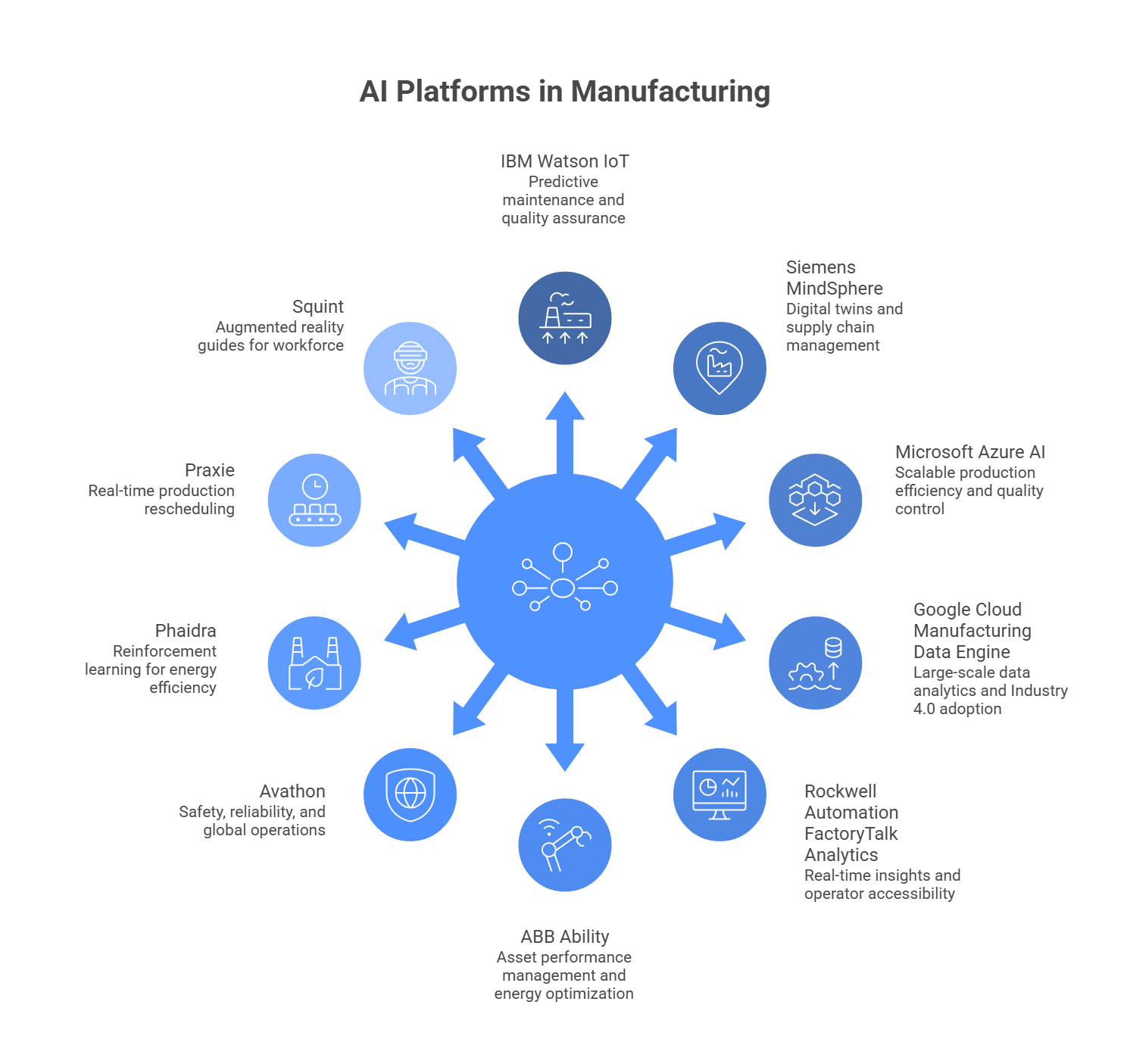
AI Platforms in Manufacturing

IBM Watson IoT for Manufacturing

IBM Watson IoT brings together IoT connectivity and AI to power predictive maintenance, quality assurance, and supply chain optimization. Its machine learning algorithms work through sensor data continuously, helping manufacturers improve product quality, cut downtime, and keep production workflows running smoothly. It performs particularly well in large, data-heavy environments where real-time equipment monitoring feeds into plant-wide decision making.

Siemens MindSphere

MindSphere is Siemens’ industrial IoT platform with AI at its core. It pulls together data from devices, machines, and sensors into a unified system that surfaces actionable insights for maintenance, supply chain management, and energy use. The recent partnership with NVIDIA has added a digital twin layer, enabling manufacturers to simulate complex production scenarios before committing to physical changes on the floor.

Microsoft Azure AI for Manufacturing

Microsoft Azure’s manufacturing suite weaves together AI, IoT, and advanced analytics to improve production efficiency, quality control, and supply chain management. Its toolkit covers predictive maintenance, anomaly detection, and process optimization. The platform’s real appeal for many manufacturers is its scalability. A single production line can serve as the starting point, with the capability to expand across entire operations as comfort and capability build over time.

Google Cloud Manufacturing Data Engine

Google Cloud’s Manufacturing Data Engine was built specifically to handle the enormous data volumes that modern manufacturing environments produce. It delivers AI-powered analytics and supports decision-making at scale, connecting edge devices through Manufacturing Connect and offering pre-built AI solutions designed to accelerate Industry 4.0 adoption. Its capabilities in machine anomaly detection and predictive quality insights are backed by Google’s considerable depth in machine learning infrastructure.

For manufacturers serious about getting full value from this platform, partnering with a specialist Google Cloud Development Company makes a meaningful difference, particularly for integrating the platform cleanly with existing ERP and MES systems and building data governance frameworks that hold up as deployments scale across multiple sites.

Rockwell Automation FactoryTalk Analytics

Rockwell’s FactoryTalk Analytics suite collects and interprets data from machines, sensors, and enterprise systems, turning it into timely, actionable information for plant decision-makers. Its product lineup includes GuardianAI for predictive maintenance, VisionAI for computer vision quality inspection, and LogixAI for production optimization. One of its practical strengths is how it surfaces insights directly to operators without requiring them to dig through dashboards, which accelerates adoption significantly on the shop floor.

ABB Ability

ABB Ability is ABB’s flagship industrial AI platform, built around asset performance management, energy optimization, and process control for heavy manufacturing environments. It uses machine learning to anticipate failures in motors, pumps, and robots before they happen, and makes continuous parameter adjustments in industries like steel, cement, and automotive. Its open architecture makes integration with third-party systems straightforward, giving manufacturers a flexible path toward digital transformation rather than a locked-in vendor ecosystem.

Avathon (formerly SparkCognition)

Avathon brings advanced industrial AI to bear on safety, reliability, and efficiency challenges in manufacturing. Its platform predicts equipment risk, optimizes energy usage, and catches potential production incidents before they develop, integrating with existing IoT infrastructure and scaling to support complex, multi-site global operations.

Phaidra

Phaidra takes a reinforcement learning approach to energy efficiency, with AI agents that learn the actual physics of a plant rather than following preset rules. Those agents make autonomous setpoint adjustments to maintain stable operations while continuously driving down energy consumption. For manufacturers managing sustainability commitments alongside production targets, Phaidra offers one of the more sophisticated approaches to keeping both in balance.

Praxie

Praxie focuses on real-time production rescheduling. When equipment goes down or a material shortage hits, the platform reads live factory signals and adjusts schedules immediately rather than waiting for a planner to intervene. TechNow Because it sits above the machinery layer rather than integrating directly into control systems, it represents a practical low-risk entry point for manufacturers not yet ready for deeper AI integration.

Squint

Squint approaches manufacturing intelligence from the workforce angle. The platform captures the knowledge of experienced operators and converts it into AI-powered, augmented reality guides that any worker can access directly on the floor. It combines spatial computing, large language models, and practical human expertise to reduce errors and close the skills gap that many manufacturers are struggling with right now.

What Companies Are Actually Reporting

It is one thing to cite market projections. It is another to look at what manufacturers who have deployed AI are actually seeing in their operations. Companies running AI on their production floors are reporting profit margin increases of 38% and defect detection accuracy climbing from 70% to over 90%. These are reported outcomes, not modeled estimates.

McKinsey’s 2025 State of AI report identified manufacturing as one of the sectors most consistently reporting cost benefits from AI deployments. The pattern among the top performers is telling. They did not treat AI as a tool for incremental savings. They used it to redesign how work actually flows through the organization, and the returns reflect that broader ambition.

Where Adoption Is Still Falling Short

The case for AI in manufacturing is strong, but it would be dishonest to leave out the parts of the story that are more complicated.

Jacek Smoluch, an automation expert at Mitsubishi Electric, noted that only about one in a thousand manufacturing facilities worldwide has successfully implemented advanced AI solutions. That statistic lands differently once you sit with it. For all the market projections and success stories, most factories are still operating without meaningful AI integration.

The barriers are real. Legacy systems that were never designed to share data cleanly, sensor infrastructure that needs to be built from scratch, data quality problems that take months to address before any AI model can be trained reliably. And then there is the human side of it.

Not every worker has been willing to embrace retraining, which points to how important change management is in any AI transformation effort. Technology is usually the easier half of the problem. Getting an organization to actually use it well is where most implementations run into trouble.

The manufacturers who have navigated this successfully share one consistent piece of advice: start narrow. Pick the use case where the pain is clearest and the data is cleanest. Build one working system, demonstrate the results, and let that success create the internal appetite for the next one.

Where This Is All Heading

The trajectory over the next decade is clear even if the exact path is not. The global AI in manufacturing market is forecast to reach roughly $287 billion by 2035, starting from $8.57 billion in 2025, at a CAGR exceeding 42%.

What is perhaps more interesting than the headline growth figure is how the adoption pattern is expected to shift. Rather than requiring massive plant overhauls, AI capabilities are increasingly being built directly into new machines, robots, and devices as standard features. These plug-and-play implementations are lowering the barrier to entry substantially, which means the mid-market manufacturers who missed the first wave are not necessarily going to miss the next one.

Generative AI is also beginning to find its footing in the manufacturing context. The generative AI segment in manufacturing is projected to reach $10.5 billion by 2033, primarily through applications in predictive maintenance, energy optimization, and product design. The technology that most people associate with text generation and image creation is quietly being put to work optimizing production parameters and accelerating new product development cycles.

Closing Thought

The manufacturers who are pulling ahead right now are not necessarily the best-funded or the most technically sophisticated. What separates them is a willingness to treat AI as a core operational priority rather than an IT project running in the background. The results being reported across predictive maintenance, quality control, supply chain management, and energy efficiency are not coming from companies that tested AI in a corner of the facility. They are coming from companies that committed to it, built the right infrastructure, chose the right platforms, and invested in helping their people work alongside the technology rather than around it.

The window for early-mover advantage in AI-driven manufacturing is not closed, but it is narrowing. The question facing most manufacturers today is not whether AI belongs in the factory. That question has been answered. The question now is how much longer a deliberate wait is worth the cost.

Choosing the Right Frontend Framework

Choosing the right frontend framework for business projects is one of those decisions that looks simple on the surface but carries real weight once development is underway. The wrong pick can mean slower load times, higher developer costs, limited scalability, or a product that’s harder to maintain a year down the road.

This post breaks down what actually matters when evaluating frameworks, so your team or your development partner can make a call grounded in business reality, not just developer preference.

What Is a Frontend Framework and Why Does It Matter for Business?

A frontend framework is a pre-built collection of tools, libraries, and conventions that developers use to build the visual, interactive layer of a web application. It handles how your product looks and behaves in the browser. For non-technical stakeholders, think of it as the structural blueprint a construction crew uses before pouring concrete. Without it, every project starts from zero.

For businesses, the choice of framework affects how fast the product ships, how much it costs to hire and retain developers, how well the application performs under traffic, and how easily new features can be added.

According to the Stack Overflow Developer Survey 2023, React remains the most widely used frontend framework at around 40 percent adoption, followed by Angular and Vue.js. (source)

That kind of market share translates directly into talent availability and community support, both of which matter when you’re running a business, not a research lab.

How Do You Pick the Right Frontend Framework for Your Business Project?

This is where most businesses go wrong. They let the development team decide based on personal familiarity rather than project requirements. That approach works sometimes, but it leaves business-critical factors off the table. Here is a more structured way to think through it.

Define the type of product you are building

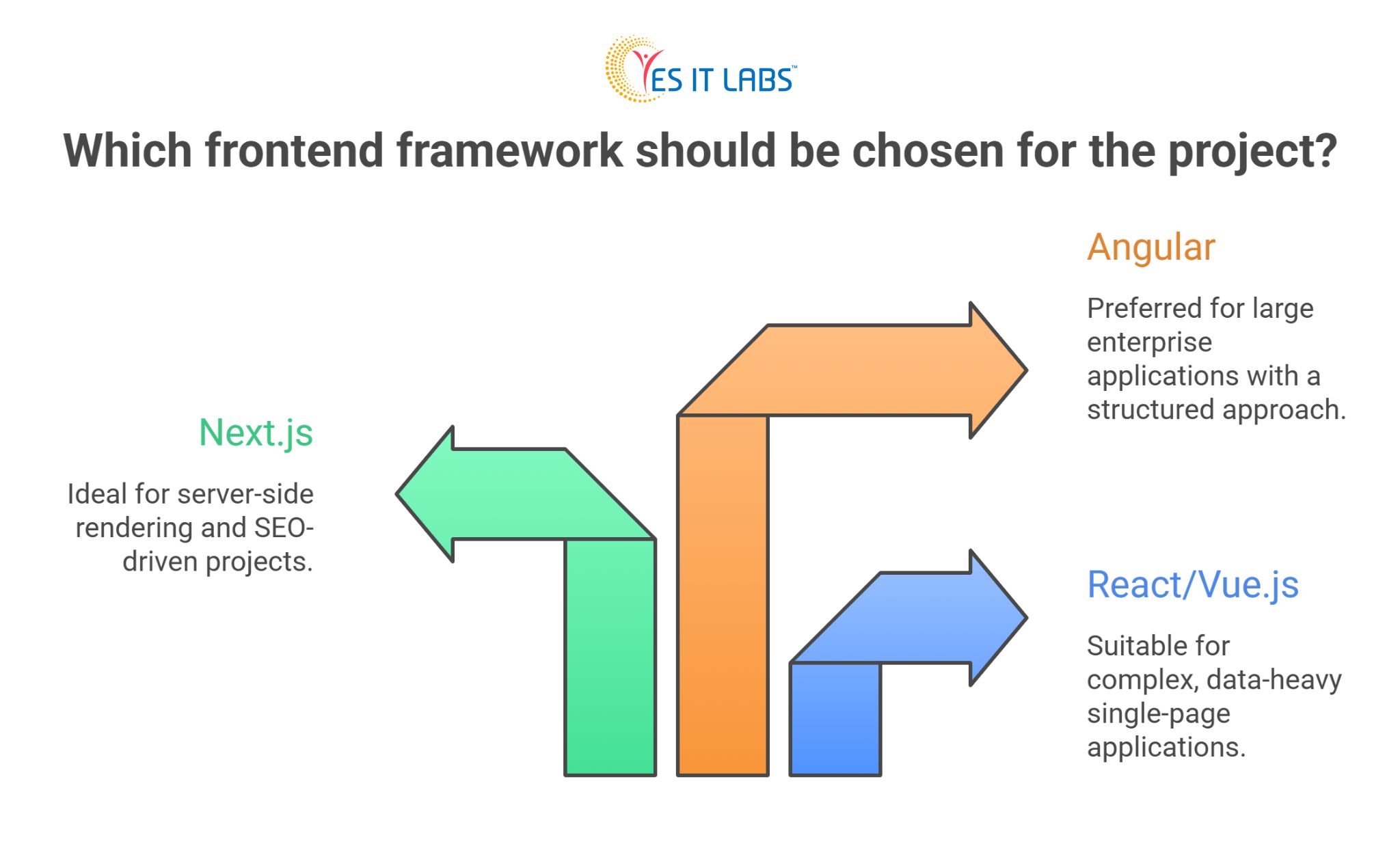
A marketing website, a SaaS dashboard, a customer portal, and a mobile-first application each have different technical demands. React and Vue.js handle complex, data-heavy single-page applications well. Next.js, which is built on React, is particularly strong for server-side rendering and SEO-driven projects.

Angular is often preferred for large enterprise applications that need a more opinionated structure out of the box. Many organizations choose Angular JS development when building complex internal systems, enterprise dashboards, or applications that require strict architecture and long-term maintainability.

Learn more about what makes Angular a strong choice for complex projects, in our blog titled What Is the Advantage of Angular JS?

Consider your team’s existing skills

Switching frameworks mid-project is expensive. If your current team or your outsourced partner already has depth in a particular framework, that familiarity reduces ramp-up time and lowers risk. If you are starting fresh, factor in how large the talent pool is for that framework in your target hiring region.

Think about long-term maintenance

Frameworks with large communities and corporate backing tend to have longer shelf lives. React is backed by Meta. Angular is backed by Google. Vue.js is community-driven but widely supported. Smaller or newer frameworks carry more uncertainty about long-term support, which matters if you plan to maintain the product for five-plus years.

Right Frontend Framework for Business Project

Key Factors to Evaluate Before Making a Decision

Beyond the technical specs, several practical factors should shape your final choice.

Performance requirements

If your application needs to handle high-frequency data updates in real time, like a trading dashboard or a logistics monitoring tool, framework rendering performance becomes critical. Vue.js and React both offer virtual DOM implementations that handle this well. Angular’s change detection model can be optimized but requires more configuration.

SEO and content visibility

Businesses that rely heavily on organic traffic must prioritize server side rendering. Next.js has become a leading framework for React projects that demand reliable SEO performance. Many organizations choose to hire Next.js developers when building content rich platforms or ecommerce websites where search rankings directly influence traffic and sales.

Integration with existing systems

Your frontend does not operate in isolation. It needs to connect with your backend APIs, your CRM, your payment processors, and potentially your content infrastructure. If your business relies on custom CMS development services to manage digital content at scale, the frontend framework needs to be headless-friendly, meaning it can pull content from a CMS via API rather than being tightly coupled to a specific platform.

Design and no-code flexibility

Some businesses, particularly those with fast-moving marketing teams, need the ability to update pages without developer involvement. In those cases, tools like Webflow have become increasingly relevant. Webflow sits in an interesting middle ground between a visual page builder and a frontend development platform.

For businesses that need rapid landing page deployment alongside a more robust web application, it often makes sense to hire Webflow developers for the marketing layer while keeping the core application in React or Vue.

Here’s what to look for when hiring a Webflow developer for your project through our blog titled- How to Find and Hire the Best Webflow Developers

Framework Comparison: A Practical Breakdown

Framework

Best For Learning Curve Talent Availability

SEO Capability

React

SPAs, dashboards, large apps Moderate Very High Good with Next.js

Vue.js

Mid-size apps, fast prototyping Low to Moderate High

Good with Nuxt.js

Angular

Enterprise apps, complex systems High Moderate Moderate

Next.js

SEO-driven React apps Moderate High

Excellent

Nuxt.js SEO-driven Vue apps Moderate Moderate

Excellent

Webflow Marketing sites, content pages Low Growing

Good

This table is not meant to declare a winner. It is a starting point for narrowing options based on your specific situation. A fintech startup building a customer-facing dashboard has different constraints than a manufacturer building an internal operations tool.

Still torn between React and Vue? Here’s a deeper breakdown to help you decide- React JS vs Vue JS

Common Mistakes Businesses Make When Choosing a Framework

1. Choosing based on hype rather than fit

A framework trending on developer forums is not automatically the right choice for your project. Svelte, for example, has generated significant buzz in the developer community, but its talent pool is still relatively small compared to React or Vue, which means higher hiring costs and longer timelines.

2. Ignoring total cost of ownership

The cheapest framework to start with is not always the cheapest to maintain. A framework with a steeper learning curve might require more senior developers, higher hourly rates, and longer onboarding for new team members. Factor in the three-to-five-year horizon, not just the initial build.

3. Skipping the prototype phase

Before committing to a framework at scale, building a small proof-of-concept can surface integration issues, performance bottlenecks, or developer friction early, when changes are cheap. This step gets skipped more often than it should.

4. Treating the frontend choice as isolated

The frontend framework decision ripples into your hiring strategy, your DevOps setup, your testing approach, and your content management workflow. A business that later discovers it needs Vue js developers for hire to maintain a system that was built in Angular faces a real operational problem that a bit of upfront planning could have avoided.

5. Practical Advice for Moving Forward

Start by documenting your product requirements, your expected user base, and your team’s current skill set. Then map those against the framework characteristics covered above. If you are outsourcing development, ask your partner to walk you through their framework recommendation with specific reasoning tied to your project, not a generic sales pitch.

If your project involves significant content publishing, explore headless CMS options early in the process. The combination of a headless CMS with a modern frontend framework like Next.js or Nuxt.js gives you the flexibility to scale content operations independently from application development.

If speed to market is the priority, Vue.js tends to have a lower onboarding barrier for mixed teams. If you are building something complex and enterprise-grade with multiple developers working in parallel, Angular’s opinionated structure can actually be an advantage because it enforces consistency.

FAQ: Right Frontend Framework for Your Business Project

What is the most popular frontend framework for business applications?

React is the most widely adopted frontend framework for business applications, used by approximately 40 percent of developers globally according to recent industry surveys. Its large ecosystem, strong community support, and backing from Meta make it a reliable choice for a wide range of business use cases, from customer portals to SaaS platforms. That said, popularity alone should not drive the decision without considering your specific project requirements.

How does the frontend framework affect website SEO?

Single-page applications built with frameworks like React or Vue can struggle with SEO if not configured correctly, because search engine crawlers may not fully render JavaScript-heavy content. Using server-side rendering solutions like Next.js for React or Nuxt.js for Vue resolves most of these issues by delivering pre-rendered HTML to both users and crawlers, which improves indexing and page speed scores.

Should a small business care about which frontend framework is used?

Yes, even if the technical details feel out of scope. The framework choice affects how quickly updates can be made, how easy it is to find developers if your current team changes, and how well the product scales as your business grows. A small business that launches on an obscure or poorly supported framework may face significant rebuilding costs within a few years.

When does it make sense to use Webflow instead of a traditional frontend framework?

Webflow works well when the primary need is a marketing website or content-driven pages that need frequent updates without developer involvement. It is less suited for complex application logic, user authentication flows, or data-heavy dashboards. Many businesses use Webflow for their public-facing site and a framework like React or Vue for their actual product, which is a practical split that keeps marketing agile without compromising application quality.

How do I evaluate a development partner’s frontend framework recommendation?

Ask them to explain why they are recommending a specific framework based on your project’s requirements, not their team’s comfort zone. A good partner will reference factors like your expected traffic, content strategy, integration needs, and hiring plans. If the recommendation does not connect to your business context, that is a signal worth paying attention to.

Conclusion

There is no universal answer to the frontend framework question, but there is a right process for finding the answer that fits your situation. Start with your product requirements, layer in your team and budget constraints, and think beyond the initial build to what maintaining and scaling the product actually looks like.

The businesses that make this decision well are usually the ones that treat it as a product decision first and a technical decision second. Bring your business context to the table, ask the right questions of your development team or partner, and the right framework will become reasonably clear.

Advanced LMS Solutions

The workplace is not what it used to be. Skills that were relevant a few years ago are quickly becoming outdated, and new technologies are constantly reshaping how businesses operate. In this kind of environment, hiring talent is only part of the equation. The real challenge is keeping that talent skilled, engaged, and ready for what comes next.

This is exactly why organizations are turning toward advanced LMS solutions. Not just as a training tool, but as a long-term strategy to build a workforce that can actually keep up with change.

Why “Future-Ready” Is No Longer Optional

Let’s be honest, most companies have faced this at some point. You invest in hiring, onboard employees, and then realize a few months later that there are still skill gaps. Or worse, employees lose interest in outdated training programs.

The reality is simple.
Employees today expect learning to be:

  • Flexible
  • Relevant
  • Easy to access
  • Actually useful in their daily work

If those expectations are not met, engagement drops. And when engagement drops, performance follows.

A future-ready workforce is not just about training people once. It is about creating an environment where learning becomes part of everyday work.

What Makes Modern LMS Solutions So Effective

Earlier training systems were built just to deliver content. You log in, complete a course, and move on. That model no longer works.

Today’s LMS platforms are far more dynamic. They adapt to users, track progress, and help organizations understand what is actually working.

An advanced LMS helps you:

  • Deliver personalized learning instead of generic courses
  • Track real progress, not just course completion
  • Connect training directly with business outcomes
  • Scale learning across teams without losing consistency

And the biggest difference? Employees actually want to use them.

A Real-World Perspective

Imagine onboarding ten new employees without a structured system. Each manager explains things differently, training quality varies, and employees take longer to adjust.

Now compare that with an LMS-driven approach. Every employee follows a structured path, gets access to the same quality content, and can revisit training anytime.

The difference is not just convenience. It directly impacts:

  • Time to productivity
  • Employee confidence
  • Overall team performance

That is where LMS starts becoming a business advantage, not just a training tool.

Features That Actually Make a Difference

Personalized Learning That Feels Relevant

One of the biggest reasons training fails is because it feels generic. Employees do not want to sit through content that does not apply to them.

Modern LMS platforms solve this by tailoring learning paths. Based on role, experience, and behavior, employees see content that actually matters to them.

That small shift makes a big difference in engagement.

Learning That Fits Into Real Life

People are busy. Long training sessions often get postponed or ignored.

With mobile-friendly LMS platforms, learning becomes flexible. Employees can:

  • Complete short modules between tasks
  • Access training on their phones
  • Learn at their own pace

This makes learning feel less like a task and more like an opportunity.

Insights That Help You Improve

Many organizations run training programs but have no idea if they are effective.

An LMS changes that. You can see:

  • Who is completing courses
  • Where employees are struggling
  • Which content is actually useful

Instead of guessing, you can improve training based on real data.

Engagement Through Interaction

Let’s face it, static content is boring.

Modern LMS platforms include:

  • Quizzes
  • Interactive videos
  • Simulations
  • Rewards and recognition

These elements make learning more engaging and keep employees involved.

Integration That Saves Time

Training should not exist separately from daily work.

LMS platforms integrate with existing systems like HR tools and CRM platforms. This means:

  • Automated onboarding
  • Easier tracking
  • Better alignment with business processes

Everything works together instead of in silos.

The Shift Toward Continuous Learning

One major change in recent years is how organizations approach training. It is no longer a one-time activity.

Instead, companies are building a culture where learning is ongoing.

Why does this matter?

Because industries are evolving fast. Employees need regular updates, not occasional training sessions.

An LMS supports this by:

  • Providing ongoing content updates
  • Offering bite-sized learning modules
  • Making knowledge easily accessible

When learning becomes continuous, improvement becomes natural.

How AI Is Quietly Changing LMS

Artificial Intelligence is not just a buzzword here. It is already improving how LMS platforms work.

For example, AI can:

  • Recommend courses based on user behavior
  • Identify skill gaps without manual effort
  • Suggest learning paths for career growth

This removes a lot of guesswork and makes training more effective.

Choosing the Right Approach Matters

Not every LMS will deliver the same results. The difference often comes down to how well it fits your business.

Things to consider:

  • Is it easy to use?
  • Can it be customized?
  • Will it scale as your team grows?
  • Does it integrate with your existing tools?

Working with a trusted lms software development company can help you build a solution that actually aligns with your goals instead of forcing your team to adapt to a rigid system.

Why Custom Solutions Work Better

Every organization is different. Training needs in one company may not work for another.

That is where customization becomes important.

With elearning portal development services, businesses can create platforms that:

  • Match their workflows
  • Reflect their brand
  • Offer a smoother user experience

Custom solutions are especially useful when you want long-term scalability and flexibility.

The Role of Cloud and SaaS in LMS Growth

Cloud technology has made LMS platforms easier to adopt and manage.

Instead of dealing with complex infrastructure, businesses can now use cloud-based systems that are:

  • Easy to deploy
  • Accessible from anywhere
  • Regularly updated

This is why many organizations prefer SaaS-based LMS models today.

Leading saas development companies in usa are continuously improving these platforms, making them more scalable and efficient for businesses of all sizes.

Building a Culture That Supports Learning

Technology alone is not enough. Even the best LMS will not work if employees are not encouraged to learn.

Organizations need to:

  • Make learning part of daily routines
  • Recognize progress and achievements
  • Encourage curiosity and growth
  • Align learning with career development

When employees feel that learning actually benefits them, participation increases naturally.

Getting Started Without Overcomplicating It

If you are planning to implement an LMS, you do not need to do everything at once.

Start simple:

  • Identify key skill gaps
  • Build a few essential training modules
  • Test with a small group
  • Gather feedback and improve

This approach reduces risk and helps you build a system that actually works.

Conclusion

The future of work is changing faster than most organizations expect. The companies that succeed will not just be the ones with the best technology, but the ones with the most adaptable and skilled workforce.

Advanced LMS solutions make this possible by turning learning into a continuous, engaging, and meaningful process.

When done right, it is not just about training employees. It is about preparing them for what comes next, and that is what truly makes a workforce future-ready.

Webflow Website Builder for Freight Companies

Freight companies that build their online presence using Webflow website builders consistently generate stronger lead pipelines compared to those using outdated or plugin-heavy platforms. The core reason is simple: Webflow gives transportation businesses complete control over design, page performance, and SEO without the technical debt that holds most logistics websites back. 

If your freight company is struggling to turn website visitors into actual inquiries, the platform you build on is more important than most operators realize.

What Makes a Freight Website Actually Generate Leads

Most freight companies treat their website as a digital brochure. That mindset is exactly why so many logistics sites underperform. A lead-generating freight website needs three things working in parallel: fast load times, clear service positioning, and conversion-focused design.

According to Google PageSpeed Insights data, a one-second delay in mobile page load can reduce conversions by up to 20%. That single metric explains why platform choice is a business decision, not just a design preference.

The American Trucking Associations reports that the freight industry moves over 70% of all domestic tonnage in the United States (source: ATA), meaning competition for shipper attention online is intense and growing.

Freight buyers, whether they are shippers, supply chain managers, or procurement leads, make fast judgments. If your site loads slowly or looks visually inconsistent, bounce rates climb and inquiry forms stay empty.

How Webflow Website Builder Helps Freight Companies Attract More Qualified Leads

The core advantage of Webflow website builder for freight companies is the combination of visual design flexibility and clean, semantic code output. Unlike WordPress or Wix, Webflow generates production-ready HTML, CSS, and JavaScript without plugins that bloat page performance. For freight businesses, this translates directly into faster pages, stronger Google Core Web Vitals scores, and improved organic rankings for high-intent search terms.

Beyond speed, Webflow’s CMS lets freight companies publish case studies, service area pages, and industry-specific landing pages without developer dependency. A freight company targeting the automotive shipping corridor between Detroit and Chicago can spin up a dedicated service page in hours, not weeks. That content velocity is a measurable competitive edge in regional freight markets.

Webflow also supports advanced SEO configurations natively. Custom meta titles, canonical tags, structured data, and 301 redirects are all manageable without touching code. For freight companies investing in organic search as a primary lead channel, this level of control matters significantly.

Webflow vs. WordPress vs. Wix for Freight and Logistics Websites

Feature

Webflow

WordPress Wix
Avg. Google PageSpeed Score

85–95

55–75

60–78

SEO Control

Full native

Plugin-dependent

Limited

Design Flexibility

High

Moderate

Low

Developer Dependency

Low

High

Very Low

CMS for Service Pages

Built-in

Plugin-required

Basic

Hosting Infrastructure

Enterprise CDN

Self-managed

Shared

Schema/Structured Data

Native support Plugin-required

Not supported

For freight companies that need scalable, performance-first websites without maintaining a complex backend, Webflow produces objectively stronger results across every metric that directly influences lead generation.

Still weighing your options? Get a deeper breakdown in our Webflow vs WordPress guide before you commit to a platform

The Role of Broader Digital Infrastructure in Freight Lead Generation

A well-built website is only part of the equation. Freight companies operating at scale need their digital presence connected to their broader operations. Integrating the right IT solutions for transportation into your website strategy means your site does not operate in isolation. It feeds into CRMs, quoting tools, load board integrations, and customer portals.

Webflow’s open API and native integrations with platforms like HubSpot, Zapier, and Typeform make this ecosystem easier to build without rebuilding your site every time your operations change. A Webflow site with a properly connected CRM turns a contact form submission into a tracked, attributed lead in seconds.

That closed loop between website and sales pipeline is where freight companies that invest in digital infrastructure separate themselves from competitors who treat their site as a static asset.

Challenges Freight Companies Face When Rebuilding Their Website

Rebuilding a freight company website is not without friction. The most common challenges include content migration, preserving SEO equity during the transition, and internal stakeholder alignment.

Content migration from legacy platforms is messy when your current site has years of indexed pages carrying backlinks and ranking history. Any platform migration requires careful redirect mapping to avoid losing organic traffic. Webflow’s built-in redirect manager simplifies execution, but the strategic planning must happen before a single page goes live.

Internal alignment is often the harder problem. Sales teams want lead forms on every page. Marketing wants storytelling and brand space. Operations want a rate calculator or freight quoting tool. Aligning these goals into a coherent site structure requires a proper discovery phase before design begins.

Budget expectations also need to be realistic. A high-performance Webflow build done properly is not a low-cost project. Freight companies that want to hire web development talent capable of producing conversion-focused Webflow sites should budget separately for strategy, design, development, and post-launch optimization.

Already on another platform? Here is how to migrate your existing website to Webflow without losing SEO equity or traffic.

How to Build a Lead-Generating Freight Website on Webflow: Step-by-Step

1. Conduct a lead source audit

Identify where your current leads originate, which pages they visit before converting, and where drop-off occurs in your inquiry process. This data shapes every subsequent decision.

2. Define your service corridors and buyer personas

A freight company serving Gulf Coast petrochemical shippers has a fundamentally different audience than one focused on last-mile retail delivery in the Northeast. Your site should speak directly to that specific buyer.

3. Map your site architecture before design begins

Plan your service pages, coverage area pages, and industry vertical pages as a connected content system, not as isolated pages. Google’s Natural Language API can help identify the entities and topics your target buyers associate with your services.

4. Engage experienced Webflow developers

If your team lacks in-house Webflow expertise, hire webflow developers who have direct B2B or service-industry Webflow experience. Developers new to the platform frequently underestimate its CMS logic and build sites that look polished but underperform in search.

Learn exactly what to look for before you bring someone on board. Read our guide on how to hire the best Webflow developers.

5. Configure SEO and schema before launch

Implement JSON-LD structured data for your FAQ section, service pages, and any HowTo content. This signals content structure to Google and improves eligibility for rich snippet placements in search results.

6. Connect your CRM and conversion tracking on day one

Webflow integrates cleanly with HubSpot, Google Tag Manager, and Hotjar. Launch with heatmaps and session recordings active so you have behavioral data from the first week of traffic.

7. Publish service-specific landing pages post-launch

Use Webflow’s CMS to build out coverage area and industry vertical pages systematically after launch. This ongoing content expansion is what compounds organic lead volume over six to twelve months.

Build a Lead Generating Freight Website on Webflow

FAQ: Webflow Website Builder for Freight Companies

Why is Webflow a better choice than WordPress for freight company websites?

Webflow produces faster pages, cleaner code, and requires no plugin maintenance, which are all factors that directly improve Google PageSpeed Insights scores and Core Web Vitals performance.

WordPress can match Webflow’s output with expert configuration, but that requires ongoing developer involvement that most freight companies cannot sustain internally. For teams that want performance without constant maintenance overhead, Webflow is the more practical long-term platform.

How does a better website directly increase freight leads?

A better website reduces friction at every stage of the buyer journey. Faster load times lower bounce rates. Clear service pages improve search visibility for high-intent queries.

Optimized inquiry forms increase submission rates. Research across B2B industries shows that improving landing page user experience can increase conversion rates by 200% or more. When these elements work together, the same traffic volume produces significantly more qualified inquiries.

What should freight companies look for when hiring a Webflow developer?

Look for developers with a portfolio of B2B or logistics-sector Webflow projects specifically. Ask about their process for SEO configuration, CMS architecture, and third-party integrations. A strong Webflow developer will ask about your lead generation goals before discussing visual design. Technical execution matters, but strategic thinking separates high-performing Webflow builds from those that simply look good.

How long does a proper Webflow freight website build take?

A well-scoped Webflow build for a freight company typically takes six to ten weeks from strategy to launch. This timeline covers discovery, wireframing, design, development, content migration, QA, and SEO configuration including schema markup. Compressed timelines usually result in sites that miss conversion opportunities because the strategy phase was sacrificed for speed.

Can Webflow support the complex service pages freight companies need?

Yes. Webflow’s CMS supports dynamic content collections that allow freight companies to build templated structures for service pages, geographic coverage areas, industry verticals, and case studies. Once the template is configured, adding new pages requires no developer involvement, giving marketing teams full publishing control without writing code.

Conclusion

Freight companies that invest in a properly built Webflow website are not simply upgrading their visual presence. They are building a compounding lead generation asset. The combination of page performance, native SEO control, CMS scalability, and integration flexibility makes Webflow one of the most practical platforms for freight businesses serious about growing their digital pipeline.

The freight companies winning new contracts through organic search and referral traffic are not doing anything mysterious. They built better websites, on stronger platforms, with clearer strategy behind every decision. That is a repeatable formula, and Webflow provides a proven foundation to execute it.

Risk Mitigation in Software Development

Nobody starts a software project expecting it to fail. And yet, the numbers tell a different story. According to McKinsey, large IT projects overrun their budgets by 45% on average. Just one in every 200 IT projects actually meets its goals on time, on budget, and with the scope originally promised. Those figures are not anomalies. They are the norm.

The frustrating part? Most of these failures are not caused by problems that were impossible to foresee. They happen because risks were either ignored, underestimated, or discovered too late to address without serious damage. Poor planning, communication gaps, and scope that quietly doubled over six months are behind far more project disasters than any technical complexity ever was.

That is what makes risk mitigation so valuable. Not as a checklist exercise, but as a genuine operating habit. Whether you are managing an internal development team or working with a provider of custom software development services in USA, the teams that consistently ship on time are not the luckiest ones. They are the most prepared.

This guide covers the most common software development risks, what causes them, and the strategies that actually reduce their impact before they turn into expensive problems.

What Is Risk Mitigation in Software Development?

At its core, risk mitigation is about not being surprised by the things you could have seen coming.

More formally, it refers to the process of identifying threats to a project, evaluating how likely they are and how badly they could hurt the outcome, and then doing something about it before the damage is done. The “doing something about it” part is where most teams fall short. Risks get logged in a spreadsheet during kickoff and then forgotten until the sprint where everything goes sideways.

There are four legitimate responses to any identified risk:

Avoidance means changing your approach to eliminate the risk entirely. If a particular third-party integration carries too much uncertainty, you find an alternative before writing any dependent code.

Mitigation means reducing either the probability of the risk occurring or the severity of the fallout if it does. This is the most common response and the heart of what most risk management frameworks focus on.

Transfer means shifting the financial or operational consequence to someone else, often through contracts, insurance, or service-level agreements with vendors.

Acceptance means acknowledging a risk and deciding to proceed anyway, typically because the probability is low, the impact is manageable, or the cost of addressing it outweighs the benefit. Acceptance is a valid choice when made consciously. It becomes a problem when it happens by default because nobody looked.

In practice, a well-run software project uses all four responses across different risks simultaneously.

Why So Many Software Projects Still Fail

It is tempting to think that with all the tools, methodologies, and project management frameworks available today, software project failure rates should be declining. They are not.

Research from the Standish Group found that 66% of technology projects still end in partial or total failure. BCG found that nearly half of all organizations saw more than 30% of their tech projects suffer delays or budget overruns. Harvard Business Review points out that one in six IT projects becomes a true disaster, with cost overruns exceeding 200% of the original estimate and schedule delays pushing 70%.

Here is what is most instructive, though: the causes are almost never technical. According to PMI, 56% of project failures trace back to poor communication. Unrealistic deadlines account for another 25%. A lack of skilled team members contributes to 29%. Poor project management overall is the root cause in 47% of failures.

Put simply, software projects fail because of people problems and process problems, not because the technology was too hard. Which means most of these failures were preventable.

The Most Common Risks in Software Development

1. Scope Creep

Ask anyone who has managed a software project for more than a few months and they will tell you that scope creep is the quiet killer. It rarely shows up as one dramatic demand. It is the product manager who asks for “just one more filter” on a dashboard. It is the stakeholder who mentions in passing that they assumed the mobile version would be included. It is the feature added after the design is approved, the integration tacked on mid-sprint, the requirements that keep shifting because nobody documented the original agreement clearly enough.

The result is a project that ends up costing 30 to 50% more than planned and taking significantly longer to deliver. Changing requirements are a contributing factor in nearly 43% of software project overruns.

The fix is not complicated, but it does require discipline. Document the project scope before a single line of code gets written. Get formal sign-off from every stakeholder who has the authority to request changes later. Then create a change request process that forces any new requirement through an honest evaluation of its budget and timeline impact before it gets approved. Agile methodologies help here because scope is broken into sprint-sized commitments. Additions become visible, negotiable, and traceable rather than quietly accumulating in the background.

2. Poor Requirements Management

Vague requirements are a tax that the development team pays in rework and the business pays in missed expectations. When the technical team builds what they understood and the stakeholder expected something entirely different, someone has to absorb that cost, and it is rarely the person who wrote the ambiguous brief.

Mismanagement of requirements contributes to 32% of project failures, which is a significant share for a problem that a better discovery process could largely prevent.

The approach that works is straightforward: invest real time upfront. Before any code is written, run a thorough discovery phase where wireframes, prototypes, and user stories translate business goals into something both sides can actually review and critique. The gap between what a stakeholder describes verbally and what a developer interprets technically is often enormous. Prototypes close that gap early and cheaply. Fixing misunderstood requirements before development is a fraction of the cost of fixing them after.

Document everything, version it, and get sign-off. That paper trail is not bureaucracy. It is protection for everyone involved.

3. Unrealistic Timelines

Here is an uncomfortable truth about software deadlines: a significant share of them are set by people who are not responsible for meeting them. A launch gets tied to a marketing event. A release is promised to a client before the development team has estimated the work. A fiscal quarter ends and someone needs a deliverable to show. The business commits to a date and the engineering team inherits it.

A quarter of all software project failures trace back directly to unrealistic deadlines. When teams are forced to hit dates that were never grounded in technical reality, the consequences are predictable. Testing gets compressed. Edge cases get deferred. Code quality suffers. Developers burn out.

There is a better approach. Estimates should be built from historical project data, not optimism. Break projects into phases and estimate each one independently, since granular estimates are consistently more accurate than high-level guesses. Build a contingency buffer of at least 15 to 20% into every phase. And when a deadline genuinely cannot move, the conversation should shift to what gets de-scoped to hit it, not how the team works harder to fit everything in. That tradeoff needs to be documented and agreed upon by everyone who owns the outcome.

4. Technical Debt

Technical debt is what happens when speed is consistently prioritized over quality. Quick fixes instead of proper architecture. Skipped documentation. Code that works but nobody fully understands. Refactoring that keeps getting pushed to “next sprint” until it never happens at all.

It feels like a developer concern, but it is very much a business risk. McKinsey research suggests technical debt consumes more than 20% of a development team’s total capacity on average. That means roughly one day per week, every week, is spent managing the consequences of past shortcuts instead of building new value. The painful irony is that the pressure to move fast is usually what created the debt, and the debt is precisely what makes everything slower going forward.

The practical fix is to treat debt reduction as a required deliverable rather than optional cleanup. Enforce coding standards through code reviews. Set aside dedicated sprint time for refactoring. Track technical debt as a formal backlog item with an estimated cost, so it appears in leadership conversations as a business risk rather than just a developer grievance. Companies that follow these systematic practices report 40% fewer software defects across the development lifecycle.

5. Security Vulnerabilities

Security risks differ from most other project risks in one important way: when they materialize, they tend to be both expensive and very public. A data breach is not just a technical incident. It is a business event with regulatory, reputational, and financial consequences that can follow a company for years.

Target is a well-known example. Third-party vendor access was underestimated as a risk, and the resulting breach cost the company far more than any proactive security investment would have required. This is not a story unique to Target. According to Verizon’s 2024 Data Breach Investigations Report, third-party involvement in security breaches doubled from 15% to 30% in a single year, making vendor and integration security one of the most pressing concerns for any software project today. Source

The most effective approach is to build security into the development process from day one rather than treating it as a final gate before launch. This is what practitioners call a “shift left” approach, and the evidence for its effectiveness is strong. Run regular penetration testing and automated vulnerability scans throughout development, not just at the end. Make security an explicit item in every code review. Enforce strict access controls on third-party integrations from the outset, with periodic reassessments as the project evolves.

6. Resource Constraints and Team Capability Gaps

Software development is as knowledge-intensive as any discipline gets. A team’s capabilities are not just about headcount. They are about the specific skills a project requires at each stage, and whether the people available actually have those skills. PMI research shows that 29% of project failures are directly linked to a lack of competent team members. Almost half of CIOs acknowledge their teams are already managing more projects than they can realistically handle.

Beyond raw skills, there is the hidden cost of turnover. Replacing a software developer can cost more than 100% of their annual salary once you factor in recruiting, onboarding, and the productivity gap while a replacement gets up to speed. Knowledge silos make it worse. When critical understanding lives entirely in one person’s head, a resignation or illness can become a project crisis practically overnight.

This is why many businesses choose to work with an established Software development company in USA rather than scaling an in-house team under tight timelines, particularly when a project requires specialized skills that are difficult to hire for quickly. Whether you build internally or partner externally, the mitigation principle is the same: run a capability audit before the project starts, close skill gaps before they become blockers, and build knowledge-sharing habits such as documentation, pair programming, and cross-training into your regular workflow.

7. Third-Party and Integration Risks

Very few software products are built from scratch in isolation anymore. They connect to payment gateways, CRM systems, analytics platforms, third-party APIs, and legacy infrastructure. Every one of those connections is a dependency your team does not fully control.

When a vendor changes their API without adequate notice, deprecates a feature, or experiences an outage, your project absorbs the impact. This is not hypothetical. It happens regularly, and teams that have not planned for it find themselves scrambling under the worst possible conditions.

Map your external dependencies early and assess the risk profile of each one honestly. What happens if this service goes down? What happens if this API changes? Prioritize integrations with providers who have strong SLAs and transparent versioning policies. Build abstraction layers in your codebase so that third-party dependencies are isolated, meaning a vendor change does not cascade into a complete rewrite. And always maintain fallback behavior for any integration that is critical to core functionality.

8. Poor Communication and Stakeholder Alignment

Of all the risks on this list, poor communication is the one that shows up in project failure post-mortems most consistently. PMI attributes 56% of project failures to communication breakdowns. BCG found that misalignment between technical and business teams ranks among the top three root causes of IT project failures globally.

What makes communication risk particularly tricky is that it is invisible until it is not. The project appears to be moving. Standups are happening. Updates are going out. But the business stakeholders believe the project is on track to deliver one thing, and the development team is building something subtly different. By the time the gap surfaces, it is usually too late to correct without significant cost.

Solving this requires structure, not just goodwill. Build a communication plan at the start of every project that defines who receives what information, how often, and through which channel. Hold regular cross-functional reviews that put technical and business stakeholders in the same room looking at the same data. Use dashboards that give everyone real-time visibility into project status, open risks, and active blockers, rather than polished reports that can obscure what is actually happening on the ground.

A Practical Framework for Managing Risk Across the Project Lifecycle

Knowing what can go wrong is useful. Having a repeatable process for catching it early is what separates teams that deliver consistently from those that are perpetually in crisis mode. Here is the seven-step framework high-performing software teams use:

Project Risk Management Cycle

Step 1:

Risk Identification. Before work begins, run a structured session with the full team to surface every potential threat across technical, organizational, and external dimensions. This is not the time to filter by likelihood. The goal is to get everything on the table.

Step 2:

Risk Assessment. For each identified risk, estimate two things independently: how likely is it to occur, and how badly would it hurt if it did? A simple high, medium, or low rating for each is enough to work with. The combination determines where attention should go.

Step 3:

Risk Prioritization. Work the high-probability, high-impact risks first. Low-probability, low-impact risks can be monitored passively. The common mistake is treating every risk as equally urgent and spreading attention thin across all of them.

Step 4:

Mitigation Planning. For each priority risk, define a specific plan. What action reduces the likelihood? What limits the damage if it happens anyway? Who owns the execution? Vague plans do not get executed.

Step 5:

Contingency Planning. Some risks cannot be fully mitigated. For those, you need a response ready before the risk materializes, not while you are in the middle of dealing with it. Who makes the call? What gets paused? What are the escalation paths?

Step 6:

Monitoring and Tracking. Assign a risk owner for every significant risk and review the register at every sprint retrospective or project checkpoint. Risks are not static. New ones appear as projects evolve, and old ones either resolve or change character over time.

Step 7:

Lessons Learned. When the project closes, document what actually happened. Which risks materialized? Which mitigations worked? What would you do differently? This kind of institutional memory is rare, which is exactly why teams that build it consistently outperform those that do not.

Does Agile Actually Help With Risk Management?

There is a lot of enthusiasm in the industry about Agile solving project risk problems. The reality is more nuanced. BCG research found no consistent correlation between agile adoption and project success when it is implemented without the underlying cultural and operational changes that make it work. Calling sprints “Agile” while running waterfall-style decisions underneath does not move the needle.

That said, when Agile is practiced with genuine discipline, it creates real structural advantages for risk management. Short delivery cycles mean problems surface in weeks rather than months. Regular stakeholder reviews reduce the risk of building in the wrong direction for extended periods. Retrospectives create a standing forum for teams to flag what is not working before it becomes a project-level crisis.
The key word is discipline. The teams that get real risk management value from Agile are the ones running tight sprints, maintaining a visible and prioritized backlog, and holding honest retrospectives rather than performative ones.

How Technology Is Changing the Risk Management Picture

The risk management software market was valued at $15 billion in 2024 and is projected to grow at roughly 12% per year as projects grow more complex and organizations invest in earlier warning systems.

At the leading edge, companies like Meta are using AI-powered tools such as their Diff Risk Score system to predict whether specific code changes are likely to trigger production incidents before they go live. In 2024, Meta used this system to ship over 10,000 code changes during a single high-stakes event with minimal production impact. That is a meaningful demonstration of what AI-assisted risk management looks like at scale.

For most teams, the wins are less exotic but equally valuable. Automated testing pipelines catch defects before they reach production. Continuous integration tools surface conflicts between parallel development threads early. Project management platforms with built-in risk registers and dependency tracking give everyone a shared view of what is at risk and what is being done about it. None of these require a large research team to implement, and all of them meaningfully reduce the chance that small problems grow into large ones.

The Real Cost of Skipping Risk Management

There is often resistance to investing in risk management, particularly in early-stage companies or teams under pressure to ship fast. The perception is that it slows things down. The data says otherwise.

Teams with structured risk management practices finish projects with 28% fewer delays on average. They see 40% fewer software defects over the development lifecycle. They reduce cost overruns from an industry average of 27% down to around 8%. IT project failures collectively cost the U.S. economy between $50 billion and $150 billion in lost revenue and productivity every year. Organizations using proven project management practices waste 28 times less money than those operating without structured processes.

For businesses evaluating development partners, these numbers matter in a very practical way. Whether you are building an in-house team or engaging a custom web development company in USA, the risk management practices a partner has in place are one of the clearest predictors of whether your project will actually land. It is worth asking about them early in any engagement.

Risk mitigation is not overhead. For any team serious about delivering, it is one of the highest-return investments they can make.

Final Thoughts

Software development involves uncertainty. That is never going to change. Requirements shift, priorities get realigned mid-project, and teams face pressures that no planning document fully anticipates.

What separates the teams that navigate that uncertainty well from those that get buried by it is not raw talent or luck. It is the discipline to think through what could go wrong before it does, assign clear ownership to those risks, and build enough structure to respond quickly when things do not go as planned.

Start with the risks most likely to hit your current project. Build a response plan for each. Put the communication structures in place that keep every stakeholder genuinely informed rather than just technically updated. The goal was never a risk-free project. That does not exist. The goal is a team that knows how to adapt when the unexpected shows up, and one that does not have to reinvent the wheel every time it does.

The difference between a project that succeeds and one that falls apart is rarely the technology. It is almost always the preparation behind it.